Compact Voice Alarm System
User Manual
18
Message priorities
Activate alarm and select zones. Press “Warning” button – warning message will be played back in
given zones. Next, press “Evacuation” button – warning message will stop, and evacuation message
will replace it because has a higher priority. Then, press“push to talk” button – all automatic mes-
sages will stop and you will be able to transmit a live message via the reman microphone.
Transmitting automatic messages and microphone messages in various zones
Activate alarm and select one zone. Activate evacuation message or warning message playback
in the given zone. Unselect this zone (green indicator goes out, red one still emits a constant light
or ashes). Select another zone. To send a verbal message, press and hold “Push to talk” button
and speak to the microphone.
Transmitting verbal messages when the central processing unit is faulty – CPU OFF
Set the switch on the front panel in the CPU OFF position. The CPU OFF LED will light up with
a steady green light. Press “push to talk” button and speak to the microphone.
c
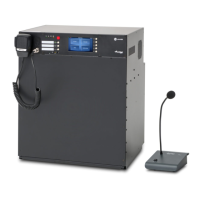
NOTE! When the switch is in the CPU OFF position, playback of the alarm messages recorded
in the miniVES memory does not work. The processor is bypassed. A direct connection
between devices is created: microphone ampliers loudspeakers. Microphone input is
broadcasted to the entire system. Ampliers operate at maximum amplication – be aware
that this rises the SPL signicantly.
5.2 Failure mode
A ashing yellow FAILURE LED means that one of VAS central unit elements or a loudspeaker
line is damaged. On miniVES devices and ABT-DFMS the system failure will be indicated by an
acoustic signal. When the damage is signaled, press “conrm failure” button to mute the alarm
sound, and the system will register that the failure was conrmed by the Operator (this event will
be recorded in the event log). The failure LED goes out when the system failure is eliminated and
“ cancelfailure” button is pressed.
A system maintenance technician or technical service must be notied of any damage immediately.


 To Next Page