7
2. miniVES and midiVES front panel
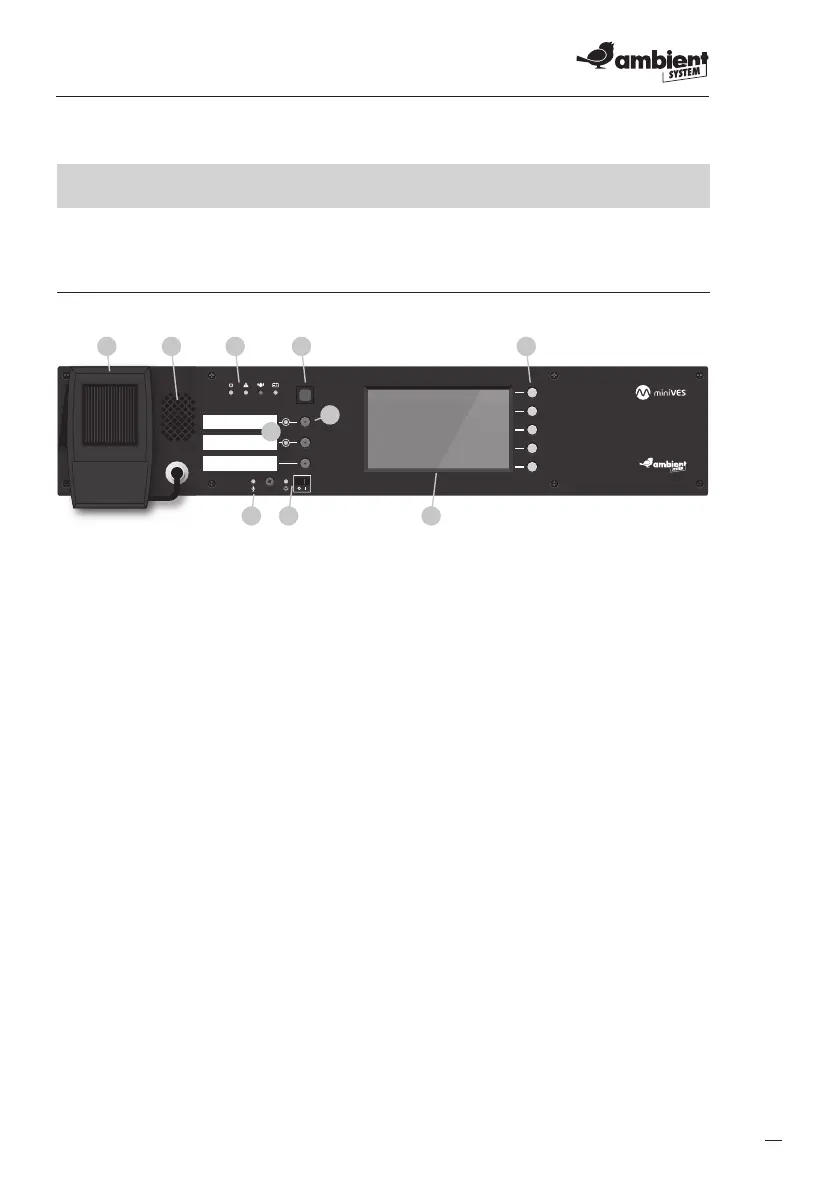
2.1 Front panel of miniVES
Fig. 1.
7 8 9
5
6
Front panel of miniVES 2001L, 4001L, 4002L, 2001LN, 4001LN, 4002LN series and
midiVES 8003LN and 8003LNR
1. Handheld reman’s microphone
2. Built in speaker
3. Indicators
a. Power supply indicator (green LED)
b. Failure indicator (yellow LED)
c. Emergency indicator (red LED)
d. Battery failure indicator (yellow LED)
4. Emergency button
5. Congurable function buttons
6. Function button activation LEDs
7. Handheld microphone LED
8. CPU o section
a. CPU o function LED (yellow)
b. CPU o function switch
9. Display – shows control unit’s menu
10. Functional keys, support auxillary functions when navigating the menu
a. HOME – press to return to the fers menu
b. ENTER – press to enter value / select control unit in menu
c. Up arrow – press to navigate in the control unit menu
d. Down arrow – press to navigate in the control unit menu
e. Back – press to return to previous item in the control unit menu


 To Next Page