EasyManua.ls Logo

Amcrest IP2M-841 - Page 16

Amcrest IP2M-841
105 pages
Print Icon
To Next Page IconTo Next Page
To Previous Page IconTo Previous Page
Loading...
16
Note: The default
username is
admin and the
default password
is admin.
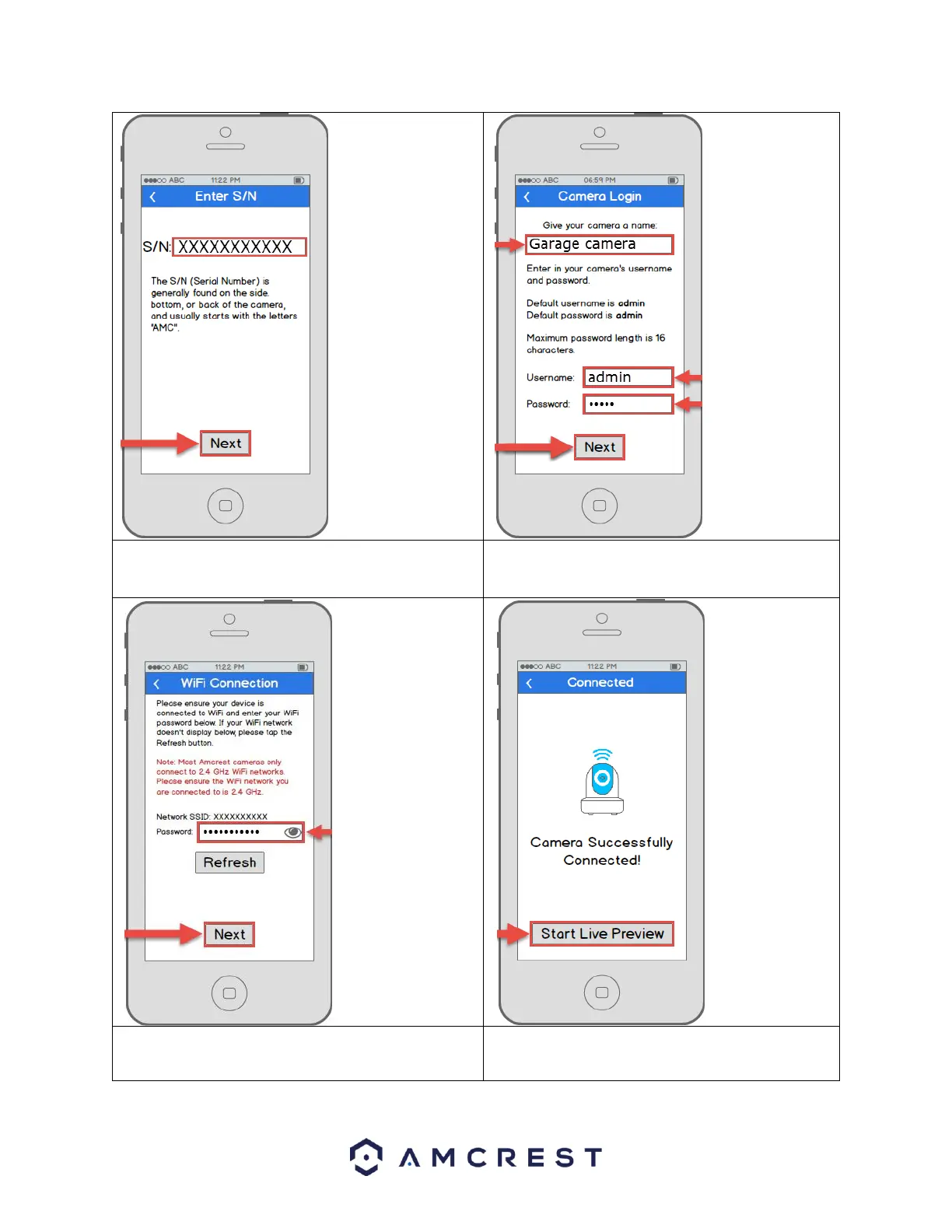
7. Double check to ensure that your S/N (Serial
Number) is entered correctly, then tap Next.
8. Give your camera a name, then enter in the
camera’s username and password. Once
you’ve filled out all of the fields, tap Next.
Note: Most
Amcrest cameras
can only connect to
2.4 GHz WiFi
networks, so please
ensure that your
phone is connected
to a compatible
network.
Otherwise, perform
the Ethernet WiFi
Setup method in
section 4.3.2.
9. Enter your WiFi password, then tap Next.
10. Your camera is almost ready. Tap the Start
Live Preview button to proceed with
changing your password.

Table of Contents

Related product manuals