73
Below is an explanation of the fields on the WiFi tab of the WiFi menu:
Enable: This checkbox allows the user to enable WiFi functionality.
Add SSID: This button allows the user to manually enter in an SSID.
Search SSID: This button allows the user to search for more SSIDs.
Refresh: This button obtains the most recent WiFi network information.
To connect to a WiFi network, click the line item for a specific network, and enter in the password if needed.
5.4.2.11.2 WPS
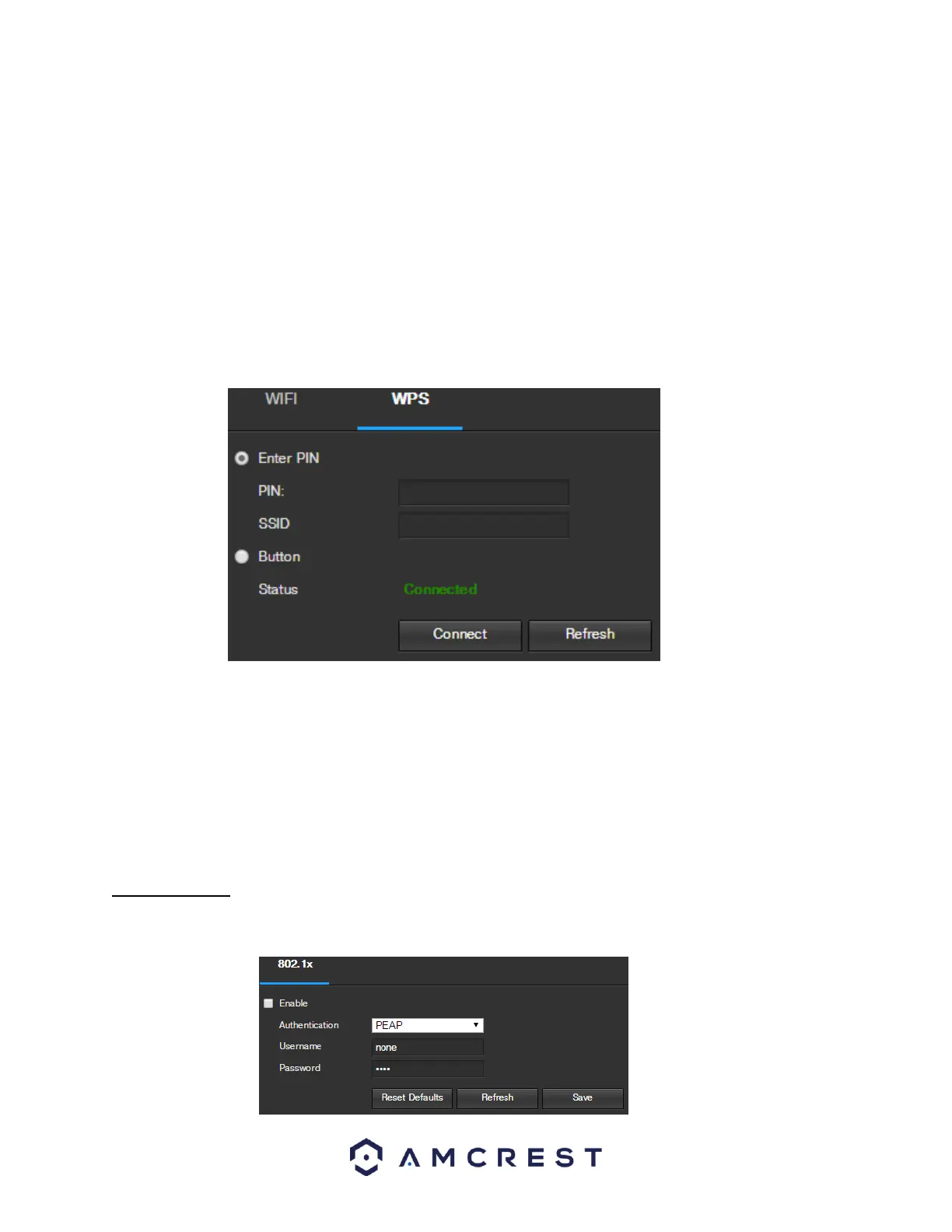
The WPS tab of the WiFi menu is used to connect to a wireless network through the WPS connection method.
Below is an explanation of the fields on the WPS tab of the WiFi menu:
Enter PIN: This radio button allows the user to select the Enter PIN option for WPS
o To enter a PIN, enter the PIN in the PIN field, and enter an SSID in the SSID field
Button: This radio button allows the user to select the WPS button connection method for connecting to WiFi.
To connect to a network, click the Connect button. To refresh the page, click the Refresh button.
5.4.2.12 802.1x
802.1x is an authentication method for connecting to a network. Below is a screenshot of the 802.1x screen:















 To Next Page