EasyManua.ls Logo

Amcrest IP2M-851 - Page 26

Amcrest IP2M-851
118 pages
Print Icon
To Next Page IconTo Next Page
To Previous Page IconTo Previous Page
Loading...
26
6. Plug your camera into your router via an Ethernet
cable. Don’t worry, once the camera is set up, the
camera can be unplugged and moved to a
different location. Tap Next when finished.
7. Ensure your mobile phone is connected to the WiFi
network that you will be connecting your camera
to, then tap Next.
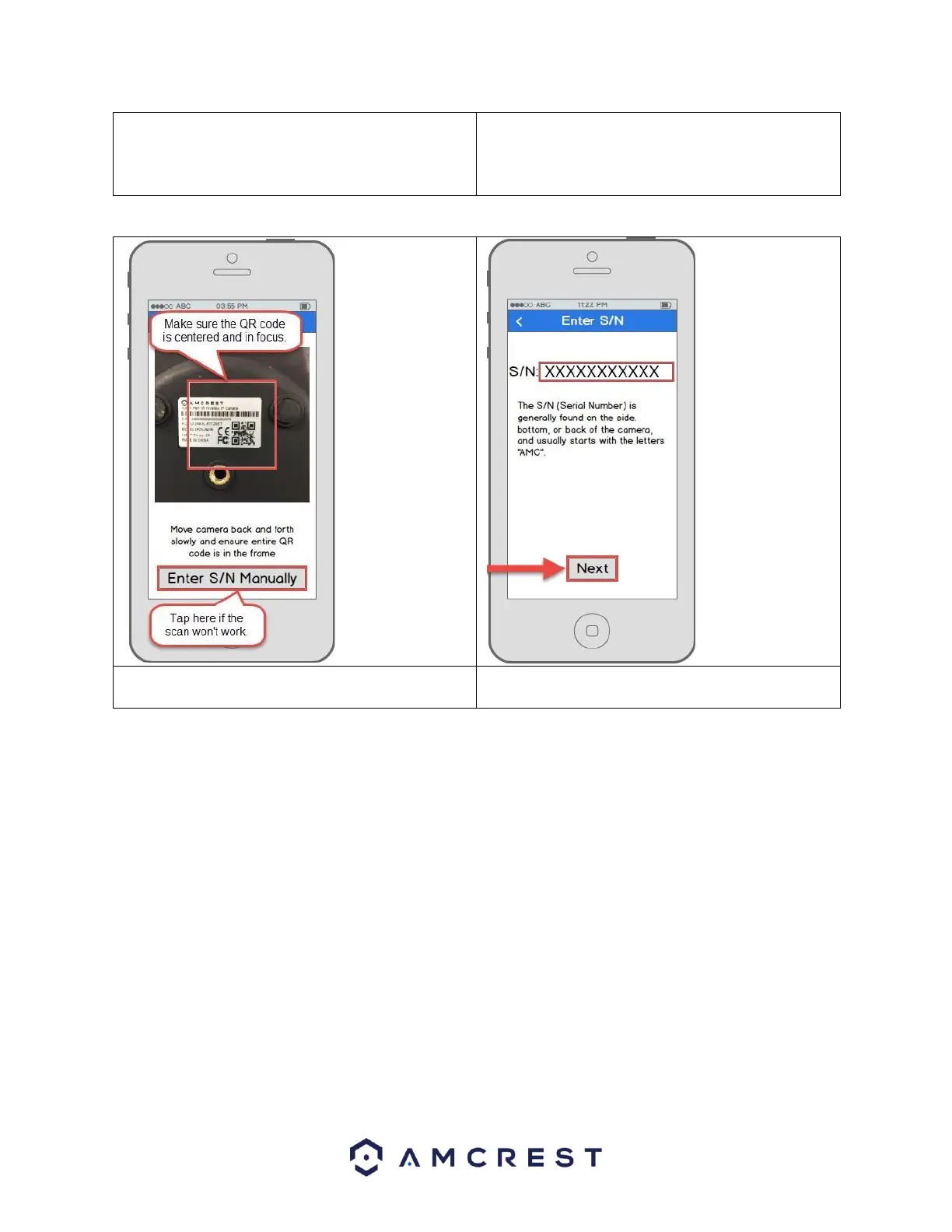
Note: Move the
camera or the
phone to ensure
that the entire QR
code is visible and
focused in the
frame. In case the
QR code cannot be
scanned,
please tap Enter
S/N Manually to
enter in the
camera’s serial
number.
8. Scan the QR code [QR code icon] from the sticker on
your camera.
9. Double check to ensure that your S/N (Serial
Number) is entered correctly. Then, tap Next.

Related product manuals