87
To enable 802.1x, click the checkbox next to Enable. An authentication method can be chosen from the dropdown
box, and a username and password can be entered in their respective fields.
To reset to default settings, click the Reset Defaults button. To refresh the page, click the Refresh button. To save
the settings, click the Save button.
5.3.2.13 QoS
QoS stands for Quality of Service and it refers to the overall performance of a computer network, particularly the
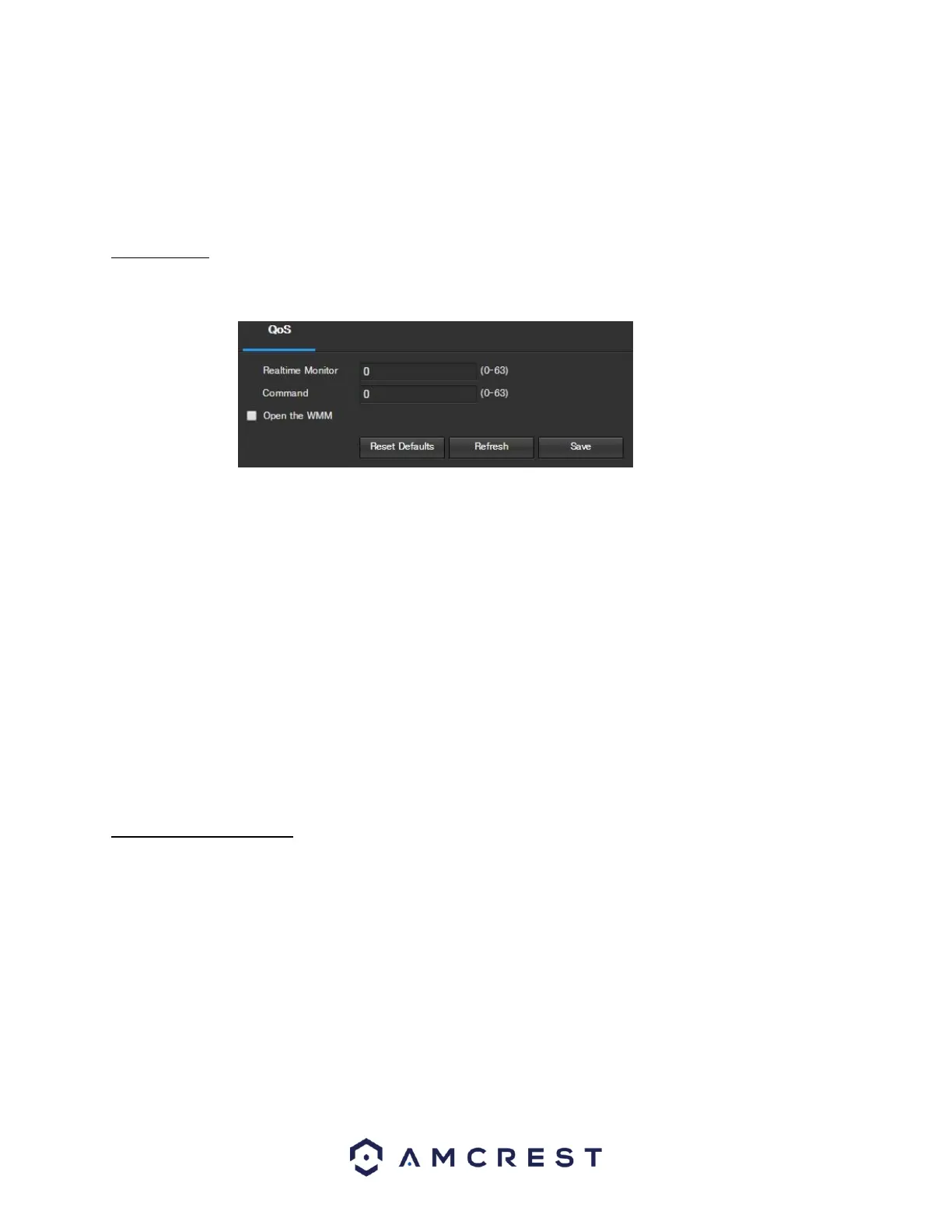
performance seen by the users of the network. Below is a screenshot of the QoS screen:
Below is an explanation of the fields on the QoS screen:
• Realtime Monitor: This field allows the user to enter in a priority value for realtime monitoring packets. The
range is between 0-63.
• Command: This field allows the user to enter in a priority value for command packets. The range is between
063.
• Open the WMM: This checkbox allows the user to open the WiFi MultiMedia (WMM) options.
To reset to default settings, click the Reset Defaults button. To refresh the page, click the Refresh button. To save
the settings, click the Save button.
5.3.3 Event
This menu section allows the user to change different settings for triggering events.
5.3.3.1 Video Detection
The video detection menu has two tabs: Motion Detect and Video Tamper.
5.3.3.1.1 Motion Detect
This tab allows the user to modify motion detection settings. Below is a screenshot of the Motion Detect tab:















 To Next Page