13
AMS-1000 Hard Drive Shredder Manual 2016 v.1
ALIGNMENT AND TENSIONING
Read all safety warnings (see page 6) before proceeding.
Lock power o.
Mark the inial posion. Make all adjustments in small increments.
By design, the conveyor belt should have 1/16” or less clearance to side frames. This assists in
prevenng debris from geng under the belt but some side rubbing may be expected. This is
normal.
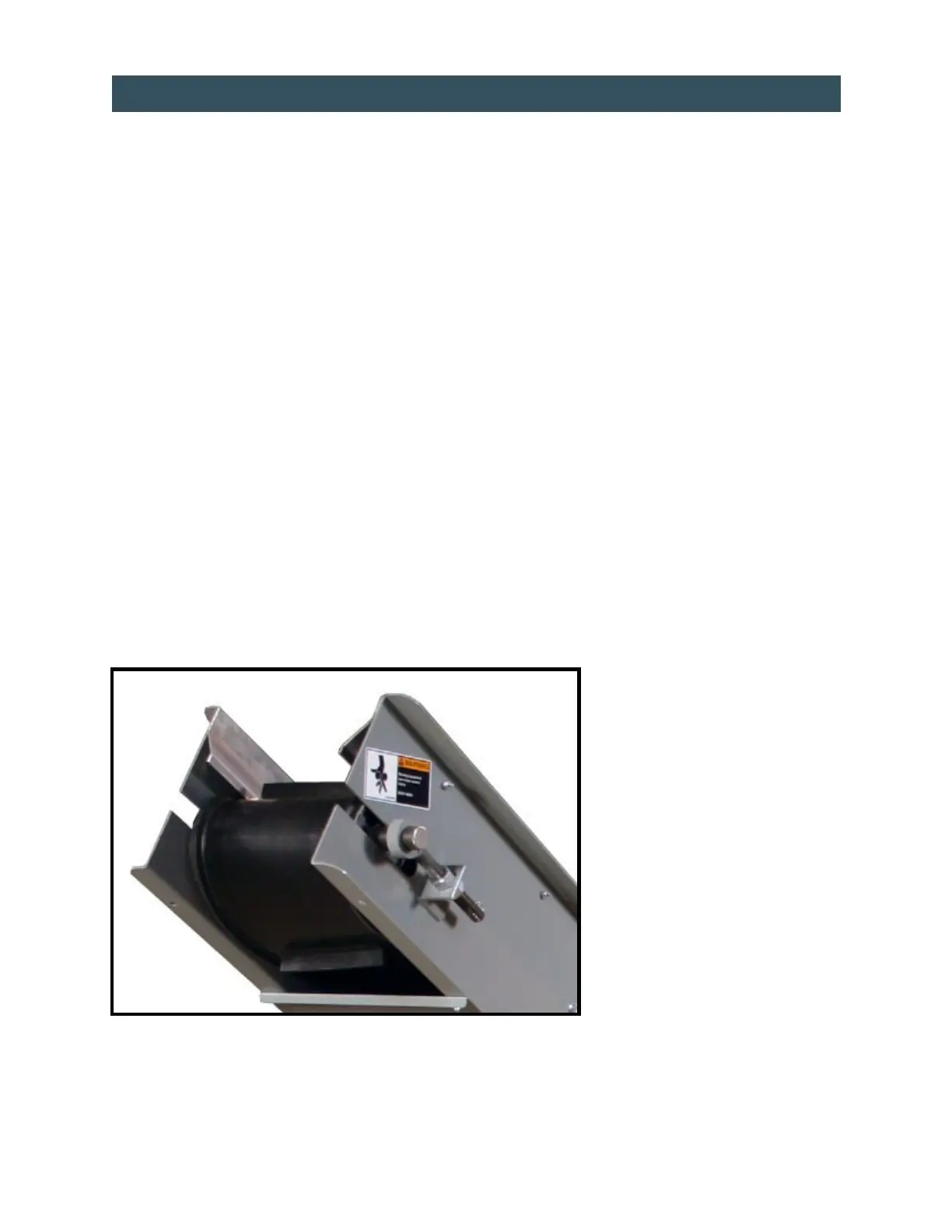
Loosen jam nuts, each side of machine (see picture below).
Turn jam nuts half turn each side, repeang unl belt is at proper tension.
Ensure all personnel are clear and that no tools are on machine or input chute.
Turn power on.
Run machine in Forward.
Stop machine and turn power o.
Adjust alignment by ghtening take-up bolt on side of conveyor where belt is rubbing side frame. Tighten
only one quarter turn at a me.
Tighten jam nuts.
Replace all guards.
Turn power on.
Run machine forward for ve minutes. If further alignment is required, repeat the above steps.
NOTE:
Belt may run slightly o center. When machine is run in reverse, the belt may run slightly o center to the
opposite side. This is normal. The belt may stretch during the rst few days of operaon. This will aect
alignment since the belt alignment relies in part on proper tensioning for eecve tracking.
CONVEYOR BELT ADJUSTMENT
Figure 4


 To Next Page