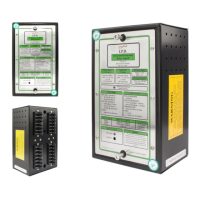
3.2 Remote Display Module (HDM)
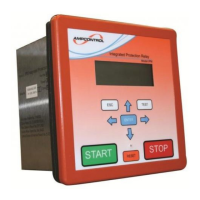
The Ampcontrol HDM (Remote Display Module) communicates with the HPB Relay via a three-wire
connection. The Module consists of a two-line 16 character alpha-numeric liquid crystal display (LCD),
LED status indicators and a tactile keypad.
The various display pages are arranged on levels with each level having a number of positions. The
display level is changed with the Up/Down arrow keys and the Left/Right arrow keys control the display
position. An Enter key is used when programming the relay. The display map shows how the movement
is controlled between levels and positions (See Drawing HPBB004, in APPENDIX A: DRAWINGS).
The healthy LED located top centre of the module flashed at 3Hz (three times per second) to indicate
healthy communications with the relay. A flash rate of 1Hz (once every second) indicates that the
module is powered (15VDC), but no receiving data.
The module displays the following information:
a. Software version and serial number
b. HPB Status
c. Operational information from the protection functions, e.g. earth leakage current, earth continuity
resistance etc.
d. System information including the line voltage and current
e. Status of digital inputs and relay outputs
f. Protection trip settings, which can be viewed at any time. Authorised personnel can modify these
settings via that HDM Remote Display Module
g. Data logging information. The 120 most recent events and parameter changes are logged, with
time and date, in a non-volatile memory (e.g. power-up, trip, reset, close etc.).
The HPB Relay status display is one of the most useful features of the relay’s display system and should
be viewed as the first step in fault finding.
This display shows a list of 9 prompts in order of priority indicating what the HPB Relay requires to allow
the output to close. The prompts are listed as follows:
Table 1: HPB Display Messages


 To Next Page