Need help?
Do you have a question about the Ananda D10 PC5 and is the answer not in the manual?
Turn the display on by pressing the battery Power On button. If the battery is off, the display turns on.
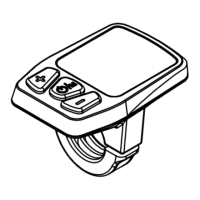
Switch between real-time speed, ODO, AVG speed, Trip, Max Speed, and trip time by short pressing the ON/OFF button.
Auto-mode switches light based on environment via sensor. Manual mode activates lighting by short pressing the LIGHTING button.
Activate 6km/h assistance by holding the button for stable speed. Release to cancel the function.
Adjust motor output by short pressing PLUS or Minus buttons. Features 5 levels, from lowest to highest output.
Five lights indicate full charge. Under-voltage is shown by blinking or empty symbols; recharge needed.
Auto-mode adjusts brightness based on environment. Manual mode allows direct control of display background light.
Display shows ECU error codes. The ebike cannot be used until the error code is cleared.
Enter setting mode by holding Plus/Minus buttons. Navigate settings like background light, speed limit, and unit.
Adjust background lightness in 3 levels (darkest, standard, brightest) via the setting interface.
Set maximum speed from 12-25 km/h to ensure rider safety. Controller cuts motor output when the limit is reached.
Access battery information codes by navigating through hidden settings. Information may vary depending on the battery.
View software version details by navigating through hidden settings. Access is available after activating hidden mode.
Adjust ISO sensitivity for auto-mode lighting based on environmental conditions. Higher values mean less sensitivity.
Save settings by holding ON/OFF for 2s. The display automatically returns to the main interface after 60s of inactivity.
 General
| Brand | Ananda |
|---|---|
| Model | D10 PC5 |
| Category | Bicycle Accessories |
| Language | English |


 To Next Page