EasyManua.ls Logo

Anden A210V1 - User Manual

Anden A210V1
16 pages
Print Icon
To Next Page IconTo Next Page
Loading...
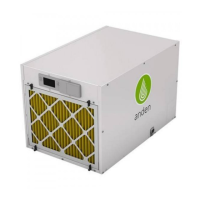
DEHUMIDIFER CONTROL
ON/OFF BUTTON
USED TO TURN
DEHUMIDIFIER ON
AND OFF
UP/DOWN
BUTTONS USED TO
CHANGE HUMIDITY
SETTING
MODE BUTTON
USED FOR
OPTIONAL FEATURES
INLET
FILTER
DRAIN
OUTLET
SAFETY INSTRUCTIONS
WARNING
1. 208-240 volts may cause serious injury from electric shock. Disconnect electrical power before starting installation or servicing. Leave power
disconnected until installation/service is completed.
2. Sharp edges may cause serious injury from cuts. Use care when cutting plenum openings and handling duct work.
3. Dropping may cause personal injury or equipment damage. Handle with care and follow installation instructions.
CAUTION
1. Read all instructions before beginning installation.
2. This appliance is not intended for use by persons (including children) with reduced physical, sensory or mental capabilities, or lack of
experience and knowledge, unless they have been given supervision or instruction concerning use of the appliance by a person responsible
for their safety. Children should be supervised to ensure that they do not play with the appliance.
3. Do not use in pool applications. Pool chemicals can damage the dehumidifier.
4. Do not use solvents or cleaners on or near the circuit board. Chemicals can damage circuit board components.
5. Wait 24 hours before running the unit if it was not shipped or stored in the upright position
6. If the supply cord is damaged, it must be replaced by the manufacturer, its service agent or similarly qualified persons in order to avoid a hazard.
READ AND SAVE THESE INSTRUCTIONS
Model A210V1 Dehumidifier
Installation and Operating Instructions
90-2393
10013307 B2208162E 11.21
English 1

Other manuals for Anden A210V1

Questions and Answers

Summary

SAFETY INSTRUCTIONS

WARNING

Critical safety warnings about electrical shock, sharp edges, and dropping hazards.

CAUTION

Precautions for safe operation, including reading instructions, child supervision, and proper maintenance.

SPECIFICATIONS

ENVIRONMENTAL SPECIFICATIONS

Details operating temperature and dew point limits for the dehumidifier.

MECHANICAL SPECIFICATIONS

Lists weight, drain size, capacity, filter, and airflow of the unit.

ELECTRICAL SPECIFICATIONS

Provides voltage, current, and efficiency ratings for the dehumidifier's electrical system.

DIMENSIONS

Presents the physical measurements of the dehumidifier with a diagram.

UNPACKING AND INSTALLATION CONSIDERATIONS

UNPACKING THE DEHUMIDIFIER

Instructions for removing the unit from its carton and checking included components.

LOCATION CONSIDERATIONS

Recommendations for optimal placement to ensure performance and accessibility.

FLOOR MOUNTING GUIDANCE

Guidance on leveling the unit for proper drainage and stability.

SUSPENDING THE DEHUMIDIFIER

BRACKET INSTALLATION FOR SUSPENSION

Steps to install mounting brackets for suspending the dehumidifier.

HANGING THE DEHUMIDIFIER

Advice on suspending the unit using threaded rod and vibration isolators.

DUCTING INSTALLATION

Information on using a specific duct kit for connecting ductwork to the unit.

DRAIN INSTALLATION AND CONDENSATE MANAGEMENT

DRAIN INSTALLATION DETAILS

Details on hard-piping or using flexible tubing for draining condensate.

LEVELING FOR DRAINAGE

Explains how to adjust feet to ensure proper drainage slope.

CONDENSATE PAN, PUMP, AND FLOAT SWITCH

Guidance on installing condensate pans, pumps, and overflow safety switches.

HARD WIRING INSTALLATION

LINE VOLTAGE HARD WIRING STEPS

Step-by-step instructions for hard-wiring the dehumidifier's power connection.

ELECTRICAL SPECIFICATIONS TABLE

Provides recommended breaker size, wire gauge, and circuit ampacity.

POWER CORD REPLACEMENT DIAGRAM

Illustrates the wiring connections for hard-wiring.

START UP AND OPERATION MODES

USING THE DEHUMIDIFIER CONTROL

How to operate the unit using its onboard controls for humidity settings and sampling.

USING THE MODEL A77 CONTROL

Instructions for operating the unit with an external Model A77 humidity control.

SYSTEM SET-UP AND CHECKOUT

INSTALLER TEST MODE PROCEDURE

Guides through a test mode to verify proper operation of all components.

DEHUMIDIFICATION AND AIR SAMPLING SETTINGS

Configuring dehumidification parameters and air sampling frequency.

RH OFFSET ADJUSTMENT

How to apply an offset to the humidity reading for calibration.

MODEL A77 EXTERNAL CONTROL SETUP

INSTALLING THE MODEL A77 CONTROL

Steps for wiring and connecting the Model A77 control to the dehumidifier.

CONFIGURING DEHUMIDIFIER FOR A77 CONTROL

How to set the dehumidifier to recognize and use the Model A77 control.

ALTERNATIVE EXTERNAL CONTROL SETUP

INSTALLING ALTERNATIVE EXTERNAL CONTROL

Steps for wiring and connecting an alternative dry contact control.

CONFIGURING DEHUMIDIFIER FOR EXTERNAL CONTROL

How to set the dehumidifier to recognize and use an alternative external control.

DAISY CHAIN WIRING CONFIGURATION

MODEL A77 AS DRIVING CONTROL

How to use a Model A77 to control multiple dehumidifiers in a daisy chain.

DAISY CHAIN SEQUENCE OF OPERATION

Describes how units operate and respond to faults in a daisy chain setup.

EXTERNAL DRY CONTACT CONTROL SETUP

DRY CONTACT CONTROL AS DRIVING CONTROL

How to use a dry contact control to manage multiple dehumidifiers.

SEQUENCE OF OPERATION FOR DRY CONTACT CONTROL

Describes how units operate and respond to faults when controlled by an external dry contact.

TROUBLESHOOTING ERROR CODES

Lists failure modes corresponding to diagnostic error codes displayed on the unit.

TROUBLESHOOTING AND DIAGNOSTIC CODES

DIAGNOSTIC CODES OVERVIEW

Explains how error codes are displayed and what they indicate.

DIAGNOSTIC CODE TABLE

Details specific error codes, their failure modes, actions to take, and reset methods.

TROUBLESHOOTING GUIDE

SYMPTOM-BASED TROUBLESHOOTING

Lists common symptoms, possible reasons, and troubleshooting procedures.

LIMITED WARRANTY AND REGISTRATION

WARRANTY TERMS AND CONDITIONS

Outlines the five-year warranty, exclusions, and limitations.

WARRANTY REGISTRATION

Instructions on how to register the product for warranty coverage.

SERVICE PARTS

REPLACEMENT PARTS LIST

Identifies numbered parts with their descriptions and part numbers.

CONTACT INFORMATION

Provides company contact details for inquiries and support.

Anden A210V1 Specifications

General IconGeneral
BrandAnden
ModelA210V1
CategoryDehumidifier
LanguageEnglish

Related product manuals