English - 54 -
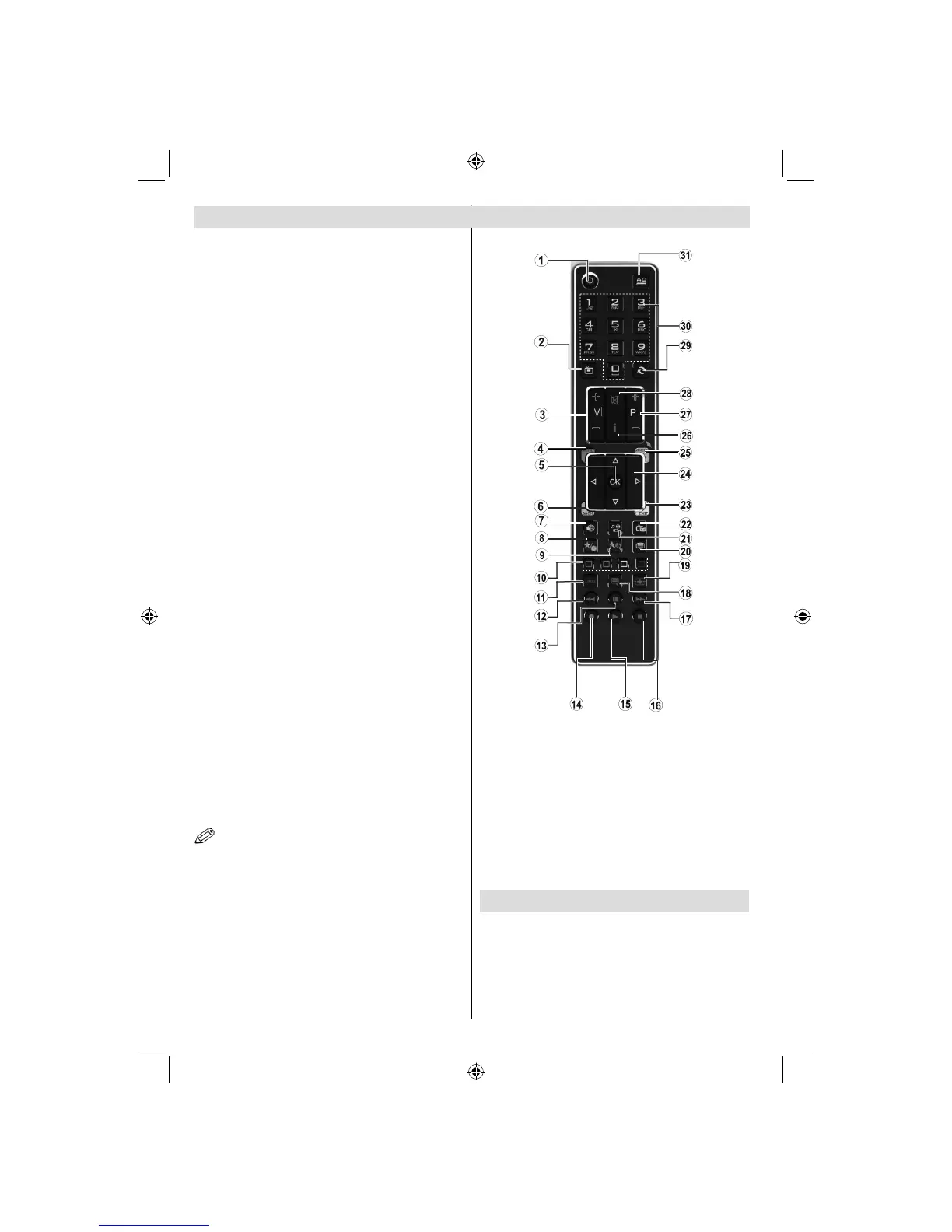
Viewing remote control
S1. tandby / On
Channel list2.
Volume up-down3.
Menu on/off4.
OK / Confi rm5.
Return / Back6.
Internet7.
Youtube / My button 1 (*)8.
My button 2: Switches between digital/cable/9.
satellite broadcasts (**)
Colored buttons (Red, Green, Yellow, Blue)10.
Mono-Stereo Dual I-II / Current language11.
Fast rewind (in media browser mode)12.
Pause (in media browser mode) / Timeshift 13.
recording
Programme recording14.
Play (in media browser mode)15.
Stop (in media browser mode)16.
Fast forward (in media browser mode)17.
Subtitle on-off / Subtitle (in media browser 18.
mode)
Image size19.
Teletext - Mix20.
Media Browser21.
Electronic programme guide 22.
Exit23.
Navigation buttons24.
Quick menu 25.
Info / Reveal (in TXT mode)26.
Programme up/down27.
Mute28.
Previous programme / Now (in EPG mode)29.
Numeric buttons30.
AV / Sourc31. e
Accessories included
Remote Control
Batteries: 2 x AAA
Instruction Book
Side AV Connection Cable
Nero Media Home CD
NOTE: The Remote Control range is approximately 7m
/ 23ft.
Using My button 1 (*)
This button’s main function is to run Youtube link.
However, if you want to change this function, you can
press MY BUTTON 1 for fi ve seconds when on a desired
source, channel or link, until the “MY BUTTON IS SET”
message is displayed on the screen. This confi rms that
the selected MY BUTTON is now associated with the
selected function.
Note that if you perform fi rst time installation, MY BUTTON
1 will return to its default function
Using My Button 2 (**)
Press MY BUTTON 2 for fi ve seconds when on a
desired source, channel or link, until the “MY BUTTON
IS SET” message is displayed on the screen. This
confirms that the selected MY BUTTON is now
associated with the selected function.
Note that if you perform fi rst time installation, MY BUTTON
2 will return to its default function.
A03_[GB]_MB90_4836UK_DVBT_C_PVR_MMH_DLNA_100HZ_BASIC IB_55985LED_GOLD18_10079836_50229710.indd 54A03_[GB]_MB90_4836UK_DVBT_C_PVR_MMH_DLNA_100HZ_BASIC IB_55985LED_GOLD18_10079836_50229710.indd 54 24.08.2012 15:38:4124.08.2012 15:38:41



 To Next Page