19 20
2)Press BT icon, then click on icon
to turn on the BT function and meantime
turn BT function of your mobile phone on.
Press “Link” icon, then the unit will
search automatically. When the system is
linked to the phone signal, your mobile
shows on the screen. Link it and input the
PIN code. After successful match and
link, an icon like will shown on the
bottom right of screen.
( -20)picture
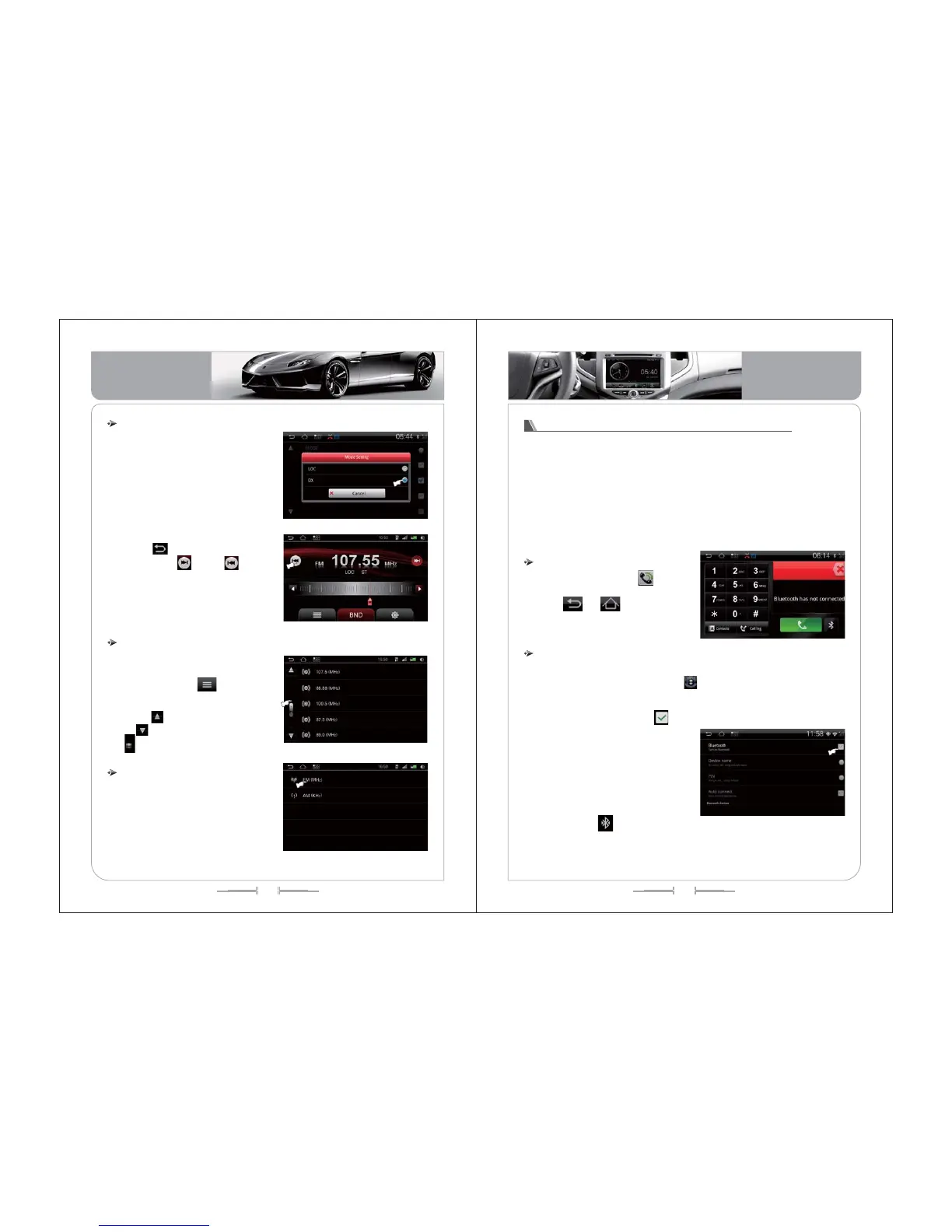
1) Remote automatic search: on the
setting interface, press MODE icon, then
select LOC, then press AST icon into
remote automatic search. During the
search process, the stations will be
stored automatically, like (picture -15,16):
2) Remote manual search: on the setting
menu, press MODE icon, select LOC,
then pres icon to back to radio
interface. Press icon or icon into
low/high frequency remote manual
search. Press it to start searching, press
again to stop searching. When the
stations searched, they will be stored
automatically, like (picture -15,16):
Remote automatic search/ Semi-automatic search
( -15)picture
( -16)picture
1) During the search process, the
stations will be stored automatically into
the station list. Press icon to select
the station you want to play.
2) Press icon to turn to up page,
press icon to turn to down page, or
slip icon to move from up to down
page.
List playing
( -17)picture
( -18)picture
Press the “BND” icon, the band can
be switched between FM(MHZ) to
AM(KNZ) .
FM band: This unit can be saved for
100 channels.
AM band: This unit can be saved for
100 channels.
Band Selection
Bluetooth Hands Free communication operation
1) The system features with BT hands-free communication function. If your
mobile phone equips with BT function, you can set up point to point link with the
system, dialing, answering phone, as well as playing music and other functions
on the screen.
2) Since there are various brands of mobile phone, their BT module is different
from each other. So when it comes to the practical use, some of the functions
might be different, even some of them might not compatible with our unit,
please forgive for this.
On main interface, press icon into
BT interface, see (picture -19):
Press or icon to exit BT
interface.
Enter/Exit
Pairing and Link
( -19)picture
1) Before using the BT hands-free communication function, please pair and link
it with your mobile phone first. Press icon on the main menu, select BT
setting, like (picture -20):
Basic Operation
Basic Operation


 To Next Page