EN
29
7. Bluetooth Speaker Mode
You can use this projector as a standalone Bluetooth speaker.
①
To switch to Bluetooth speaker mode, you have two options:
A: Press on the projector.
B: On the home screen, select > [Projector Settings] > [Bluetooth
Speaker Mode] and press .
②
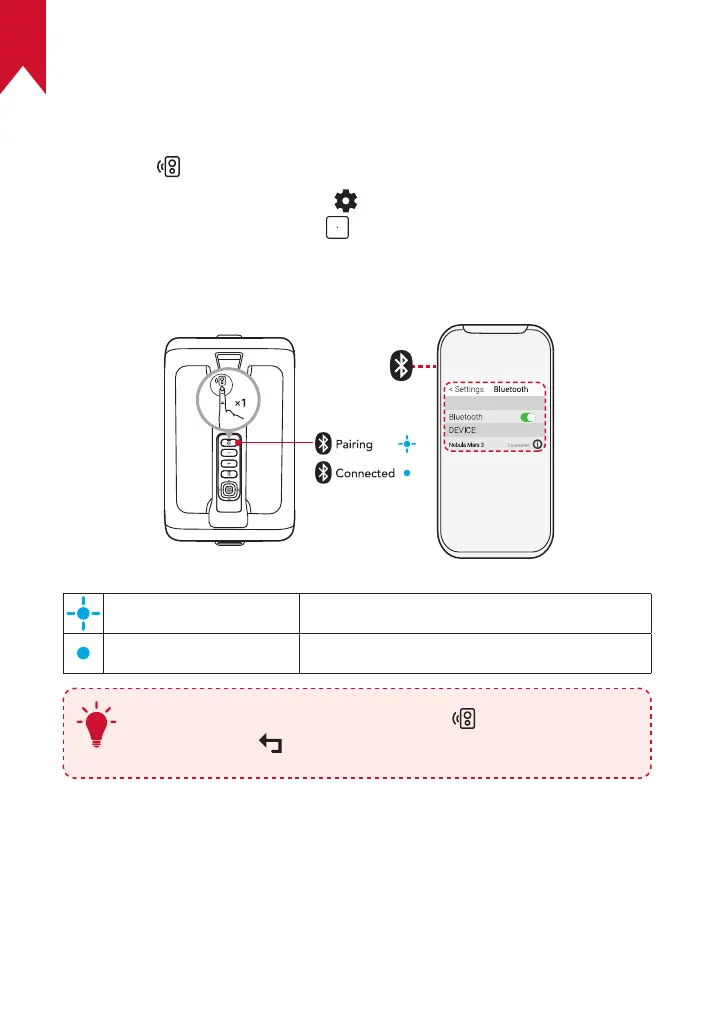
Enable Bluetooth on your smartphone and select Nebula Mars 3 to
connect.
Flashing blue Ready to pair / Bluetooth pairing
Steady blue Bluetooth connected
T
To exit Bluetooth speaker mode, press on the projector or
press and hold on the remote for two seconds.
Firmware Update
To fully enhance your experience with this projector with the latest
features, you are recommended to update the firmware from time to
time.



 To Next Page