1413
AnkerMake App
The AnkerMake app enables you to try the best of this 3D printer and enhances your
experience.
• The app will update from time to time.
Functions Description
Bluetooth Connection Connects the 3D printer to your phone via Bluetooth.
Multi-Terminal Connection
Connects the 3D printer to Wi-Fi to enable remote wireless
operation.
Device Sharing Share the 3D printer with others (Up to 2 persons).
Remote Controls
Remotely control the 3D printer, including remote printing,
temperature adjustment during printing, network switch, renaming,
and more.
Remote Printing
Remotely operate the printing work, enable one-key printing or
remotely print the local les.
Live Video Streams live video.
Time-Lapse Video
Synthesizes time-lapse short video using photos taken during
printing.
AI Monitoring Intelligently monitors the printing process for error conditions.
Warning Sending Sends warning messages during printing.
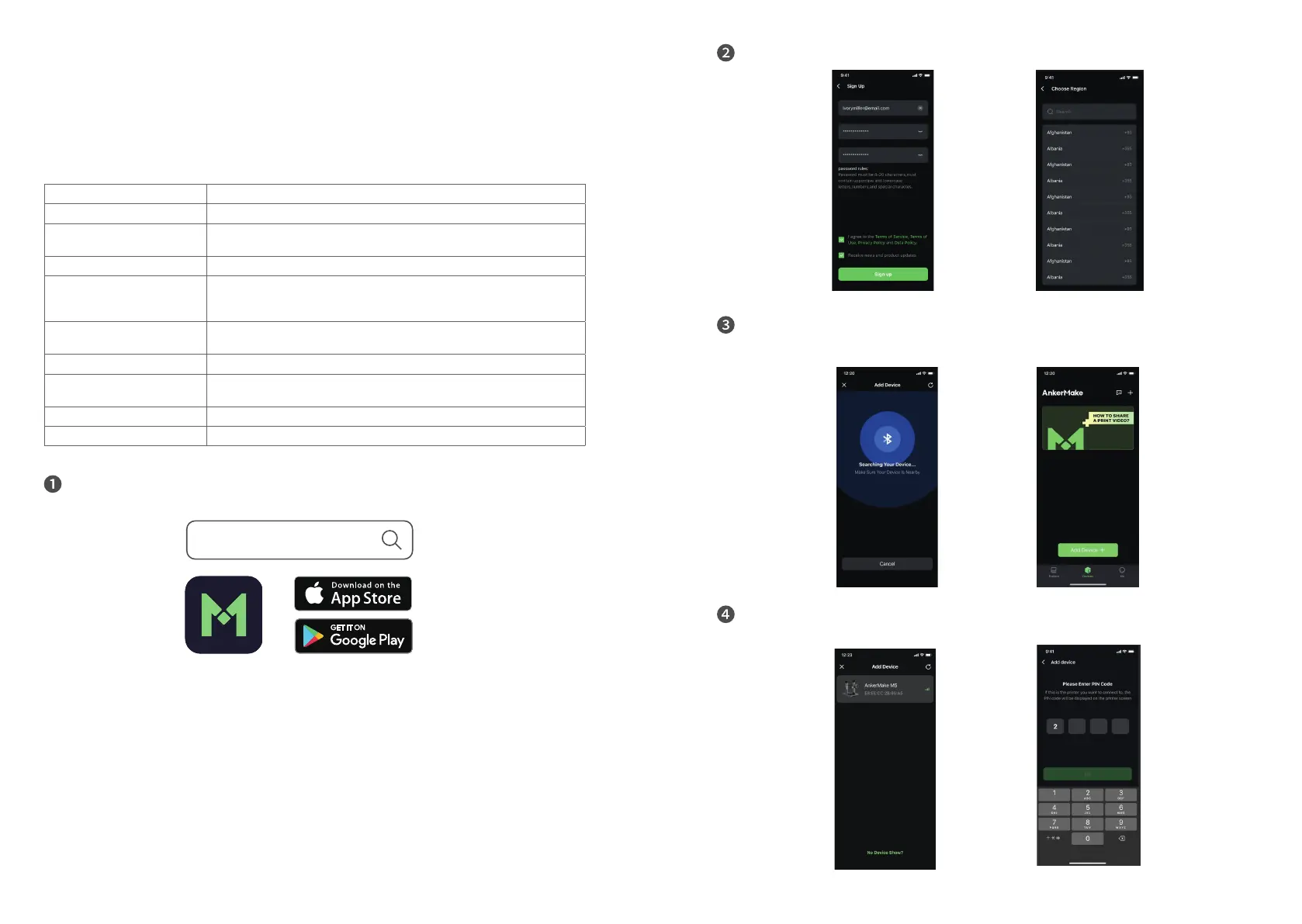
Download and install the AnkerMake app from App Store (iOS devices) or Google
Play (Android devices).
ankermake
When you sign up for an account, you are requested to choose your country or region.
Add device. Make sure your phone's Bluetooth is enabled and close to your
AnkerMake M5.
Add AnkerMake M5 from the device list and enter the PIN code that is displayed on
the printer's touch screen.


 To Next Page