EN 10
Each transmitter comes with built-in storage to record up to 7 hours of audio.
1. Swipe left or right on the receiver's screen to access transmitter settings.
2. Tap
to start recording, and tap again to stop. The audio le will be stored on
the transmitter.
•
Returning the transmitter to the charging case will stop recording.
•
To export audio les, return the transmitter to the case and connect
the case to your computer via the USB-C cable.
•
When the storage is full, you can delete audio les or turn on
"Overwrite Files" in the AnkerWork software.
Receiver Screen Guide
To watch a video on receiver screen guide, scan the QR code
or visit this website: https://support.ankerwork.com/s/product/
a085g000004znm4AAA/ankerwork-m650-wireless-microphone
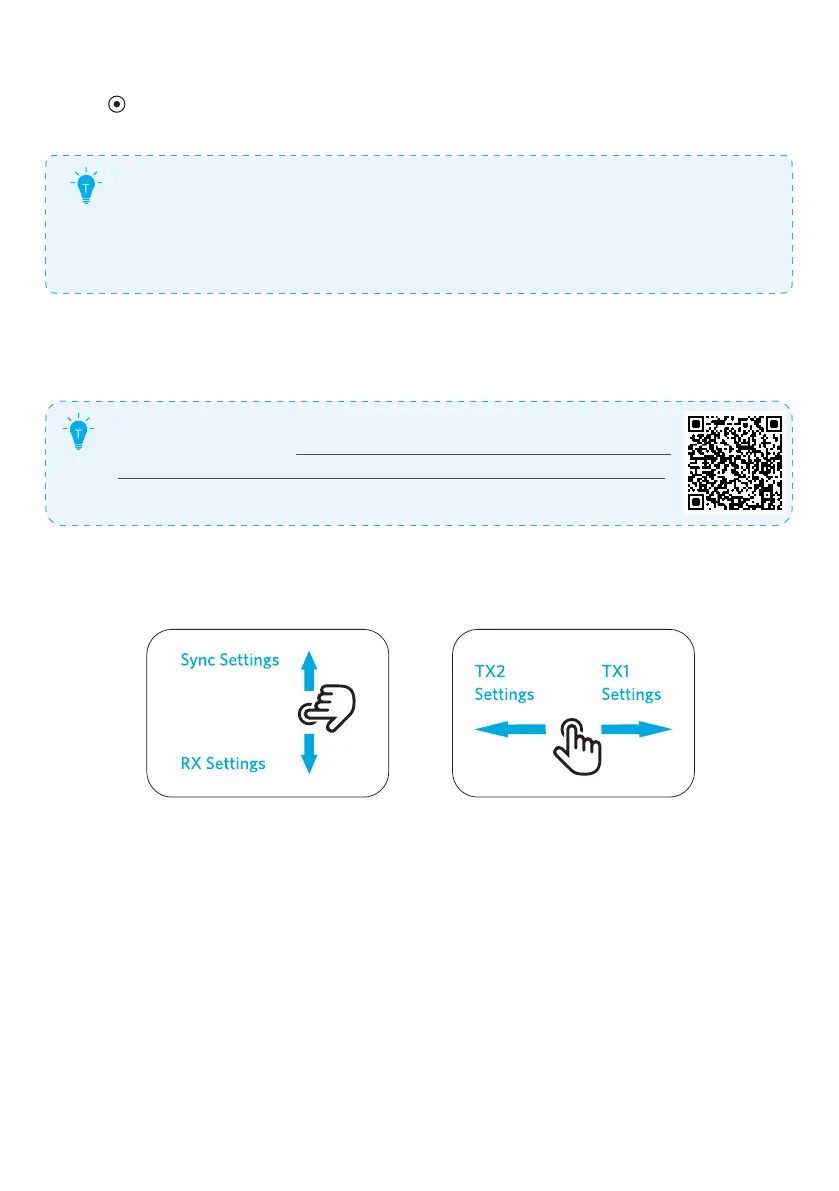
1. Touch Control
On the home page:
•
Swipe down to set the receiver, or swipe up to synchronize settings on
Transmitters 1 and 2.
•
Swipe left / right to adjust settings on Transmitters 2 / 1.


 To Next Page
 Loading...