EN 11
2. Settings
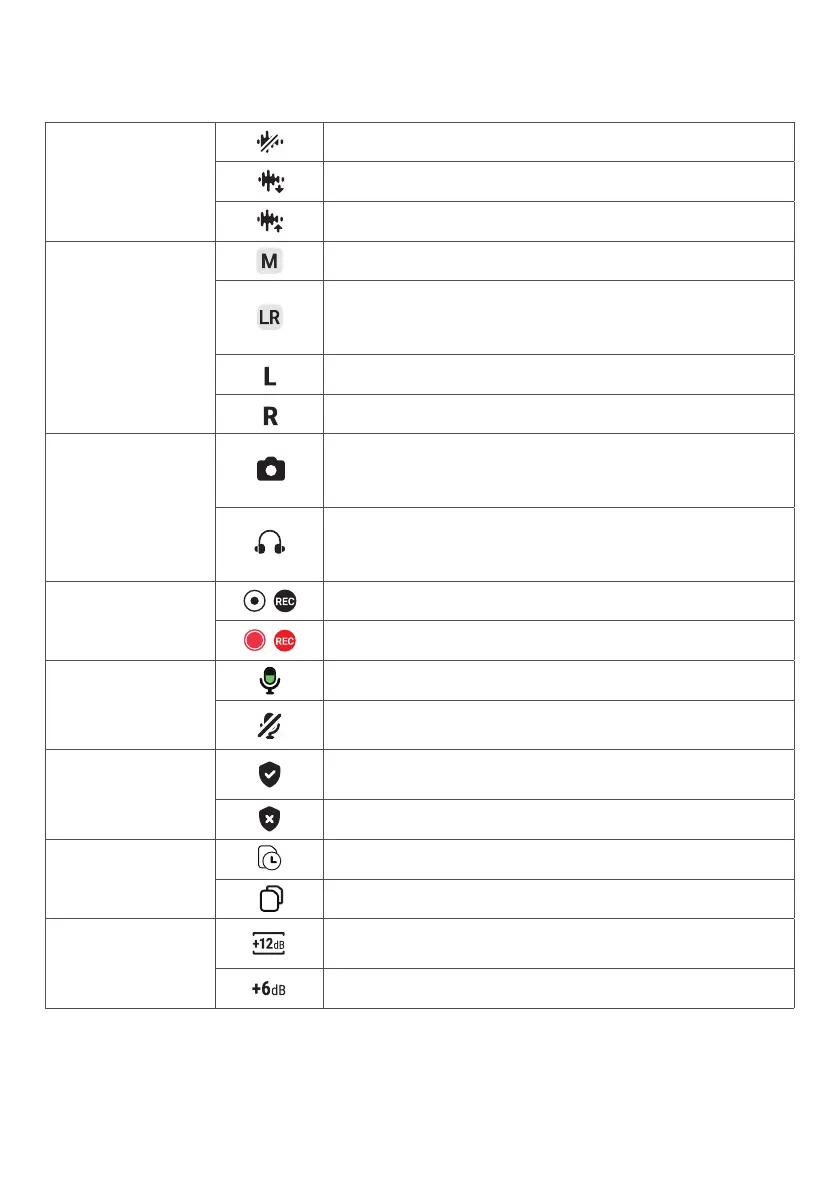
Check the icons that you may see when setting your microphone.
Noise reduction
mode
Turn off noise reduction.
Set noise reduction to a low level.
Set noise reduction to a high level.
Sound channel
Mono mode: Record audio onto one single channel.
Stereo mode: Record audio onto left and right
channels. (Transmitter 1 as left channel and
Transmitter 2 as right channel)
Indicates the left sound channel.
Indicates the right sound channel.
Output mode
Camera mode: Set output gain at a suitable level to
avoid sound distortion. Select this mode when you
don't need to monitor audio.
Headphone monitoring mode: Set output gain at a
suitable level to increase headphone volume. Select
this mode when you need to monitor audio.
Recording
/ No audio is being recorded. Tap to start recording.
/ Audio is being recorded. Tap to stop recording.
Microphone
The microphone is on. Tap to mute the microphone.
The microphone is muted. Tap to unmute the
microphone.
Safe mode
Turn on safe mode to record a backup audio track
with a volume of -6dB.
Turn off safe mode.
Audio file
Check the available recording time.
Check the number of audio les.
Gain control
Adjust the transmitter's gain level between -15dB
and 15dB.
Indicates the current gain level of the transmitter.



 To Next Page
 Loading...