EasyManua.ls Logo

AnyCubic MEGA ZERO - Page 34

AnyCubic MEGA ZERO
47 pages
Print Icon
To Next Page IconTo Next Page
To Previous Page IconTo Previous Page
Loading...
Introduction
to
slicing
software
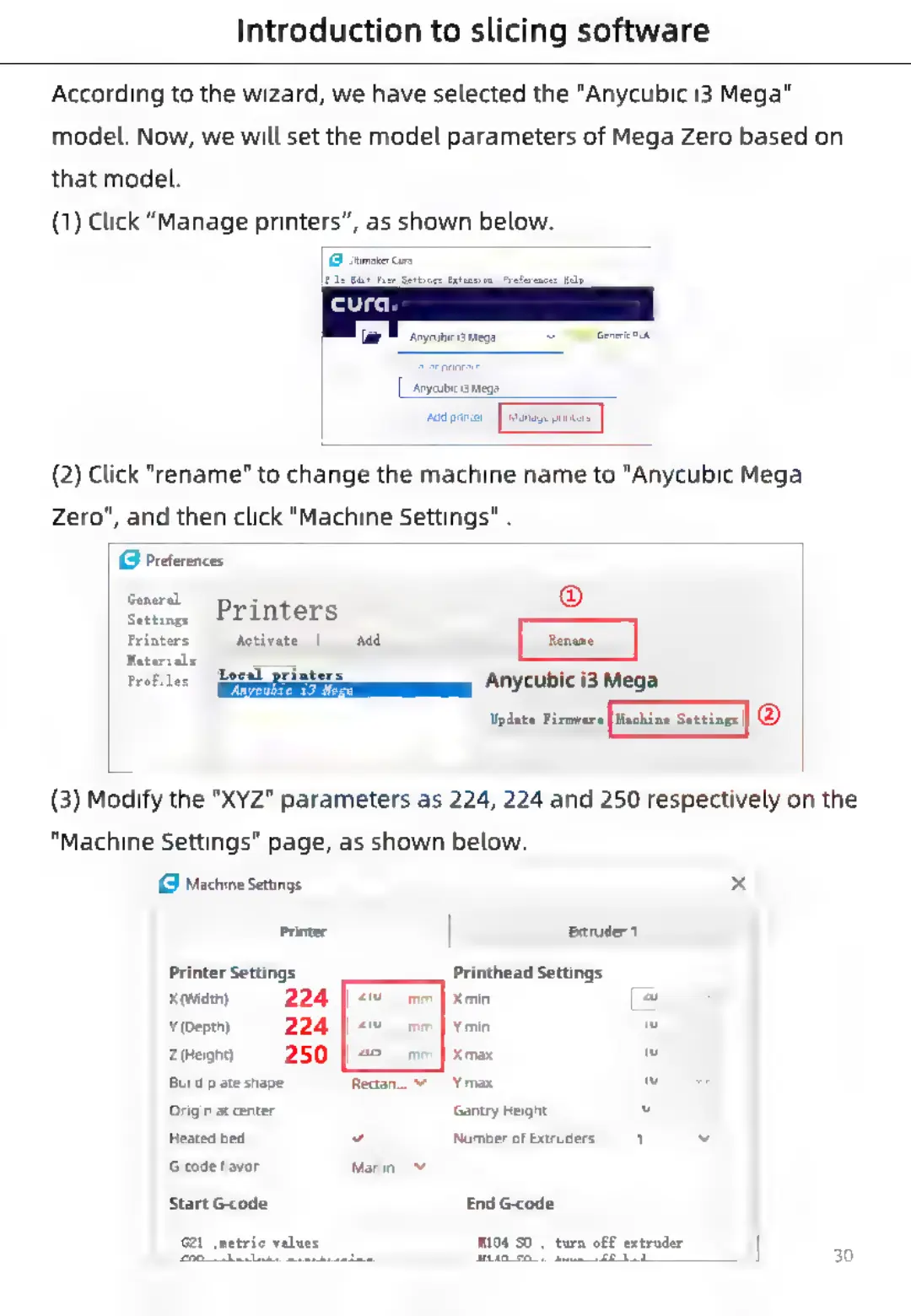
According
to
the
wizard,
we
have
selected
the
"Anycubic
i3
Mega"
model.
Now,
we
will
set
the
model
parameters
of
Mega
Zero
based
on
that
model.
(1)
Click
“Manage
printers”,
as
shown
below.
1G
iitimater
Cure
‘Anycubic
am
‘dd
printer
(2)
Click
"rename"
to
change
the
machine
name
to
"Anycubic
Mega
Zero",
and
then
click
"Machine
Settings"
.
G
Preferences
General
Setting
|
PELWers
Printers
Activate
Add
Materials
z
Profiles
fegeal
pefaters
___
Anycubic
i3
Mega
aiken
®
(3)
Modify
the
"XYZ"
parameters
as
224,
224
and
250
respectively
on
the
"Machine
Settings"
page,
as
shown
below.
Machine
Settings
x
Printer
extruder
1
Printer
Settings
Printhead
Settings
x
(width)
224
|
+w
Xmin
a
¥
(Depth)
224
|
«v
Ymin
w
zeigt)
250
|
>
Xmax
w
Build
plate
shape
Rectan...
Y
Ymax
w
Origin
at
center
Gantry
Height
v
Heated
bed
y
Number
of
Extruders
[1
v
G-code
flavor
Marlin
Start
G-code
End
G-code
G21
imetric
values
W104
SO
;
turn
off
extruder
Pt
200
Lsbaclnks
nantbbent
MLAD
EA
\
heee
wraeel
30

Related product manuals