EasyManua.ls Logo

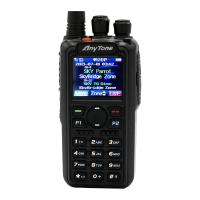
AnyTone 868 - User Manual

AnyTone 868
8 pages
Print Icon
To Next Page IconTo Next Page
Loading...
Quick
Start
Guide
Quick
Start
Guide
*
For
AnyTone
868,
878,
and
PLUS
Question and Answer IconNeed help?

Do you have a question about the AnyTone 868 and is the answer not in the manual?

Summary

Connect Battery and Antenna

Power On and Confirm

Radio Programming

Download Programming Software

Visit bridgecomsystems.com, click support, and select your radio model to download the necessary software.

Download CPS and Firmware

Install CPS

BridgeCom University Course

Summary

Connect Battery and Antenna

Power On and Confirm

Radio Programming

Download Programming Software

Visit bridgecomsystems.com, click support, and select your radio model to download the necessary software.

Download CPS and Firmware

Install CPS

BridgeCom University Course

AnyTone 868 Specifications

General IconGeneral
Zones250 Zones
Dimensions129 x 61 x 39 mm
Channel Spacing12.5/25 kHz
Operating Voltage7.4V DC
Digital ProtocolDMR Tier I & II
WaterproofIP54
BluetoothNo
GPSYes
Display1.77 inch
Frequency Range136-174 MHz (VHF) & 400-480 MHz (UHF)
Operating Temperature-20°C to +60°C

Related product manuals