12
Wall Mounting
Preparing to Install An Optional Wall Mounting Arm.
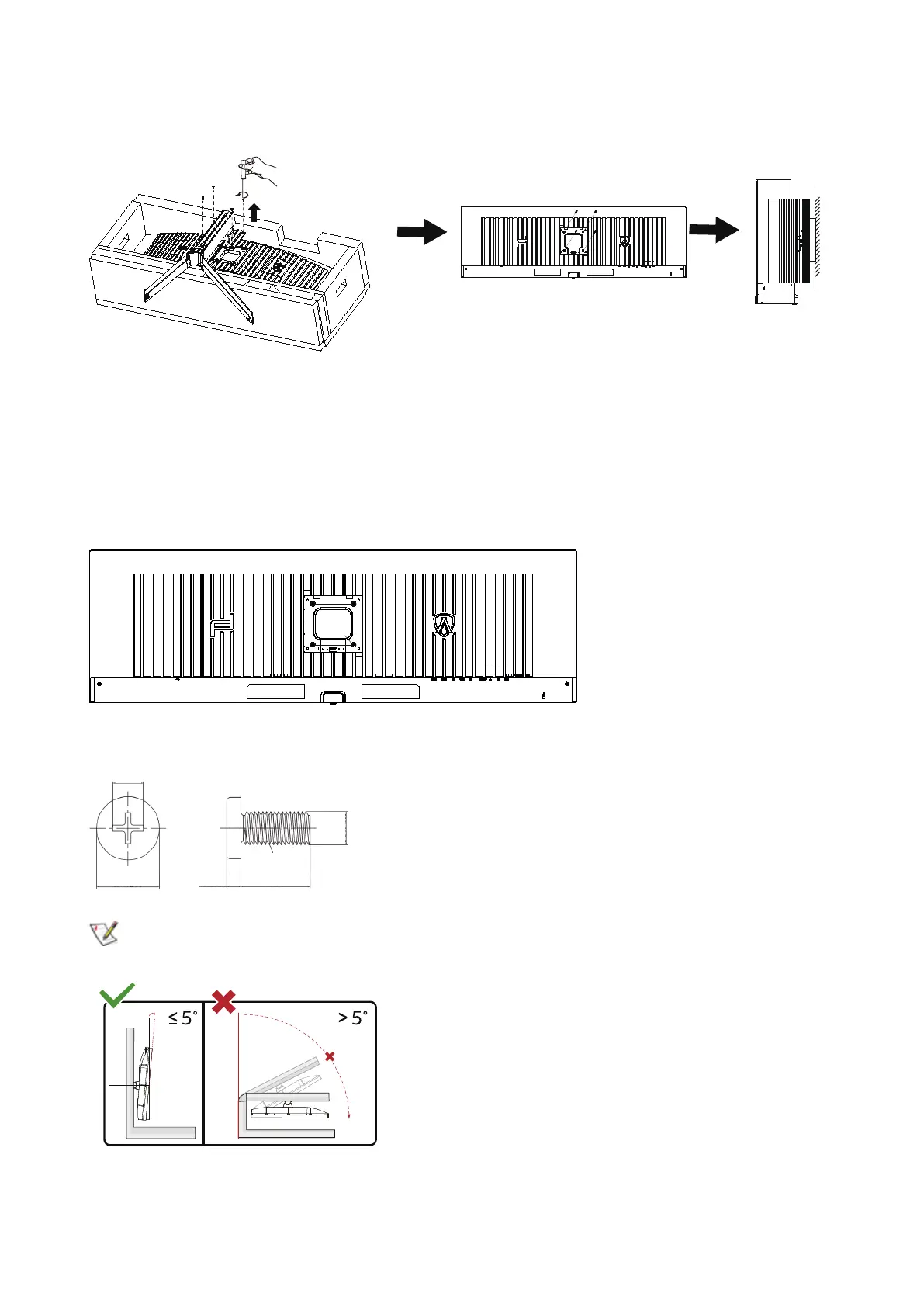
This monitor can be attached to a wall mounting arm you purchase separately. Disconnect power before this procedure. Follow these
steps:
1. Remove the base.
2. Follow the manufacturer’s instructions to assemble the wall mounting arm.
3. Place the wall mounting arm onto the back of the monitor. Line up the holes of the arm with the holes in the back of the monitor.
4. Reconnect the cables. Refer to the user’s manual that came with the optional wall mounting arm for instructions on attaching it to
the wall.
100mm
100mm
M4
Specication of wall hanger screws
:
M4*(10+X)mm, ( X=Thickness of Wall mount bracket )
M=4.0Max
Dk=8.0
H=2.0
L=10+X
D3.86-3.96
M4-P0.7
Note: VESA mounting screw holes are not available for all models, please check with the dealer or ocial department of AOC.
Always contact manufacturer for wall-mount installation.
* Display design may dier from those illustrated.



 To Next Page