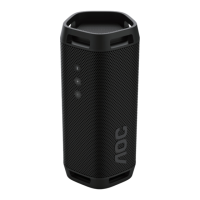
This document is a user manual for the AOC Speaker 03, a party speaker designed for various audio playback and entertainment functions.
Function Description
The AOC Speaker 03 is a versatile party speaker that supports audio streaming from Bluetooth devices, USB storage, and external audio sources. It features a built-in rechargeable battery for portability and can be connected to other identical speakers for stereo sound (TWS mode) or up to 100 party speakers for a larger audio experience (PartyLink mode). The speaker also includes microphone inputs for karaoke, wireless Qi charging for compatible mobile devices, and customizable light effects.
Important Technical Specifications
Amplifier:
- AC output power (RMS): 80 W
- AC output power (maximum): 160 W
- Battery output power: 30 W
- Frequency response: 40Hz-20KHz, ±3dB
- Signal to noise ratio: ≥ 75 dBA
- Total harmonic distortion: < 10%
Speaker:
- Speaker impedance: 4 ohm + 8 ohm x 2
- Sensitivity: 91 dB ±3dB/m/W
Bluetooth:
- Bluetooth version: V5.3
- Bluetooth frequency band: 2.4~2.4835 GHz ISM Band
- Transmitter power: ≤10dBm
- Bluetooth range: 30 m (free space)
- Streaming format: AAC, SBC
- Music streaming (A2DP), Playback/volume control: AVRCP Multipoint (Multipair) support
Battery:
- Battery capacity: 14.4V, 2600mAh (Built-in rechargeable)
- Battery life: 12 hrs
- Battery charge time: 4 hrs
USB:
- USB direct version: 2.0 Full Speed
- USB power output: 5V, 0.5A
- Supported formats: MP3, WAV, WMA, FLAC (FLAC audio only supports not over 16 bit rate and 1M code rate)
- Maximum USB storage supported: 128GB (FAT16/FAT32/exFAT format)
General Information:
- AC power: 100-240V~ 50/60Hz, 50W
- Eco standby fewer consumption: ≤ 0.5W
- Dimensions (W x H x D): 330 x 330 x 311 mm
- Weight: 7.5 kg
- Operating Temperature: 0°C - 45°C
- Wireless Charger (Qi): 10W
Usage Features
Controls:
- DBB touch key: Adjusts BASS effect.
- +/- (Volume) touch key: Increases/decreases volume.
- (Light) touch key: Changes speaker light mode (short press) or brightness (long press for 3 seconds).
- ►II (Play/Pause) touch key: Starts, pauses, or resumes play (short press); skips to next track (long press).
- (Standby-On) touch key: Switches the unit on/off (long press for 3 seconds); checks battery level (short press in power-on status).
- Mic 1 vol +/- and Mic 2 vol +/- buttons: Adjusts microphone volume.
- Echo +/- button: Adjusts microphone echo level.
- Vocal fader button: Switches between vocal fader on and off.
- Voice changer button: Switches among different voice tones (Woman voice/Man voice/Children voice/Normal effect).
- PartyLink button: Enters PartyLink pairing mode.
- TWS pair button: Enters True Wireless Stereo (TWS) pairing mode.
- Bluetooth / pair button: Switches to Bluetooth mode (short press); activates pairing function (long press).
Connectivity:
- USB (5V, 0.5A) socket: For USB device playback and firmware upgrades.
- AC in~ socket: Connects to power supply.
- Mic 1 in / Mic 2 in socket: Connects microphones.
- Audio in socket: Connects external audio devices (3.5mm jack).
- Audio out socket: Outputs analog stereo audio signals to external devices.
Battery Management:
- The speaker has a built-in rechargeable battery with a 12-hour life and 4-hour charge time.
- Battery indicators blink in different patterns to show charging status.
- A smart battery check feature allows users to display the battery level on LED indicators by pressing the power key when not charging.
- Low battery is indicated by all battery LED indicators blinking simultaneously and a prompt tone.
Wireless Qi Charging:
- Supports wireless charging for compatible mobile devices.
- The pink speaker light turns on for 5 seconds when Qi charging begins.
- Important: Do not place metal or foreign objects on the charging pad. Remove protective cases for best connection.
Light Effects:
- Multiple light modes are available and can be cycled through by pressing the light key.
- Brightness can be adjusted by pressing and holding the light key for 3 seconds.
Bluetooth Playback:
- Connects to Bluetooth devices (e.g., smartphones, tablets) for audio streaming.
- Supports multi-point control, allowing two Bluetooth devices to connect simultaneously (not supported in TWS/PartyLink modes).
- Automatic reconnection to the last successfully connected device.
True Wireless Stereo (TWS) Mode:
- Allows two identical AOC Speaker 03 units to be paired for stereo sound.
- The master speaker controls volume, play/pause, light mode, and DBB settings for both speakers.
- Can be set up manually or automatically.
PartyLink Mode:
- Connects up to 100 party speakers for synchronized audio playback.
- The master speaker controls volume, play/pause, light effect, and DBB settings for all connected slave speakers.
- Supports connection with AOC Speaker 01 and 02 models.
USB Playback:
- Plays audio files from USB storage devices (MP3 players, USB flash drives).
- Supports MP3, WAV, WMA, and FLAC formats.
External Audio Playback:
- Connects to external audio devices (e.g., MP3 players) via the 3.5mm Audio in socket.
Microphone Functions:
- Supports two microphones for karaoke.
- Adjustable microphone volume and echo level.
- Voice changer function with different voice tones.
- Vocal fader function to reduce original vocals in music.
Pole-Mounting:
- The speaker can be mounted on a speaker tripod (sold separately) for optimal height.
Factory Reset:
- Resets the device to default settings by pressing and holding the power and play/pause buttons for 10 seconds.
Firmware Update:
- Firmware can be updated via USB. Instructions are provided for copying update files to a USB flash drive and inserting it into the speaker.
Maintenance Features
Care for Your Product:
- Use only a microfiber cloth for cleaning.
- Avoid exposing the product to rain or water.
- Do not place liquid containers or heat sources near the product.
- Do not insert objects into ventilation slots.
- Disconnect from power during lightning storms.
- Always pull the plug, not the cable, when disconnecting.
- Handle glass parts with care.
Built-in Battery Care:
- The battery is rechargeable but will eventually wear out.
- Unplug the charger when not in use to prevent overcharging.
- Avoid leaving a fully charged battery connected to a charger for prolonged periods.
- Store in moderate temperatures; extreme hot or cold conditions can reduce battery capacity and lifetime.
- Fully recharge the unit after each use to maintain battery health.
- Do not attempt to open the product or replace the battery, as it is built-in and not changeable.
Troubleshooting:
- The manual provides a troubleshooting section for common issues like no power, no sound, button unresponsiveness, USB device problems, and Bluetooth connectivity issues.
- For persistent problems, users are advised to visit the AOC website or contact Consumer Care.
- A forced shutdown can be performed by pressing and holding the Vocal fader and power buttons for 10 seconds.
Environmental Care:
- The product is designed for recycling and reuse of materials.
- Follow local regulations for the disposal of electrical and electronic products and batteries, as they should not be disposed of with normal household waste.

 Need help?

 To Next Page
 General