8 EN
Party speaker
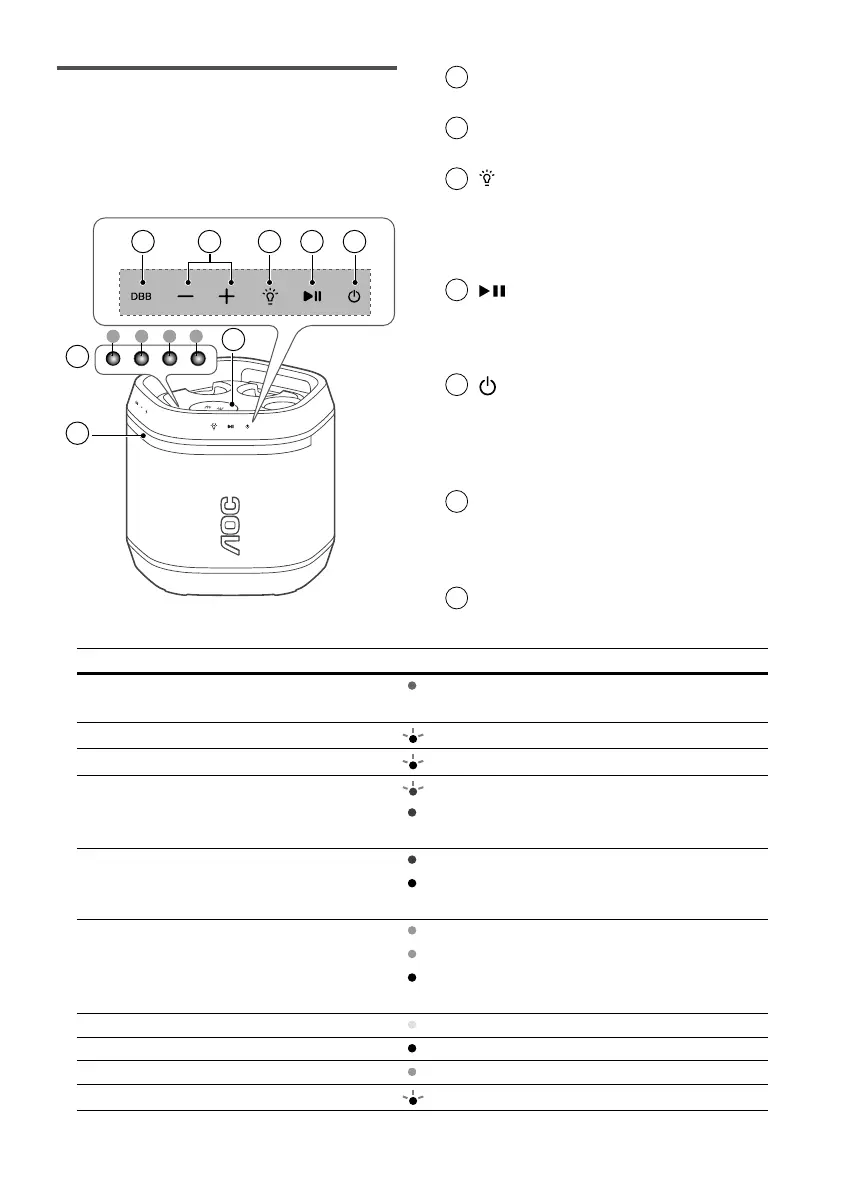
This section includes an overview of the
party speaker.
1
DBB touch key
BASS eect setup.
2
+/- (Volume) touch key
Increase/Decrease the volume.
3
(Light) touch key
• Press to change speaker light
mode.
• Press and hold for 3 seconds to
change speaker light brightness.
4
(Play/Pause) touch key
• Start, pause or resume play.
• Press and hold to skip to next
track.
5
(Standby-On) touch key
• Press and hold for 3 seconds to
switch on/o the unit.
• Press to check battery level in
power on status.
6
LED indicator
• Battery level indicator
• Function status (see below table
for details)
7
Speaker light
2122
6
7
1 32 4 5
8
9
2018 1917
10 11
12 13 14 15 16
1 2 3 4
Function status Pattern LED
Power Standby
Solid red
LED 2
Power o
- O
Battery Low
Blink white
LED 1, 2, 3, 4
Volume Maximum / Minimum
Blink white (x3)
LED 1, 2, 3, 4
Bluetooth Pairing
Blink blue
LED 3
Paired
Solid blue
Not paired
- O
TWS Pairing
Alternative blue-white
LED 3
Paired
Solid white
Not paired
- O
Partylink Pairing
Alternative green-white
LED 4
Paired
Alternative green-white (master)
LED 4
Solid white (slave)
LED 3
Not paired
- O
LED 3, 4
DBB
Solid yellow
LED 1
Vocal fader
Solid white
LED 2
Voice changer
Solid green
LED 4
Brightness change
Flash once
LED 1, 2, 3, 4


 To Next Page