9EN
8
Wireless Qi charging pad
9
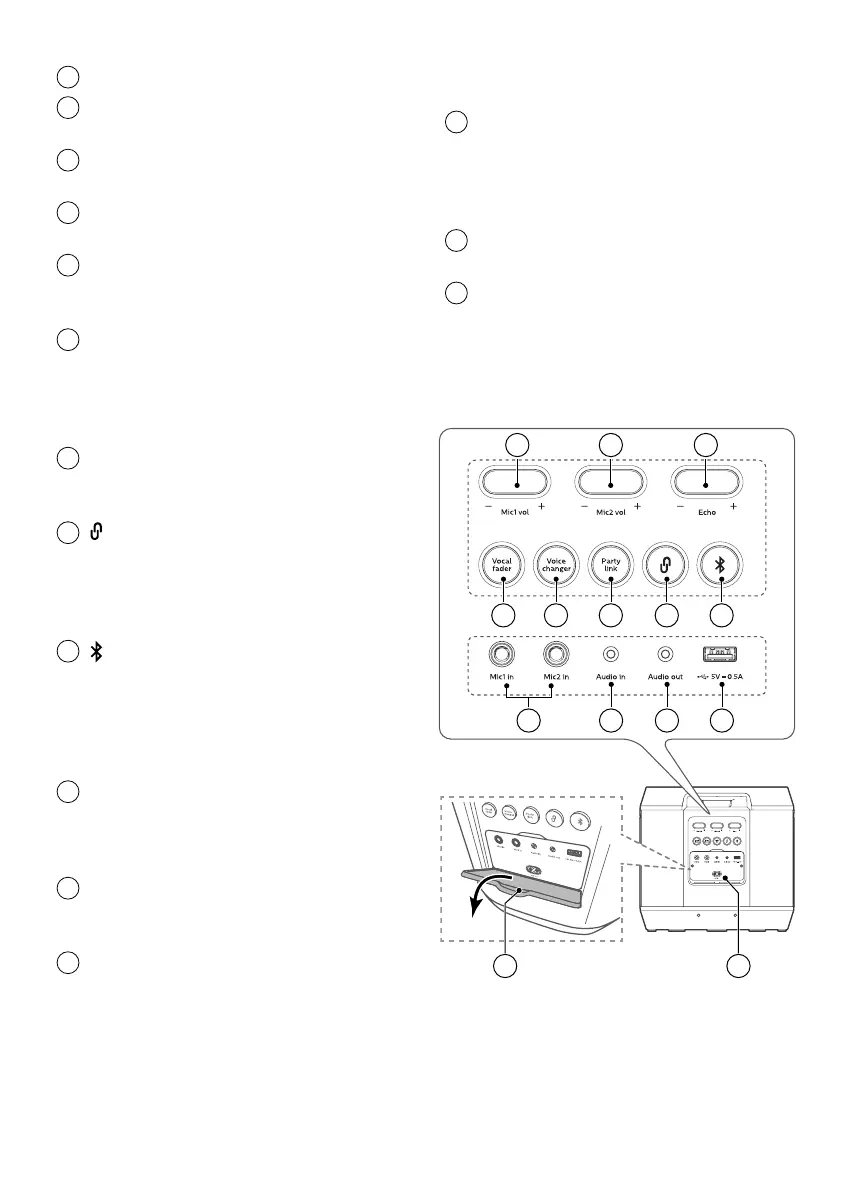
Mic 1 vol +/- button
Adjust microphone volume.
10
Mic 2 vol +/- button
Adjust microphone volume.
11
Echo +/- button
Adjust the microphone echo level.
12
Vocal fader button
Press repeatedly to switch between
vocal fader on and vocal fader o.
13
Voice changer button
Press repeatedly to switch among
dierent voice tones: Woman voice/
Man voice/Children voice/Normal
eect.
14
PartyLink button
Press to enter PartyLink pairing
mode.
15
TWS pair button
• Press to enter True Wireless
Stereo (TWS) pairing mode.
• It work only when you have two
identical speakers.
16
Bluetooth / pair button
• Switch to Bluetooth mode.
• Press and hold to activate the
pairing function in Bluetooth
mode or disconnect the existing
paired Bluetooth device.
17
Mic1 in / Mic2 in socket
Connect a microphone (not
supplied) into the Mic1 in / Mic2 in
socket on the unit.
18
Audio in socket
Audio input from, for example, an
MP3 player (3.5mm socket).
19
Audio out socket
Connect an audio cable (not
supplied) to the Audio out socket on
the unit and the audio in socket of
the external device, and the unit will
output audio automatically to the
external device.
20
USB (5V, 0.5A) socket
• Insert the USB device to play
music.
• Upgrade software of this
product.
21
AC in~ socket
Connect to the power supply.
22
Rear ap
You will need to open the rear
ap of your party speaker before
using Connect to power/Mic/Audio/
USB socket
2122
9
2018 1917
10 11
12 13 14 15 16


 To Next Page