10 EN
3 Get started
When you use this unit for the rst time
or unused for long periods of time,
recharge the battery fully.
Note
• For identication and supply ratings, see
the type plate at the back or bottom of the
product.
• Before you make or change any connections,
make sure that all devices are disconnected
from the power outlet.
Connect to power
WARNING!
• Risk of product damage! Make sure that the
power supply voltage corresponds to the
voltage printed on the back or the underside
of the product.
• Risk of electric shock! When you unplug the
power cord, always pull the plug from the
socket. Never pull the cord.
• Before connecting the AC power cord, ensure
you have completed all other connections.
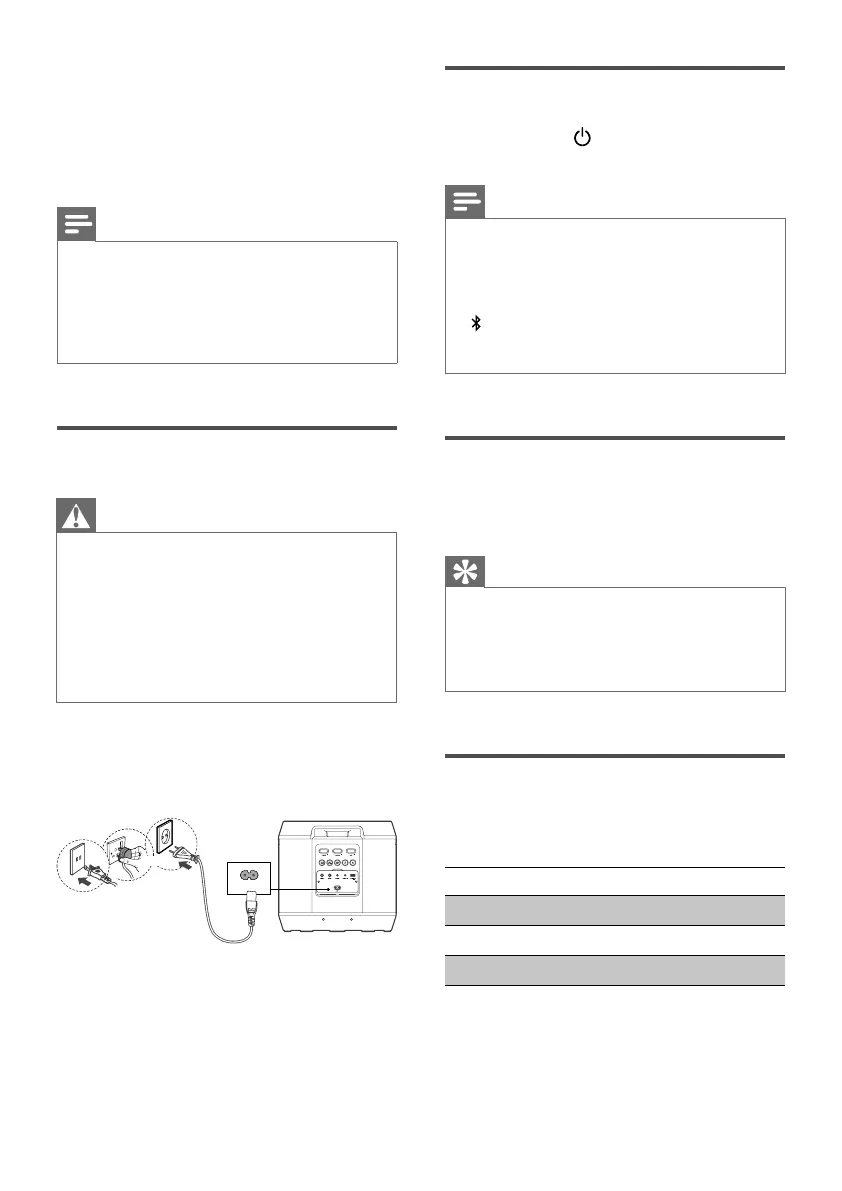
Connect the mains cable to the AC in~
socket of the party speaker and then
into a mains socket.
AC in ~
or
or
* Power cord quantity and plug type
vary by regions.
Turn On and O
Press and hold touch key for 3
seconds to switch on/o the unit.
Note
• The speaker will turn o automatically after 15
minutes without user operations and music
playback.
• In case of no response of button or function
error, you can press and hold Vocal fader and
buttons for 10 seconds to force shutdown,
then turn on the unit again to be used
normally.
Volume control
Press +/- touch key to increase or
decrease volume level.
Tip
• While adjusting the volume, the white speaker
light will move up or down for 3 seconds.
• When the volume meets the maximum /
minimum level, both the speaker light and four
LED indicators will blink white three times.
DBB control
Short press DBB touch key to switch the
DBB (bass) level.
Function LED1 (Yellow)
DBB2 LED1 ash twice then solid
DBB1 LED1 flash once then solid
DBB o LED1 off


 To Next Page