17EN
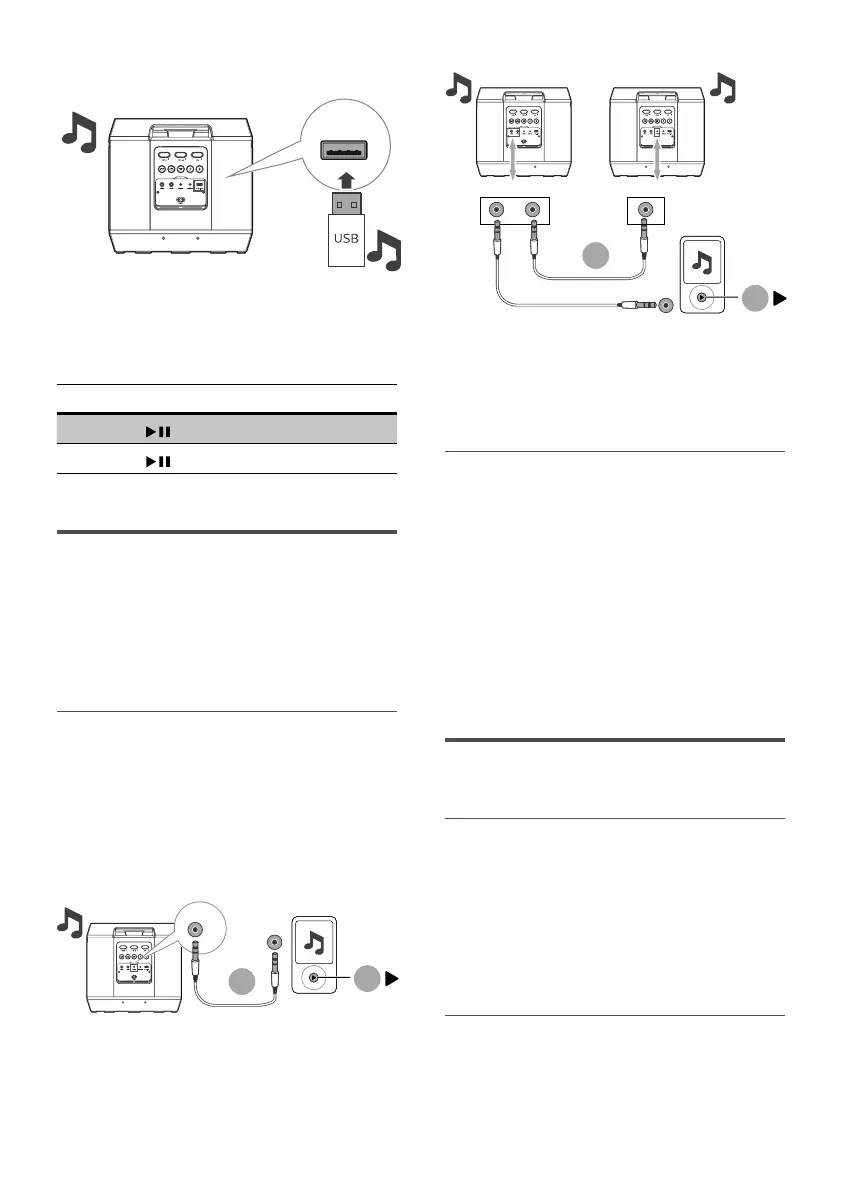
• Insert the USB device.
1
1
2
Audio in
2
Audio in Audio out Audio in
» The unit will switch to the USB
mode and play automatically.
Button Action
Short press Start, pause or resume play.
Long press Skip to the next track.
Listen to an external
device
With this product, you can listen to
an external audio device such as an MP3
player.
Play from an MP3 player
1 Connect an audio input cable (not
supplied) with a 3.5mm connector
on both ends to:
• The Audio in socket on the unit.
• The headphone socket on the
MP3 player.
1
2
Audio in
2
Audio in Audio out Audio in
1
Audio in Audio out Audio in
» The unit switches to the Audio in
mode automatically.
2 Play audio on the MP3 player (refer
to its user manual).
Audio out
This unit has an Audio out socket.
You can output the analog stereo audio
signals to external devices such as an
active speaker.
Connect an audio cable (not supplied)
to the Audio out socket on the unit
and the audio in socket of the external
device, and the unit will output audio
automatically to the external device.
Sing through microphone
Adjust microphone volume
Connect a microphone (not supplied)
into the Mic in socket of the unit, and
adjust the microphone volume by
increasing or decreasing the Mic1 vol
or Mic2 vol button.
Now, enjoy the karaoke singing!
Adjust echo
Adjust the microphone echo level to
your desired level by increasing or
decreasing the Echo button.


 To Next Page