18 EN
Vocal fader
Press the Vocal fader button to switch
between vocal fader on and o.
Voice changer
Press the Voice changer button on
the panel to switch among dierent
voice tones: Woman voice / Man voice /
Children voice / Normal eect.
Pole-Mounting your
Party speaker
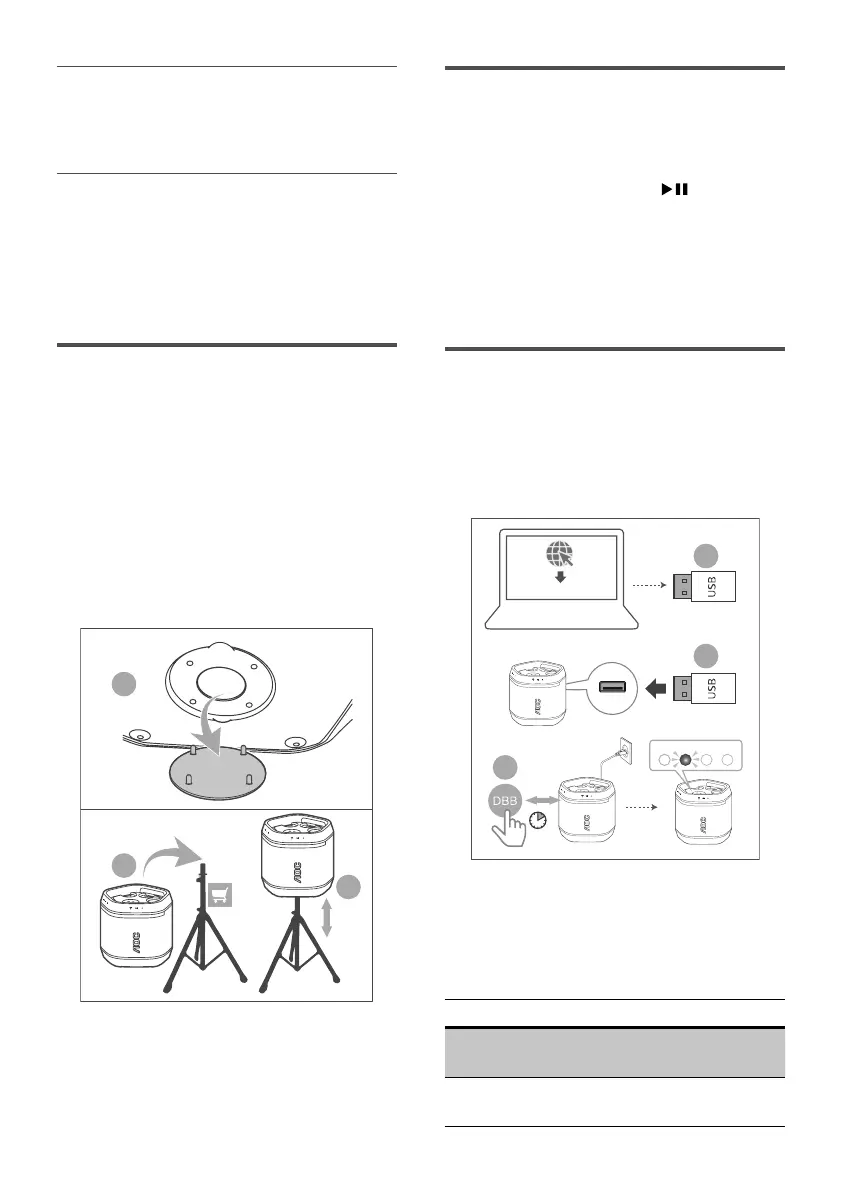
1 Remove the cover from the bottom
of the party speaker (please keep
the cover).
2 Lift the party speaker to a speaker
tripod (sold separately).
3 Adjust the speaker tripod to the
appropriate height.
2
3
1
Bottom View
Factory reset
Reset device to default setting.
1 When the speaker is power on,
press and hold + and buttons
for 10 seconds.
» Battery capacity LEDs ash three
times.
» The party speaker is reset and
enters standby mode.
Update rmware via USB
1 Check if there is the latest rmware
version on https://aoc.com. Search
for your model and click on
Support > Software and drivers.
1
2
3
Software update les
8sec
Red
2 Copy the software update les into
USB ash drive, insert USB ash
drive on the unit.
3 Press and hold DBB key for 8 seconds
in power on state with power cable plug.
LED2 (Red) Status
Slow blinking
Fast blinking
Enter upgrade mode
Upgrade start
LED off
Upgrade finished and
restart


 To Next Page