12 EN
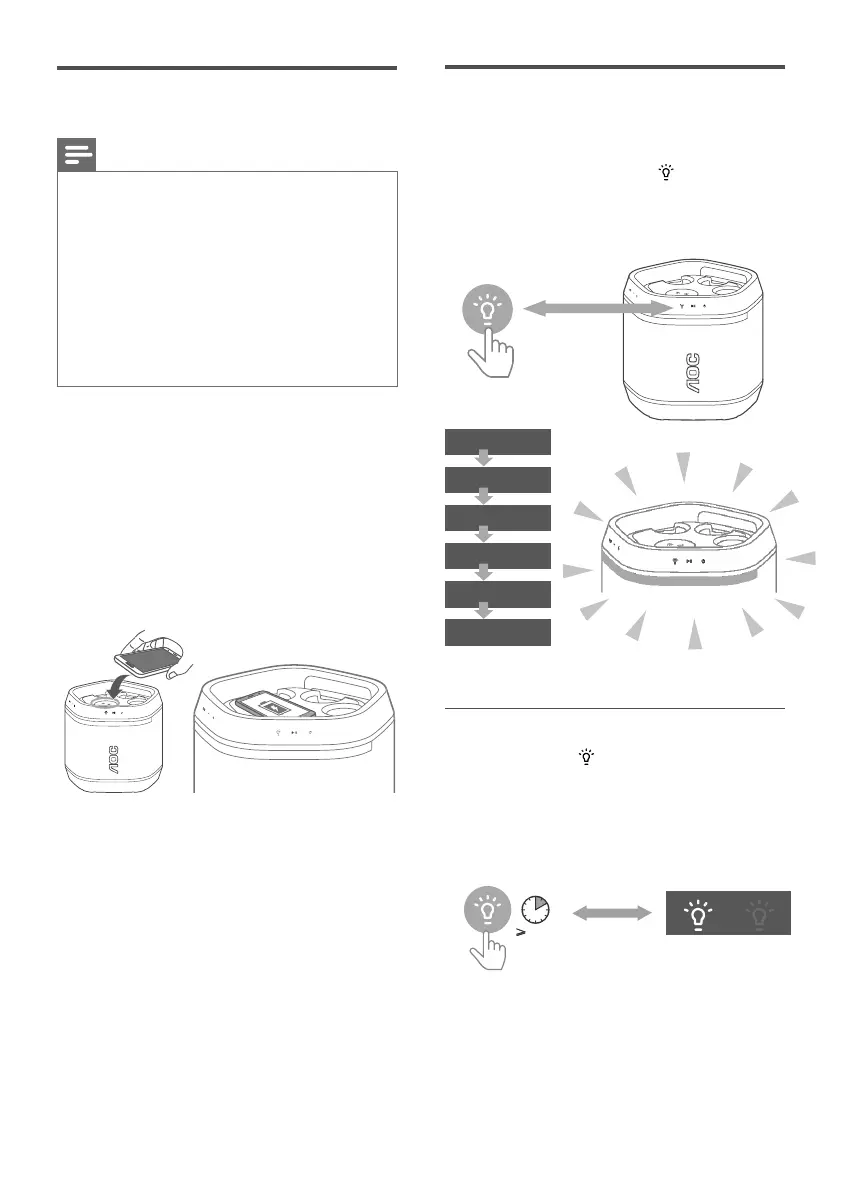
Wireless Qi charging
Note
• Metal must not be placed on the Qi charger
• When Qi charging function is not charging,
check Qi charge location is placed in place with
the charging pad. Adjust to suitable position
when necessary.
• Do NOT place foreign object on the Qi charging
pad.
• Remove the protective case from your device
for the best connection.
• Make sure that your phone is placed
horizontally on the charging pad.
This function only works with mobile
devices that support Wireless Charger
technology.
Make sure your mobile devices are
placed on wireless charging pad.
When the mobile device is entering Qi
charging, the pink speaker light will turn
on for 5 sec.
Change light eect
Turn speaker light on or o
In power on mode, press (Light)
touch key repeatedly to switch among
dierent light modes of speaker light.
Light mode 1
Light mode 2
Light mode 3
Light mode 4
Light mode 5
Light off
Change brightness
Press and hold (Light) touch key
for 3 seconds to change speaker light
brightness.
» Four LED indicators will blink
once.
Light mode 1
Light mode 2
Light mode 3
Light mode 4
Light mode 5
Light off
3 sec


 To Next Page