10
How to Get a Preferred Image Size by Adjusting
Distance and Zoom
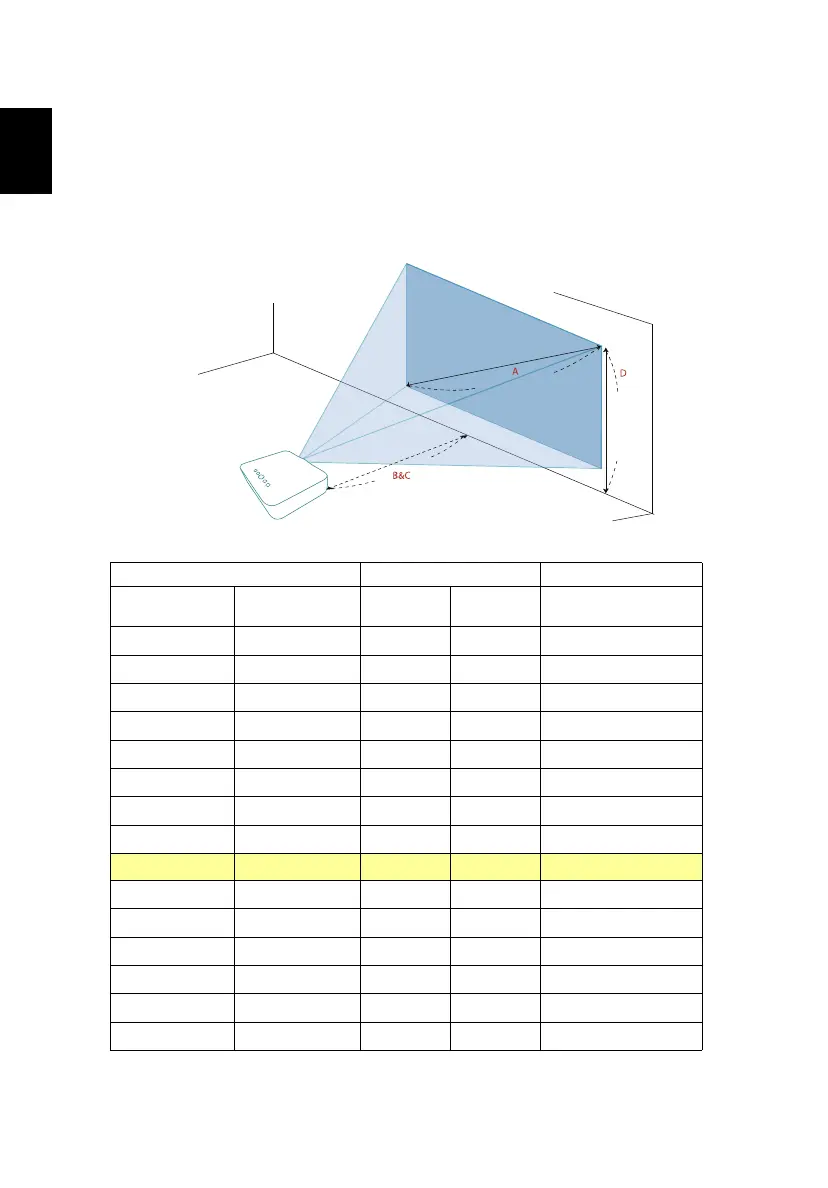
The table below shows how to achieve a desired image size by adjusting either
the position or the zoom ring.
To obtain an image size of 70" set the projector at a distance 2.01 m from the
screen.
Desired Image Size Distance (m) Top (cm)
Diagonal (inch)
<
A >
W (cm) x H (cm)
Max zoom
< B >
Min zoom
< C >
From base to top of
image < D >
30 66 x 37 0.86 0.86 37
35 77 x 44 1.01 1.01 44
40 89 x 50 1.15 1.15 50
45 100 x 56 1.30 1.30 56
50 111 x 62 1.44 1.44 62
55 122 x 68 1.58 1.58 68
60 133 x 75 1.73 1.73 75
65 144 x 81 1.87 1.87 81
70 155 x 87
2.01 2.01 87
75 166 x 93 2.16 2.16 93
80 177 x 100 2.30 2.30 100
85 188 x 106 2.45 2.45 106
90 199 x 112 2.59 2.59 112
95 210 x 118 2.73 2.73 118
100 221 x 124 2.88 2.88 124
Zoom Ratio: 1.0 x
Desired distance
Height:
87 cm
From
base to
top of
image
70"
Desired
image size
2.01 m


 To Next Page