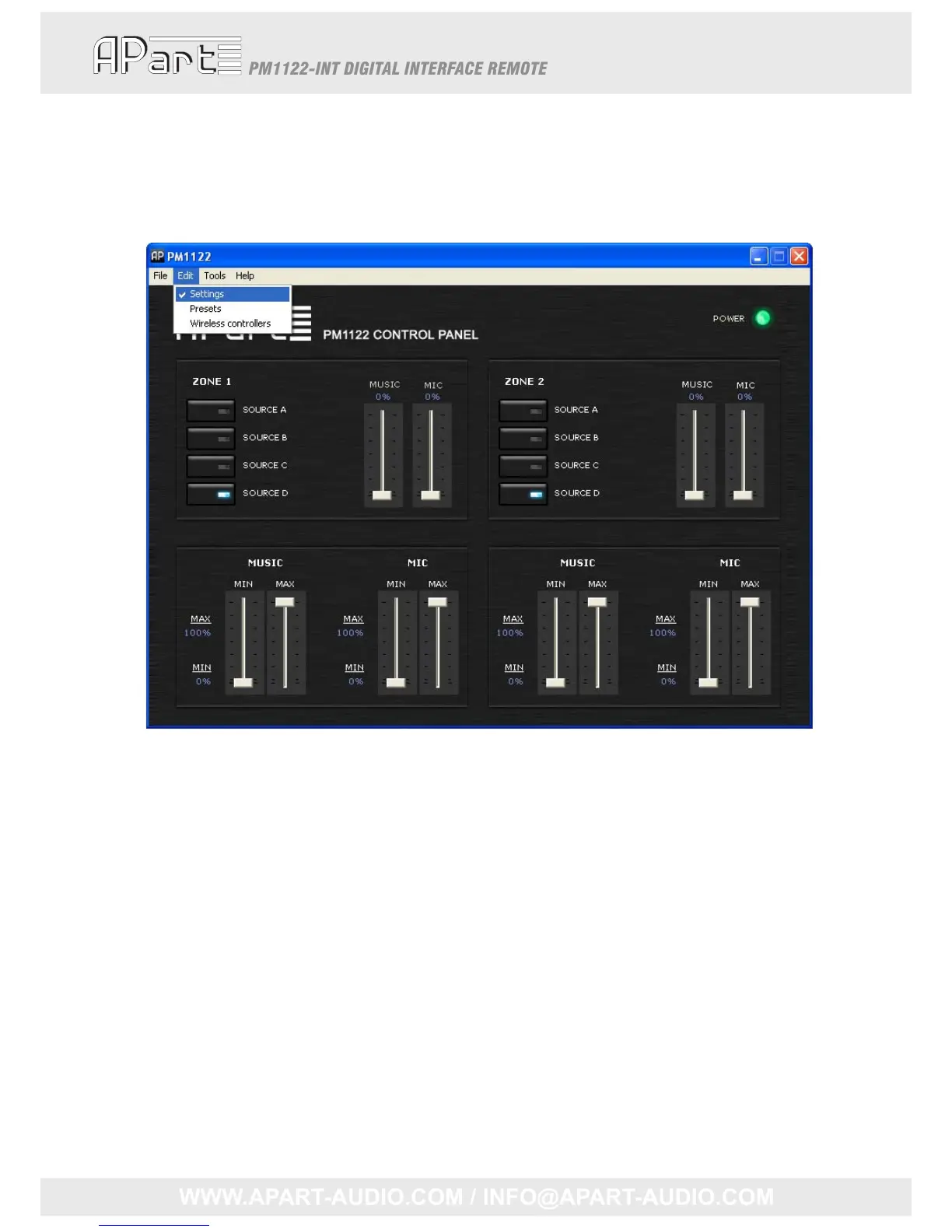
Themainscreencontrolsthesourceselect(AtoD),musiclevelandmicrophonemixlevelofboth
zones.Usebuttonsandlevelsliderstoadjustthevalues.ThePM1122willimmediatelyreact.This
mainscreenwillbecalled“mixerscreen”onthenextpages.
Toadjustminimumandmaximumsettings,clickthe“Edit”tabinthetopbarandselect“Settings”.
Themixerscreenshouldlooklikethis:
Changingtheminimumandmaximumsettingsmightinfluencethepositionoftheslidersinthe
mixerscreen,sincetheirrangeisfromminimumtomaximum.Theminimumandmaximumsettings
willimmediatelybecopiedtothePM1122‐INTinternalmemory.Pleasenotethatthemusicandmic
mixlevelledbarsonthePM1122‐INTfrontpanelareshowingabsolutevalues.Theywillnotreach
fullscaleifyouhavesetalevellowerthan100%inthisscreen,thesamefortheminimumlevel,you
willnotbeabletoentirelymuteasignalwhenyouspecifiedavaluelargerthan0%.
Torecall,storeandclearpresets,clickthe“Edit”tabintheupperbar,select“Presets”,thescreen
willenlargeandshouldlooklikethis:
16



 To Next Page