S
S
a
a
f
f
e
e
t
t
y
y
P
P
r
r
e
e
c
c
a
a
u
u
t
t
i
i
o
o
n
n
s
s
!
!
!
!
Please read these cautions to ensure that you use the device
safely. Use the device only described here and in the
accompanying manual. Misuses may cause unexpected
accident, fire, or electric shock.
C
C
a
a
u
u
t
t
i
i
o
o
n
n
s
s
!
!
Do not place the UPS in water or areas with high
humidity.
Do not allow water or other liquids into the UPS.
Do not let the UPS overheat.
Avoid placing the UPS in direct sunlight or areas with
excessive heat.
Do not connect computers and peripheral devices to the
UPS that exceed its capability.
Do not connect Laser Printer to the UPS because Laser
Printer takes a lot of power to work and may lead to the
UPS’ lower capability in maintaining backup power.
Sometimes, Laser Printer can make the UPS overload.
Observe that the red Overload Indicator light warns that
the UPS is overloaded.
U
U
P
P
S
S
’
’
P
P
a
a
r
r
t
t
s
s
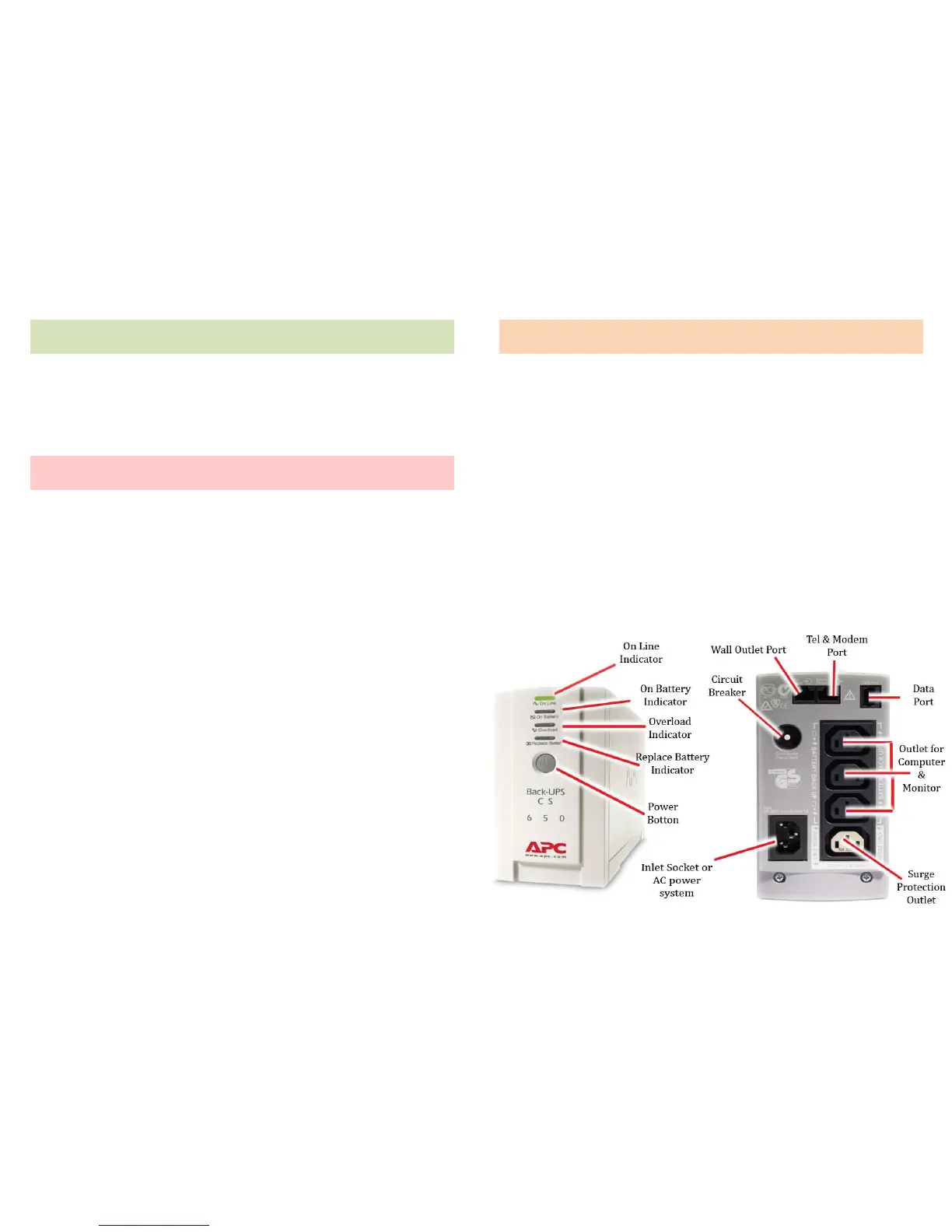
8. Data Port
9. Circuit Breaker
10. Outlet for Computer &
Monitor
11. Inlet Socket or AC Power
System
12. Surge Protection Outlet
13. Cable for Input
14. Cable for Output



 To Next Page