EasyManua.ls Logo

Aphex Studio Dominator 700 - Page 38

Aphex Studio Dominator 700
50 pages
Print Icon
To Next Page IconTo Next Page
To Previous Page IconTo Previous Page
Loading...
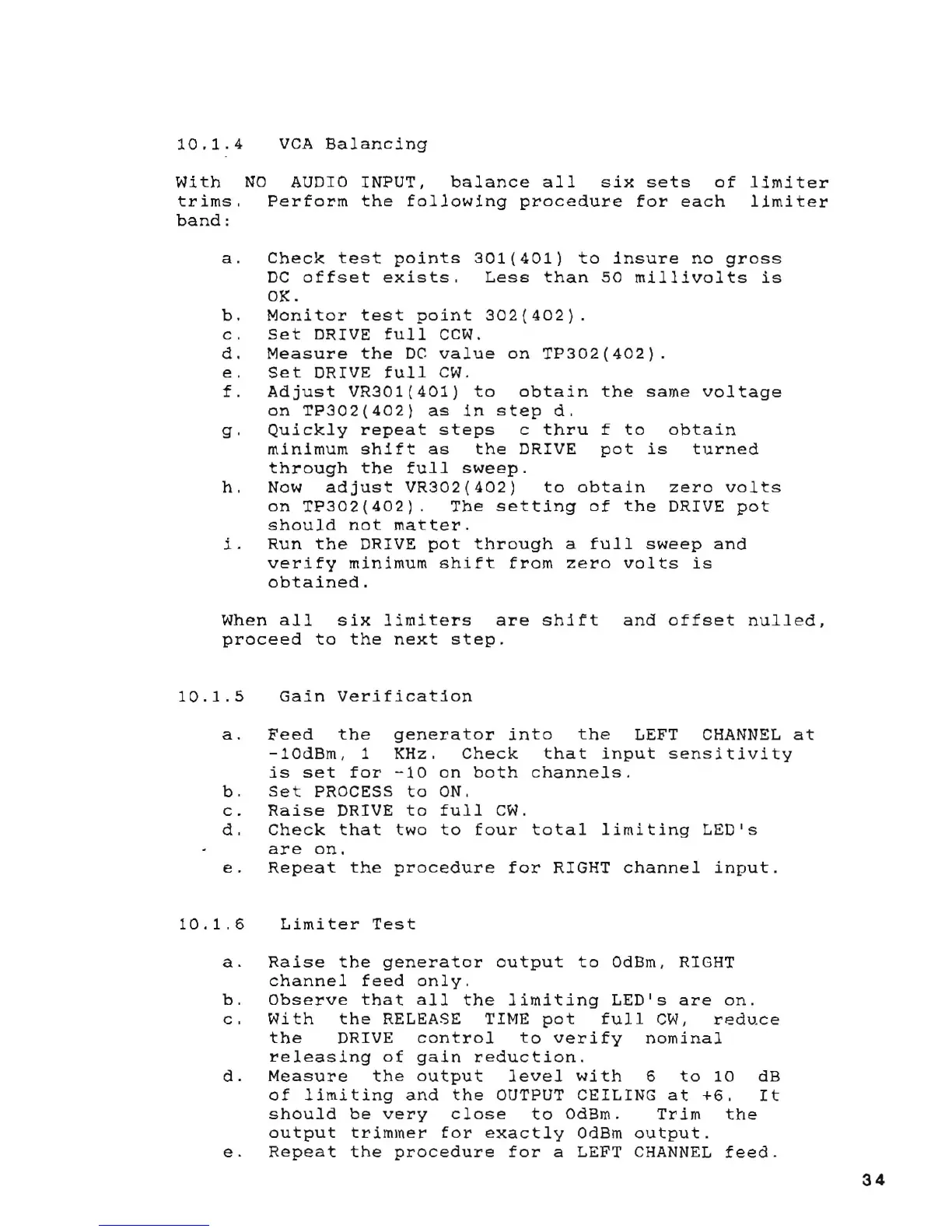
10.1.4
With
trims.
band:
VCA
Balancing
NO
AUDIO
INPUT,
balance
all
six
sets
of
limiter
Perform
the
following
procedure
for
each
limiter
a.
Check
test
points
301(401)
to
insure
no
gross
DC
offset
exists.
Less
than
50
millivolts
is
OK.
b.
Monitor
test
point
302(402).
c.
Set
DRIVE
full
CCW.
d.
Measure
the
DC
value
on
TP302(402).
e.
Set
DRIVE
full
CWo
f.
Adjust
VR301(401)
to
obtain
the
same
voltage
on
TP302(402)
as
in
step
d.
g.
Quickly
repeat
steps
c
thru
f
to
obtain
minimum
shift
as
the
DRIVE
pot
is
turned
through
the
full
sweep.
h.
Now
adjust
VR302(402)
to
obtain
zero
volts
on
TP302(402).
The
setting
of
the
DRIVE
pot
should
not
matter.
i.
Run
the
DRIVE
pot
through
a
full
sweep
and
verify
minimum
shift
from
zero
volts
is
obtained.
When
all
six
limiters
are
shift
and
offset
nulled,
proceed
to
the
next
step.
10.1.5
Gain
Verification
a.
Feed
the
generator
into
the
LEFT
CHANNEL
at
-lOdBrn,
1 KHz.
Check
that
input
sensitivity
is
set
for
-10
on
both
channels.
b.
Set
PROCESS
to
ON.
c.
Raise
DRIVE
to
full
CWo
d.
Check
that
two
to
four
total
limiting
LEDls
are
on.
e.
Repeat
the
procedure
for
RIGHT
channel
input.
10.1.6
Limiter
Test
a.
Raise
the
generator
output
to
OdBm, RIGHT
channel
feed
only
.
b.
Observe
that
all
the
limiting
LEDls
are
on.
c.
With
the
RELEASE TIME
pot
full
CW,
reduce
the
DRIVE
control
to
verify
nominal
releasing
of
gain
reduction.
d.
Measure
the
output
level
with
6
to
10
dB
of
limiting
and
the
OUTPUT
CEILING
at
+6.
It
should
be
very
close
to
OdBm.
Trim
the
output
trimmer
for
exactly
OdBm
output.
e.
Repeat
the
procedure
for
a LEFT
CHANNEL
feed.
34

Table of Contents

Related product manuals