When maximum / minimum record mode running, if you
wants to pause recording, press the A-HOLD button.
Press again to continue.
To exit maximum / minimum record mode, press the
CANCEL button.
Relative Δ
When measuring, you can use the relative (Δ) mode to
subtract the offset.
To use relative (Δ) mode, move the blink cursor of
menu to Δ position, and press the ENTER button to
enter mode. In this mode, meter records the presently
reading as reference and shows it on the secondary
display. The relative (Δ) mode subtract reference from
each reading, and shows result on the main display.
In relative (Δ) mode, the minimum range is relative (Δ)
range. For example: The ranges of measuring
resistance are 400Ω, 4kΩ, 40kΩ, 400kΩ, 4MΩ, and
40MΩ. If you use the relative (Δ) mode in 4kΩ range,
then the minimum range is the 4kΩ range. You can
use range is 4kΩ to 40MΩ, cannot change to 400Ω.
To exit relative (Δ) mode, press the CANCEL button.
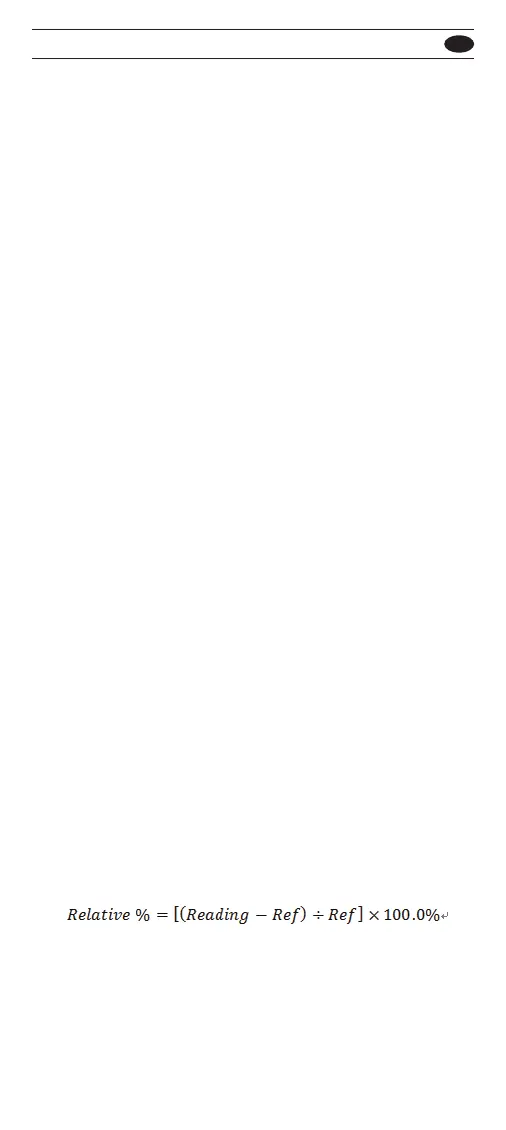
Relative %
When measuring, you can use the relative (%) mode
to calculate the relative percent value. The relative
percent value is define as below:
To use relative (%) mode, move the blink cursor of
menu to % position, and press the ENTER button to
enter mode. In this mode, meter records the presently
reading as reference and shows it on the secondary
display.
501 / 502
EN



 To Next Page