Chapter 3 iPhoto at a Glance 23
The Source List
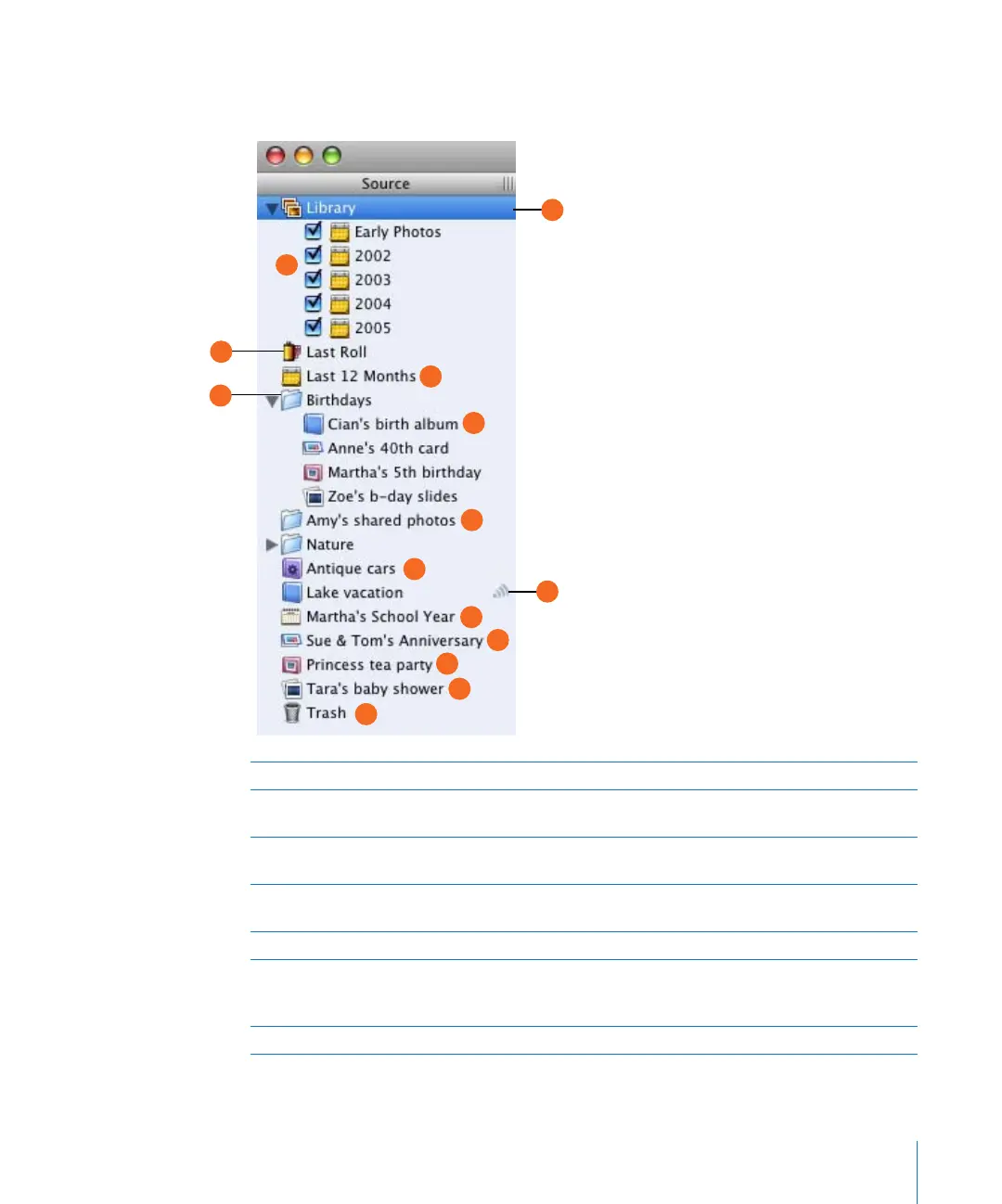
The Source list is where you can easily organize and access your photos.
A Library: Select to see all your imported photos and video clips.
B Specific years: Select to see only photos from a specific year. When you import photos, iPhoto
automatically organizes them by year.
C Recent rolls: Select to see the last roll or rolls of photos you imported. You can set the number
of recent rolls you want displayed in iPhoto Preferences.
D Recent months: Select to see the photos you imported within the last 12 months. You can set
the number of recent months you want displayed in iPhoto Preferences.
E Folder: Create folders to better organize your albums, slideshows, and books.
F Album: Create albums to group and arrange photos by an event, such as a birthday, or a
particular subject matter, such as nature photos. You can also use albums to organize photos for
a QuickTime movie or webpage.
G Shared photos: View photos being shared by other iPhoto users on your local network.
D
F
J
K
H
A
B
G
L
M
N
C
E
I



 To Next Page