34 Chapter 3 iPhoto at a Glance
Card View
When you select a card in the Source list, iPhoto displays its pages and provides tools
to create cards for any event or sentiment.
F View buttons: Click to show single pages or two-page spreads in the viewing area.
G Themes button: Click to select a calendar design.
H Layout pop-up menu: Choose a new layout for the selected page.
I Design button: Choose a new design for the selected page.
J Autoflow button: Click to add all unplaced photos to the calendar, adding pages as needed.
K Settings button: Click to choose fonts, text styles, photo captions, and whether to show page
numbers.
L Buy Calendar button: Click to order professionally printed copies of your calendar (available in
some countries only).
M Arrow buttons: Click to go to the previous or next page.
N Zoom slider: Drag to zoom in and out of calendar pages.
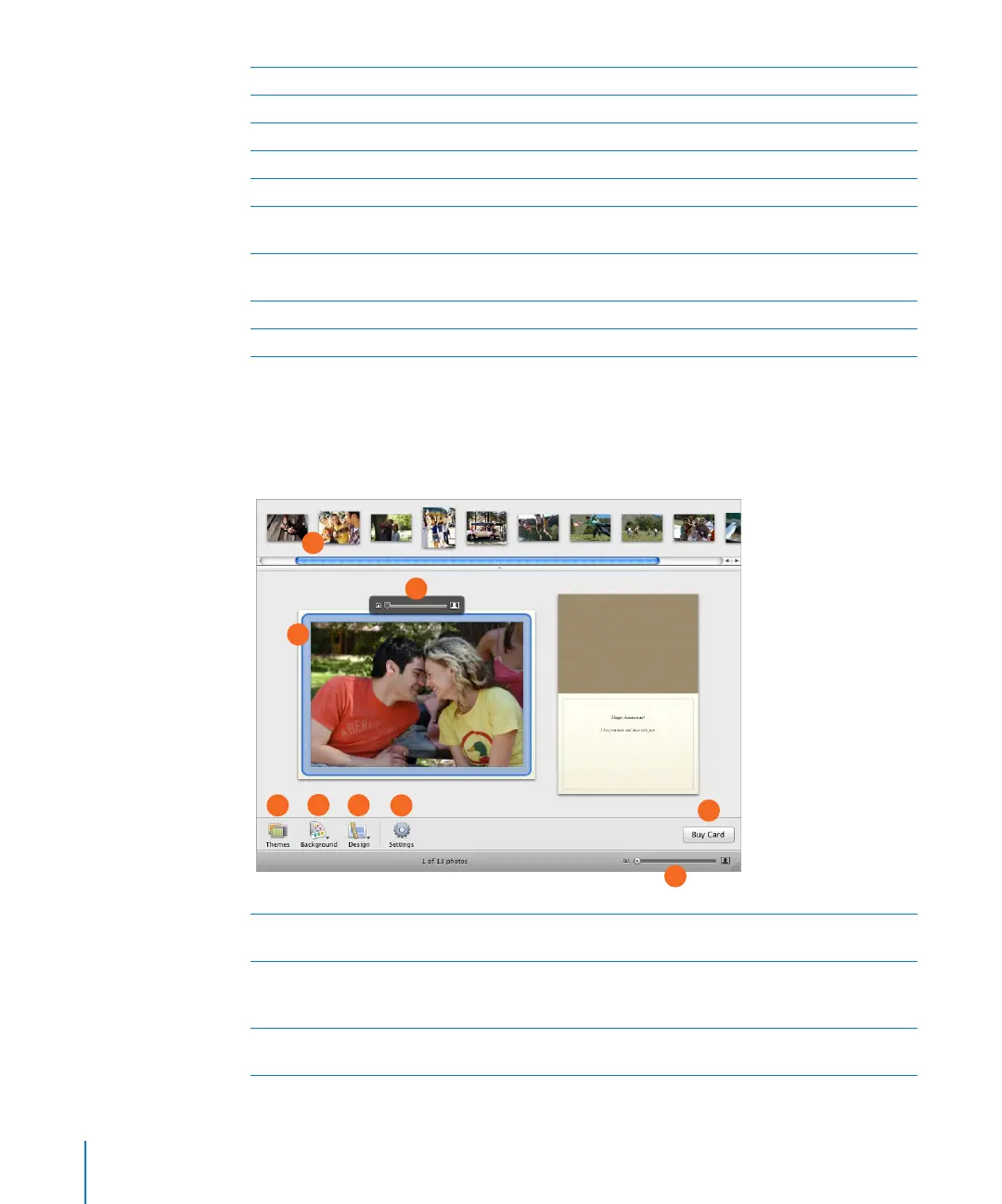
A Photo browser: View unplaced photos for your card. You can place these photos in your book
by dragging them to a page.
B Viewing area: View the page you selected in the photo browser. To rearrange photos on the
same page, drag them to a new location on the page. To replace a photo on a page, drag a new
photo from the photo browser to the photo you want replaced.
C Zoom slider: Position a selected photo within its frame by zooming in on only the area you
want to show.
A
B
C
D
E
F
G
H
I



 To Next Page