EPSON ESC/POS COMMANDS
12 RTP-3280 Thermal Receipt Printer
Chapter 3: Using the Printer
3.1 Basic Controls
Power Button
Press the Power button to turn the printer on/off.
WARNING:
DO NOT turn off the power while printing data. This may cause data loss or damage
the printer.
Open Button
Press the Open button to open the compartment cover.
Feed Button
Press the Feed button to feed the paper one line at a time.
Press and hold the Feed button to continuously feed the paper.
3.2 Replacing the Paper Roll
NOTE:
Always use high quality and approved paper rolls. Contact your dealer to
purchase.
Remove any adhesives on the paper roll before loading.
If the paper runs out while printing, DO NOT turn off the printer while replacing the
paper roll. Otherwise, the queued data may be lost.
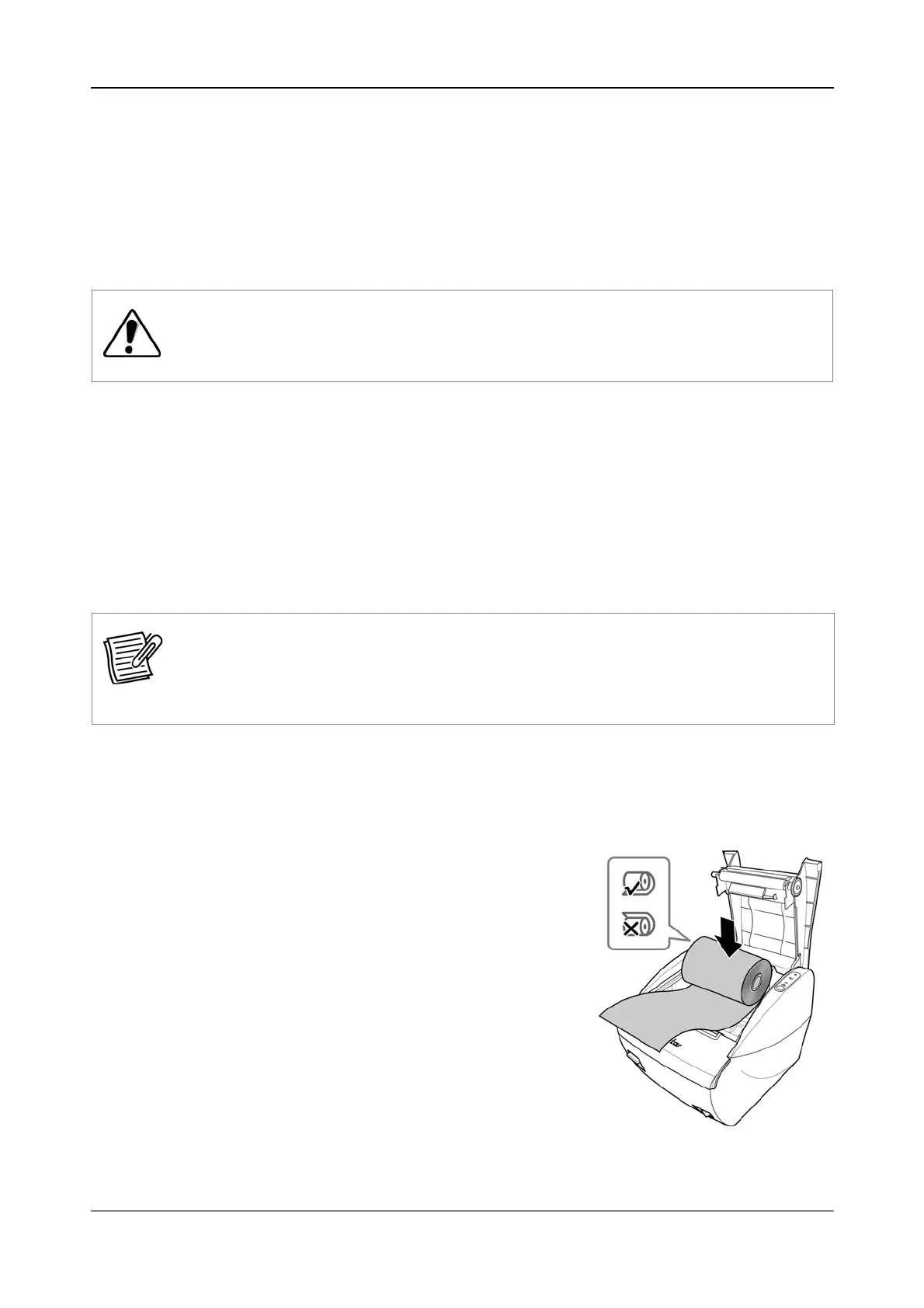
1. Press the Open button to open the compartment cover.
2. Remove the used paper roll core.
3. Place the new paper roll into the compartment.
Take note of the correct paper direction.
4. Pull out a small portion of the paper then close
the compartment cover.
5. Press the Feed button to restart printing.


 To Next Page