PRODUCT OVERVIEW
RTP-3280 Thermal Receipt Printer 3
1.4 Printer Parts
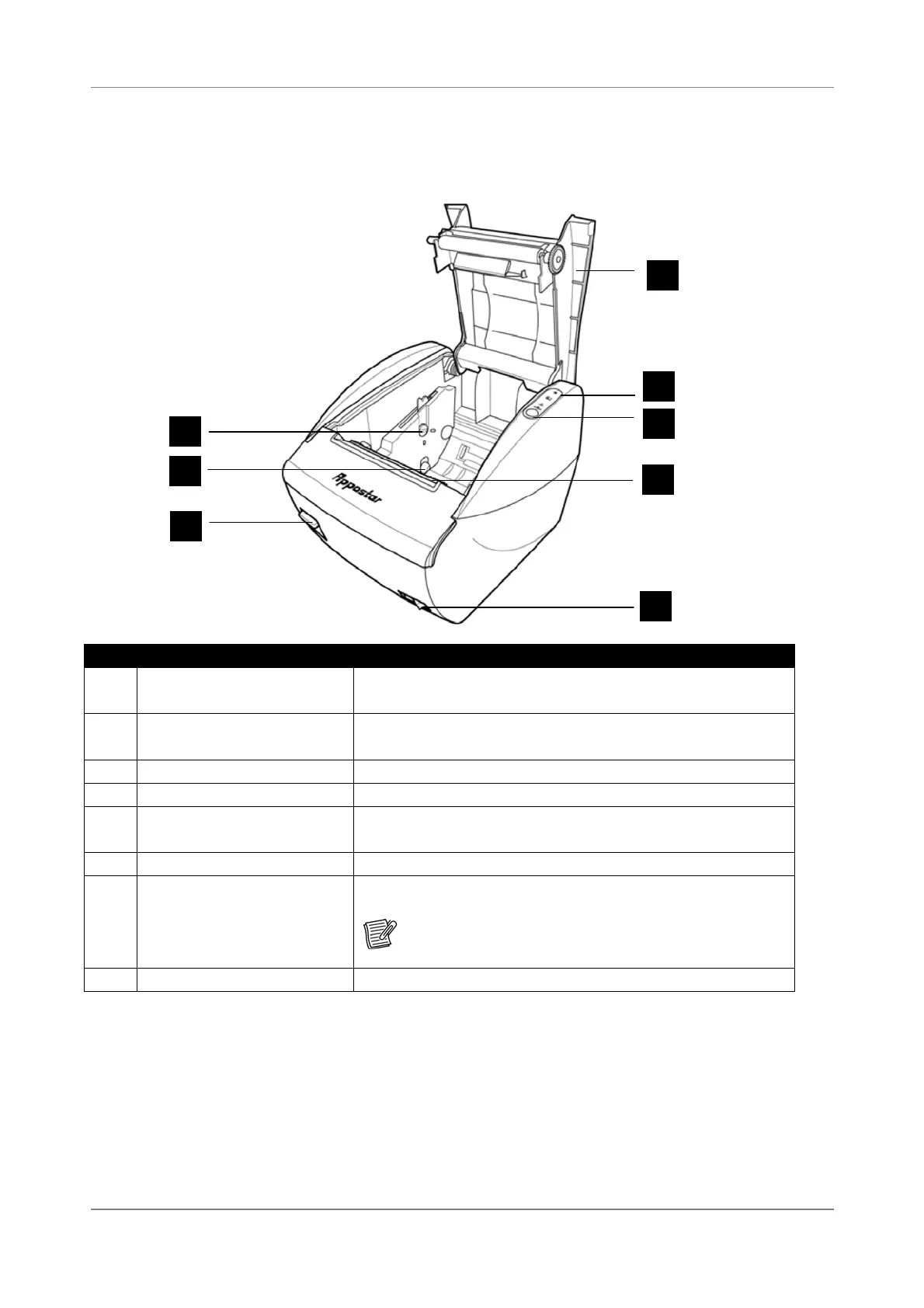
Front View and Compartment
No. Item Description
1 Adjustment screw
Loosen the screw to adjust the paper sensor.
See “3.3 Adjusting the Paper Sensor” on page 13.
2 Paper sensor
Senses if paper is nearing its end.
See “3.3 Adjusting the Paper Sensor” on page 13.
3 Open button Press to open the compartment.
4 Compartment cover Protects the compartment; press down to close.
5 Status indicators
Lights to indicate printer status.
See “Status Indicators” on page 4.
6 Feed button Press to feed paper.
7 Cutter
Use to cut the paper manually.
Note:
Auto-cutter blade is located below this
cutter.
8 Power button Turns the printer on or off.
8
1
2
3
4
5
6
7


 To Next Page