20
Terminals and Interfaces
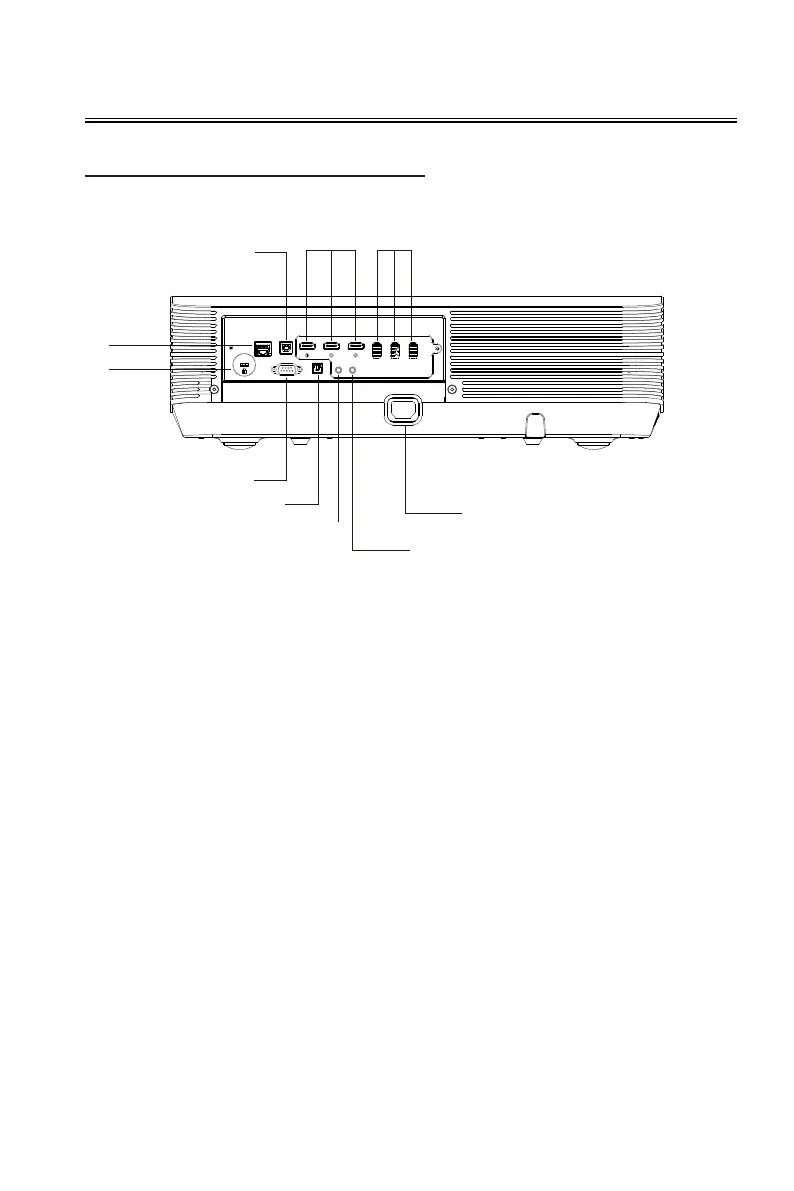
Connect the device
1
2
10
3
4 5
6
7
8
9
1. RJ45 network cable port
2. ensington anti-theft lock slot
3. USB B port
- Projector upgrade interface.
4. HDMI1、HDMI2、HDMI3 input port
- HDMI signal input port.
5. USB1、USB2、USB3 port
- HOST type port, connect U disk,
mobile hard disk, keyboard and
mouse, and other USB slave devices.
6. RS232 control port
- Connect the central control device.
7. S/PDIFoutput port
- S/PDIF optical digital audio output.
8. AUDIO OUTport
- Audio output port.
9. AUDIO INport
- Audio input port.
10. Power cable port
- Connect the power supply.


 To Next Page