17
Installation
Installation Modes
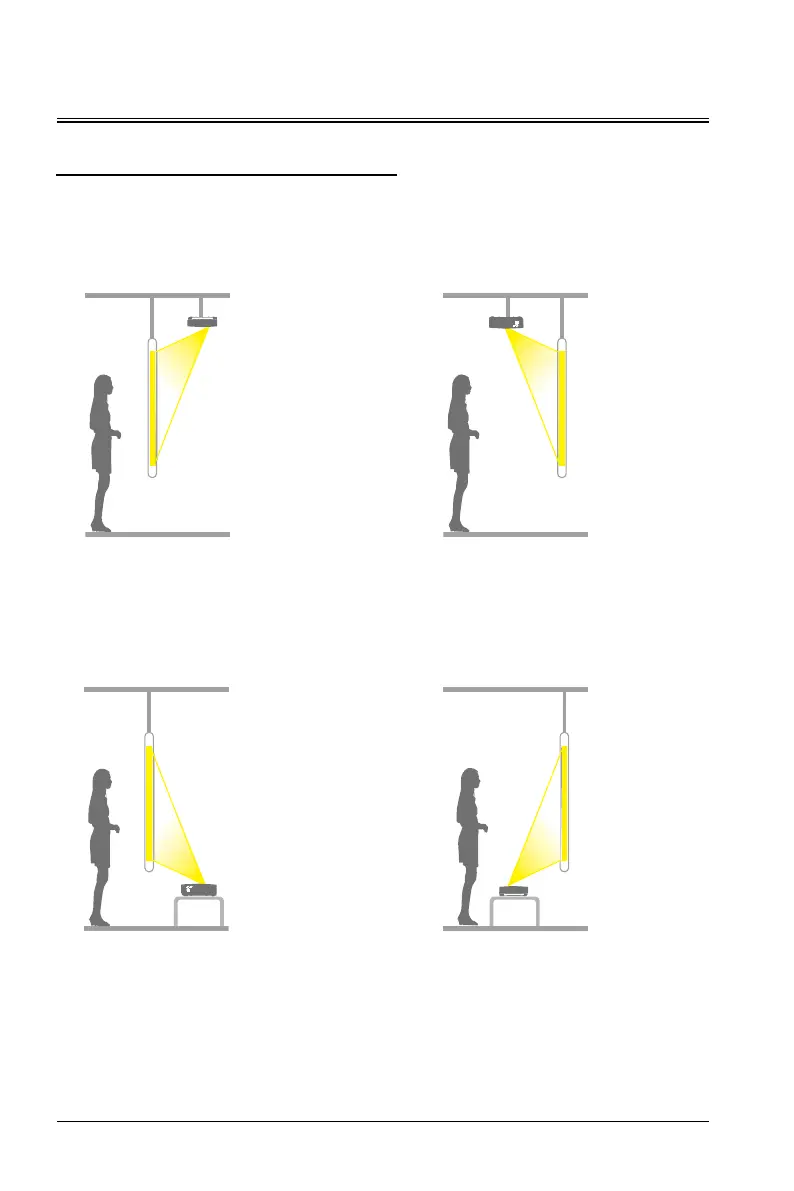
The projector supports four projection modes. You can install the projector according to the installation
position. Before changing the projection mode, shut down the projector, change the projection mode, and
then start up the projector. The projection mode can be preset to table front. You can also select another
projection mode from the menu.
Ceiling rear
Hang the projector on the wall or ceiling and
project the picture from the rear of the semi-
transparent projection screen.
Ceiling front
Hang the projector on the wall or ceiling
and project the picture from the front of the
projection screen.
Desktop front
The projection is in the front of the
projection screen.
Desktop rear
The projection is on the rear of the semi-
transparent projection screen.
- Please use four M4*10 screws to secure the installation.


 To Next Page