Simpool pH model INSTRUCTION AND MAINTENANCE MANUAL
Programmable digital peristaltic pump ENGLISH
ADSP7000407 rev. 1.2 27/03/2015 57/313
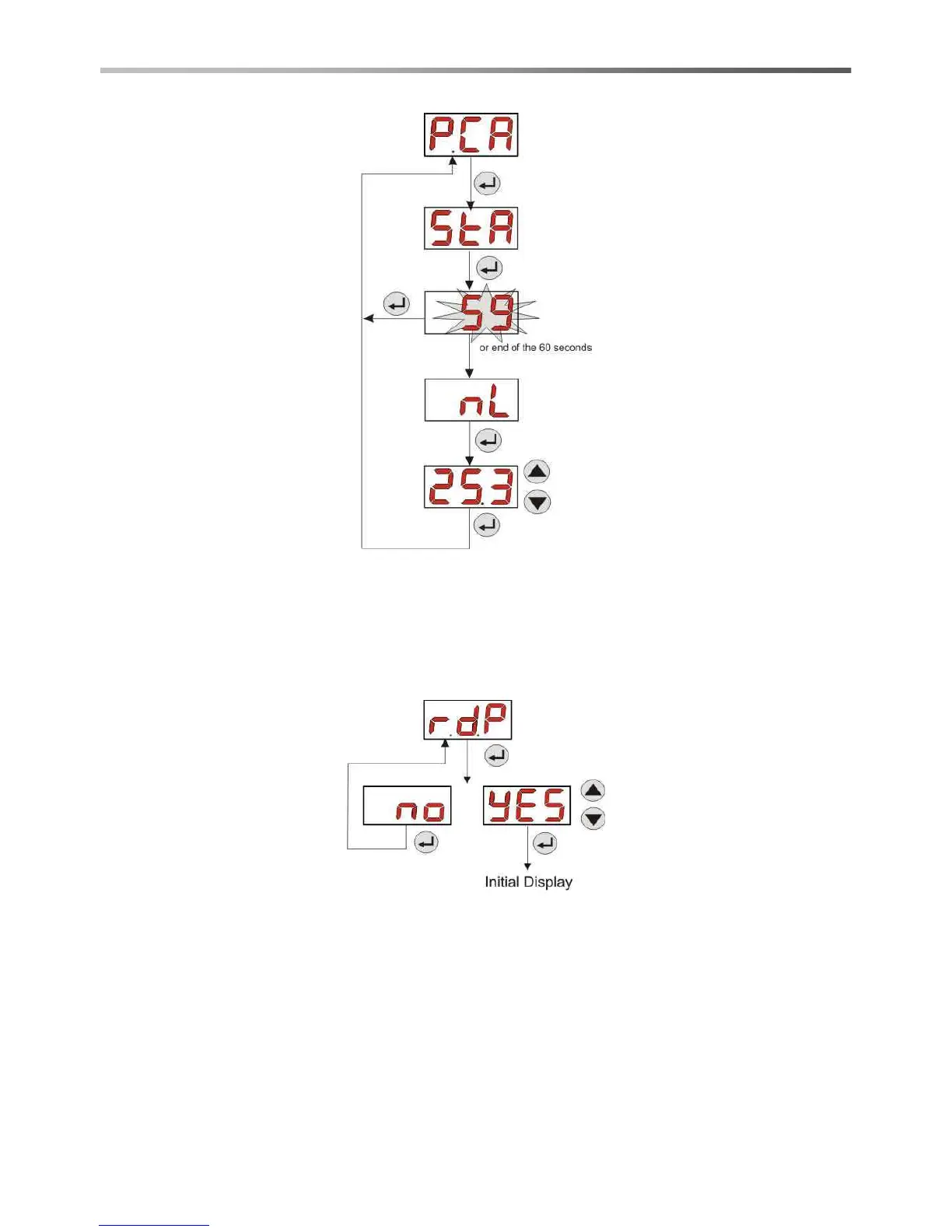
Fig. 17- pH Pump Calibration Menu
3.3.7 RESETTING DEFAULT PARAMETERS
From the r.d.P entry you will be able to reset the equipment's default parameters (refer to the Default Parameters
Table in Annex E). If you chose to reset the initial values, you will go back to the initial display. See Fig. 18
Once you confirm with YES, you cannot go back.
Fig. 18- Default parameters reset
3.3.8 SETTINGS MENU
From the OPt entry of the Programming Menu, via the Enter key, you can access the Settings Menu
From the Settings Menu you can carry out the following operations (refer to Figure 19):
Set the password to access the Programming section, PAS: with Enter you can go to the “000” selection
page, with the ▲ and ▼ keys you can increase/decrease the value displayed and with Enter you can scroll
through the figure you intend to set. After choosing the new password, press Enter for 3 seconds to go back
to the PAS entry;
Enable the pump stop in the case of a P.St level alarm: to access and exit the submenu, use Enter, to
scroll through “YES/no” use the ▲ and ▼ keys;


 To Next Page