TECHNOPOOL
Dosing systems for swimming pools ENGLISH
ADSP7000570 rev. 2.0 06/08/2021 21/37
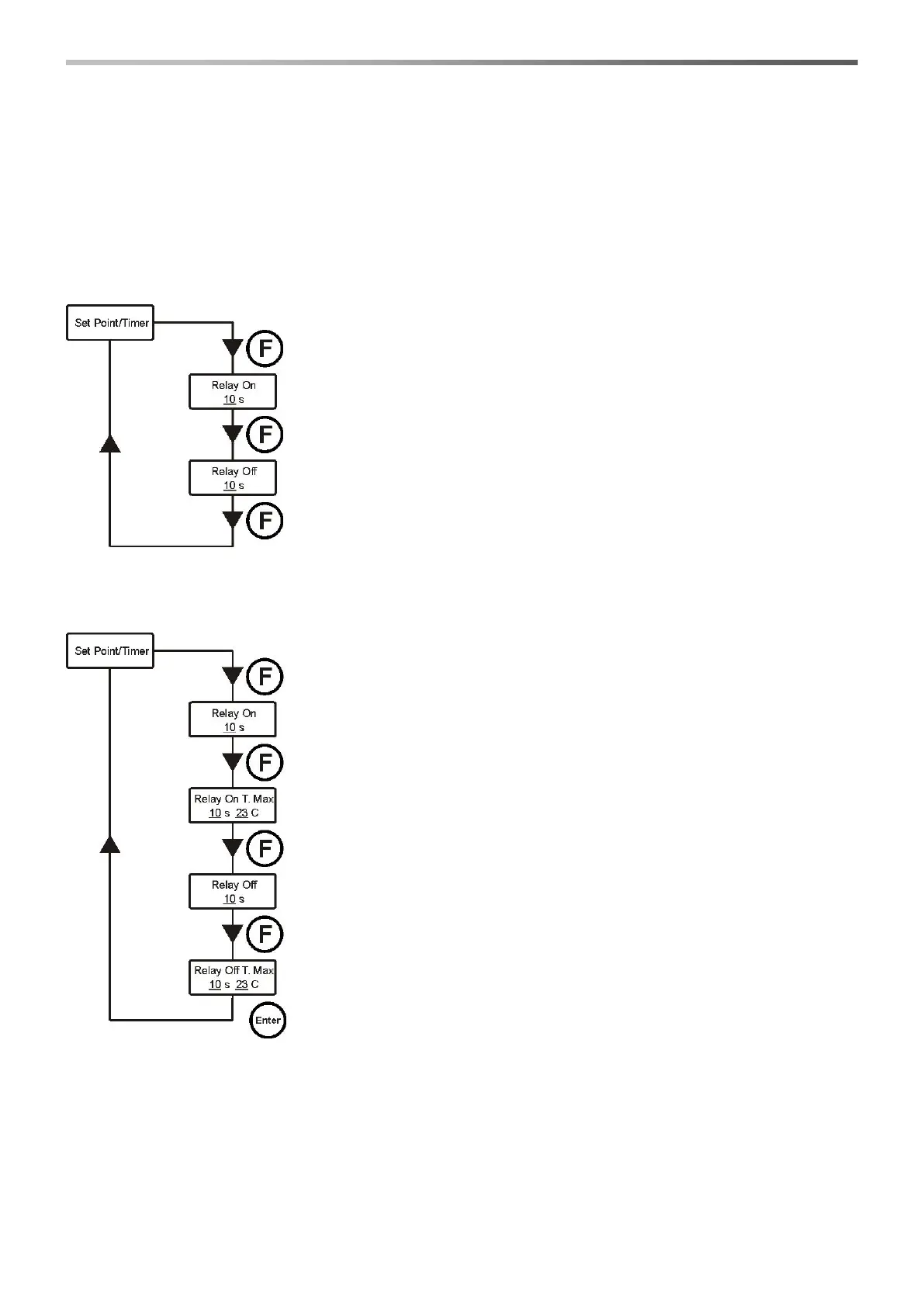
Relay On – Relay On T. Max – Relay Off – Relay Off T. Max
Temperature OFF (disabled):
Relay On – Relay Off
Enter the installer menu, select option Set Point/Timer , press key Enter and then key F more than once, until
Relay On is displayed:
Temperature OFF (disabled):
Relay On
It indicates the relay ON schedule (solenoid valve open).
Press keys ▼▲ to set the desired value and Enter to confirm.
Values that can be set are 0÷59 seconds or 1÷60 minutes.
Relay Off
It indicates the relay OFF schedule (closed solenoid valve).
Press keys ▼▲ to set the desired value and Enter to confirm.
Values that can be set are 0÷59 seconds or 1÷60 minutes.
Manual temperature or with PT100:
Relay On
It indicates the relay ON schedule (solenoid valve open).
Press keys ▼▲ to set the desired value and Enter to confirm.
Values that can be set are 0÷59 seconds or 1÷60 minutes.
Relay On T. Max
Indicates the ON timing of the relay (solenoid valve open) to the programmed
maximum temperature value.
Press keys ▼▲ to set the desired value and Enter to confirm.
Values that can be set for the timing are 0÷59 seconds or 1÷60 minutes;
whereas 23÷36° C for the temperature.
Relay Off
It indicates the relay OFF schedule (closed solenoid valve).
Press keys ▼▲ to set the desired value and Enter to confirm.
Values that can be set are 0÷59 seconds or 1÷60 minutes.
Relay Off T. Max
Indicates the OFF timing of the relay (solenoid valve closed) to the programmed
maximum temperature value.
Press keys ▼▲ to set the desired value and Enter to confirm.
Values that can be set for the timing are 0÷59 seconds or 1÷60 minutes;
whereas 23÷36° C for the temperature.
The two ON and OFF timings are proportional to the temperature reached during the latest dosing, according to the
diagram below:


 To Next Page