A further data cable socket has been provided for use with a wired remote or
diverter. This can be accessed by carefully snapping and removing the entry
pillar and connecting the cable as described above. Please refer to the Wired
Remote Installation Guide or the below wiring diagram. N.B. Wired Remotes
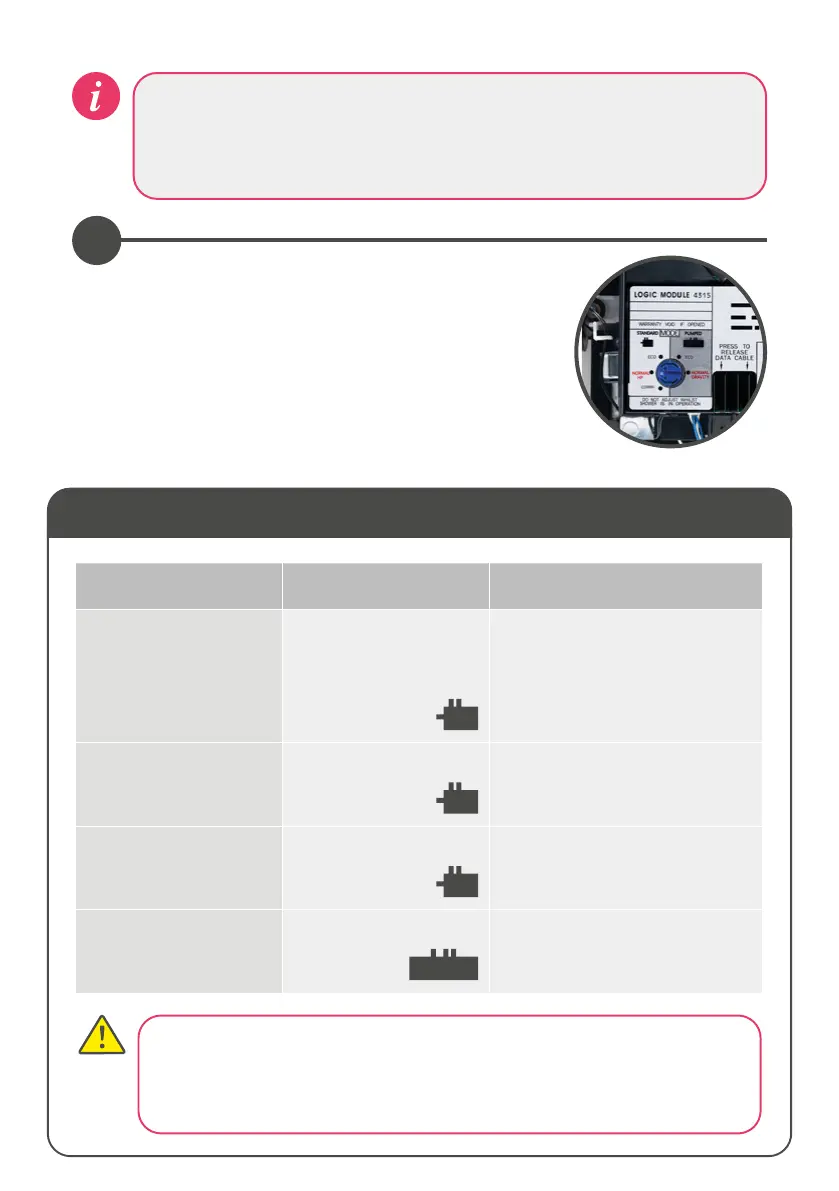
When making any adjustment to the Aqualisa
SmartValve™ settings the power MUST be isolated. For
water economy utilise the Eco mode. This is not to be
used on Combination boiler installations, whereby only
the Combi mode must be used.
To change the mode, use a flat bladed screwdriver.
Use the table below for water system settings.
3
Setting Water System Mode
Water System Valve Type Setting
Combination Boiler
- ensure setting is
changed from factory
default
Standard Aqualisa
SmartValve™
Combi
Factory default will be Normal HP,
this setting must be changed to
Combi for temperature stability
and optimum performance
Balanced High Pressure Standard Aqualisa
SmartValve™
Normal HP (factory default)
or
Eco HP
Separately Pumped
Gravity
Standard Aqualisa
SmartValve™
Normal HP (factory default)
or
Eco HP
Gravity Pumped Pumped Aqualisa
SmartValve™
Normal Gravity (factory default)
or
Eco Gravity
The ECO setting reduces the flow rate, therefore is not recommended when
used in conjunction with combination boiler or bath filler applications.
Site conditions can aect temperature settings, installer to adjust as required.
See Controller Comissioning Instructions section.




 To Next Page