ALERT TYPES
LOW PRESSURE (CAR / TRAILER)
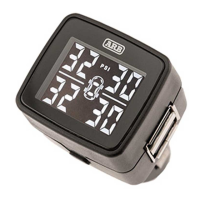
1) Problem tyre will flash, beeping will sound and yellow TPMS icon will illuminate
2) Slow down and find a suitable place to pull off the road as soon as possible
3) Press SET button once to acknowledge alarm and mute, inspect tyre
HIGH PRESSURE (CAR / TRAILER)
1) Problem tyre will flash, beeping will sound and yellow TPMS icon will illuminate
2) Slow down and find a suitable place to pull off the road as soon as possible
3) Press SET button once to acknowledge alarm and mute, inspect tyre
HIGH TEMPERATURE (CAR / TRAILER)
1) Problem tyre will show HI, beeping will sound and yellow TPMS icon will illuminate
2) Slow down and find a suitable place to pull off the road as soon as possible
3) Press SET button once to acknowledge alarm and mute, inspect tyre
LOW BATTERY IN SENSOR (CAR / TRAILER)
1) Problem tyre will show LO, beeping will sound and yellow TPMS icon will illuminate
2) Slow down and find a suitable place to pull off the road as soon as possible
3) Press SET button once to acknowledge alarm and mute, inspect tyre
LOW BATTERY IN TRAILER REPEATER
1) Both rear tyres will flash and show LO, beeping will sound and yellow TPMS icon will illuminate
2) Slow down and find a suitable place to pull off the road as soon as possible
3) Press SET button once to acknowledge alarm and mute, inspect tyre
COMMS ERROR / BROKEN LINK
1) If no signal has been received after 10 minutes, the corresponding tyre will flash - -
2) Slow down and find a suitable place to pull off the road as soon as possible
3) Press SET button once to acknowledge alarm and mute, inspect tyre
SETTING UP UNIT AS TRAILER ONLY MODE (For use with no vehicle sensors on vehicle or for vehicle with
OEM sensors used)
1) Ensure the unit is in normal display mode
2) Press and hold SET button for 30 seconds. Beep will sound at 3 seconds, 5 seconds, 10 seconds, 15 seconds and 30 seconds
3) Unit will turn off and reset to Trailer Only mode. TRLR will illuminate and ONLY will display on bottom line
FACTORY RESET IN TRAILER ONLY MODE (use this step to exit trailer only mode)
1) Press SET button 6 times, unit will beep once and enter program mode
2) Press SET button and hold for 20 seconds. Beep will sound at 5 seconds, 10 seconds and 20 seconds
3) Unit will turn off and reset to default
FACTORY RESET IN NORMAL USE MODE
1) Press SET button 5 times, unit will beep once and enter program mode
2) Press SET button and hold for 20 seconds. Beep will sound at 5 seconds, 10 seconds and 20 seconds
3) Unit will turn off and reset to default
Pairing sensors in trailer mode refer to Repeater instructions. Other settings refer to instructions provided in previous steps.
Note - Spare tyre pressure will display only when there is a pressure change on the spare tyre. This is due to no wheel rotation
when driving for the spare tyre to allow the sensors to wake up.


 To Next Page
 Loading...