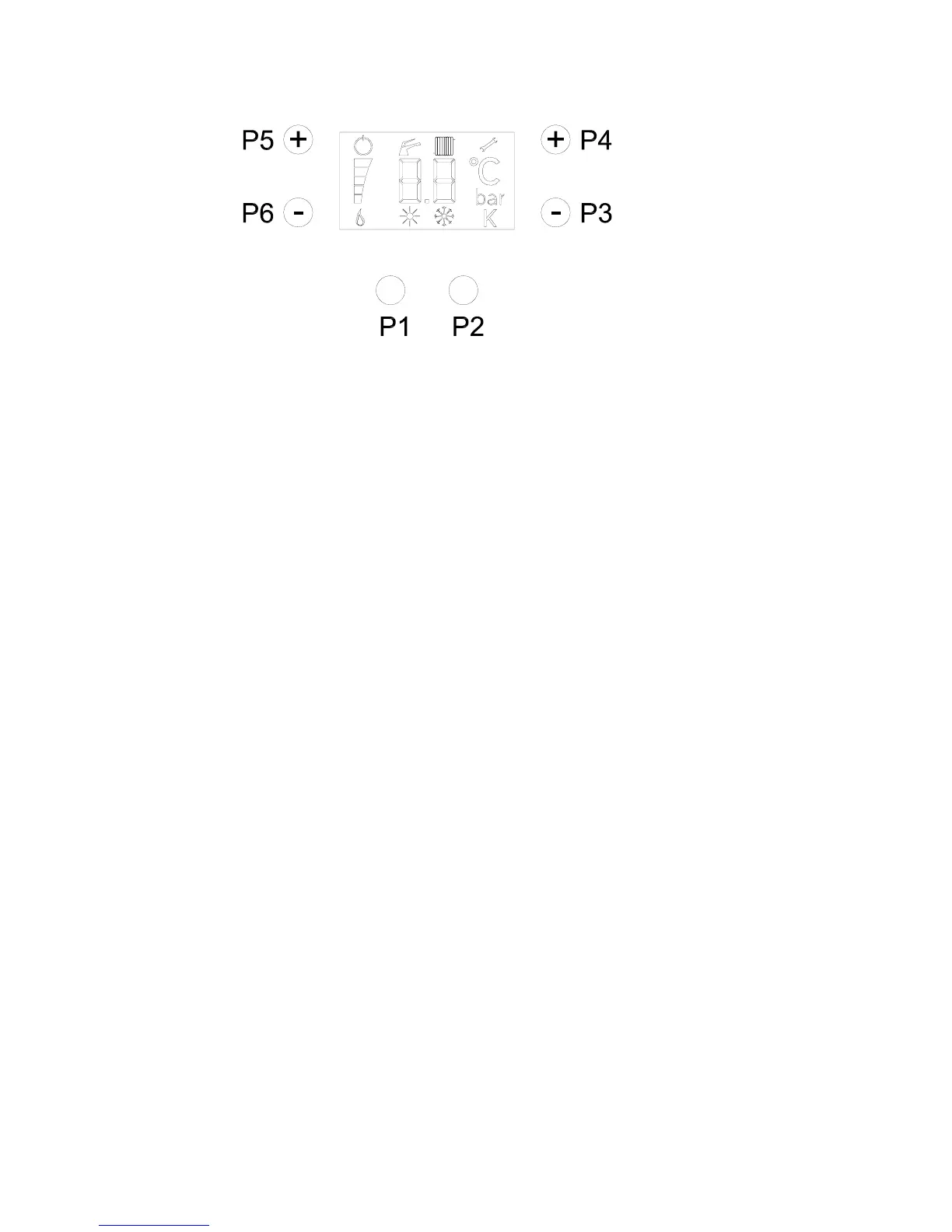
2.7 SETTING OF CONTROL PANEL
You can set 4 ways of operation:
a) Normal way:
Mode of functioning of the boiler, temperature of supply, level of gas modulation and
presence of flame are visualised. Possible anomalies are visualized as besides from
coding at page 27.
b) Mode of visualization of boiler parameters:
It is activated by pushing P1+P2 for 6s. You can visualize in order:
Heating set
- supply temperature
Domestical hot water set
- domestical hot water temperature
- water supply pressure
- heat of ignition
- nominal heat output
c) Mode of parameters setting:
It is activated by pushing P1+P2 for 9s. You visualise alternatively the number of the
parameter Px and the current value. Pushing the keys P3 and P4 is possible to see in
sequence the modifiable parameters, otherwise with the keys P5 and P6 it is possible to
modify its value.
Pressing P3+P4 you can go out of the function without memorizing the changes.
Pressing P2 for 5s you go out the menu and you memorize the changes.
The available parameters are:
- P1 Power of ignition (by 0 % to 99 % of maximum value of range of regulation)
- P2 Power of heating (by 0 % to 99 % of maximum value of range of regulation)
- P3 Anti heating cicling timer (by 0 % to 99 % of 6 minutes)
- P4 oF = post-ventilation of fan off / on = post ventilation of fan on
- P5 Off = metano / on = GPL
- P6 Not available
- P6 oF = water's lack: boiler stops / on = water's lack: boiler doesn't stop, but you have to
call to call service assistance.
- P7 Minimum heating input (0 ÷ 100 %)
- P8 oF = external sensor off / on = external sensor on
- P9 K OTC (0 ÷ 6)
20


 To Next Page