Tone Control – Global or Per source.
This specifies the scope of changes for ‘Bass’
and ‘Treble’ tone settings. The default setting
is ‘Global’ which affects all inputs equally.
‘Per source’ allows you to set tone controls
for individual inputs: once set, the amplifier
remembers tone settings for each input.
Processor Mode – This mode enables
you to adjust the gain of the amplifier. The
amplifier can then be used to drive the front
left and right speakers in a surround sound
system when fed from a separate processor.
You can then control the volume of the entire
system using the processor, feeding the sound
into the TAPE input. Set the gain to match the
amplifiers that drive your other loudspeakers.
Volume Resolution – Standard, fine
or Reference. ‘Standard’ and ‘Fine’ represent
different levels of volume control sensitivity.
The ‘Reference’ setting gives absolute
increments in 0.5dB steps.
Volume display mode – graphic or
numeric shows the volume either as a bar
graph or as a number. If Volume resolution is
set to ‘Reference’ a numeric volume display
shows the actual decibel figure.
Input Trims – use the source select buttons
and Control knob to set input trims for each
source. Input trims are used to compensate
for variations in output levels of different
source equipment.
INTRODUCTION
The A32 allows you to adjust listening settings
to suit your taste, and to customize various
features of the amplifier to fit your system.
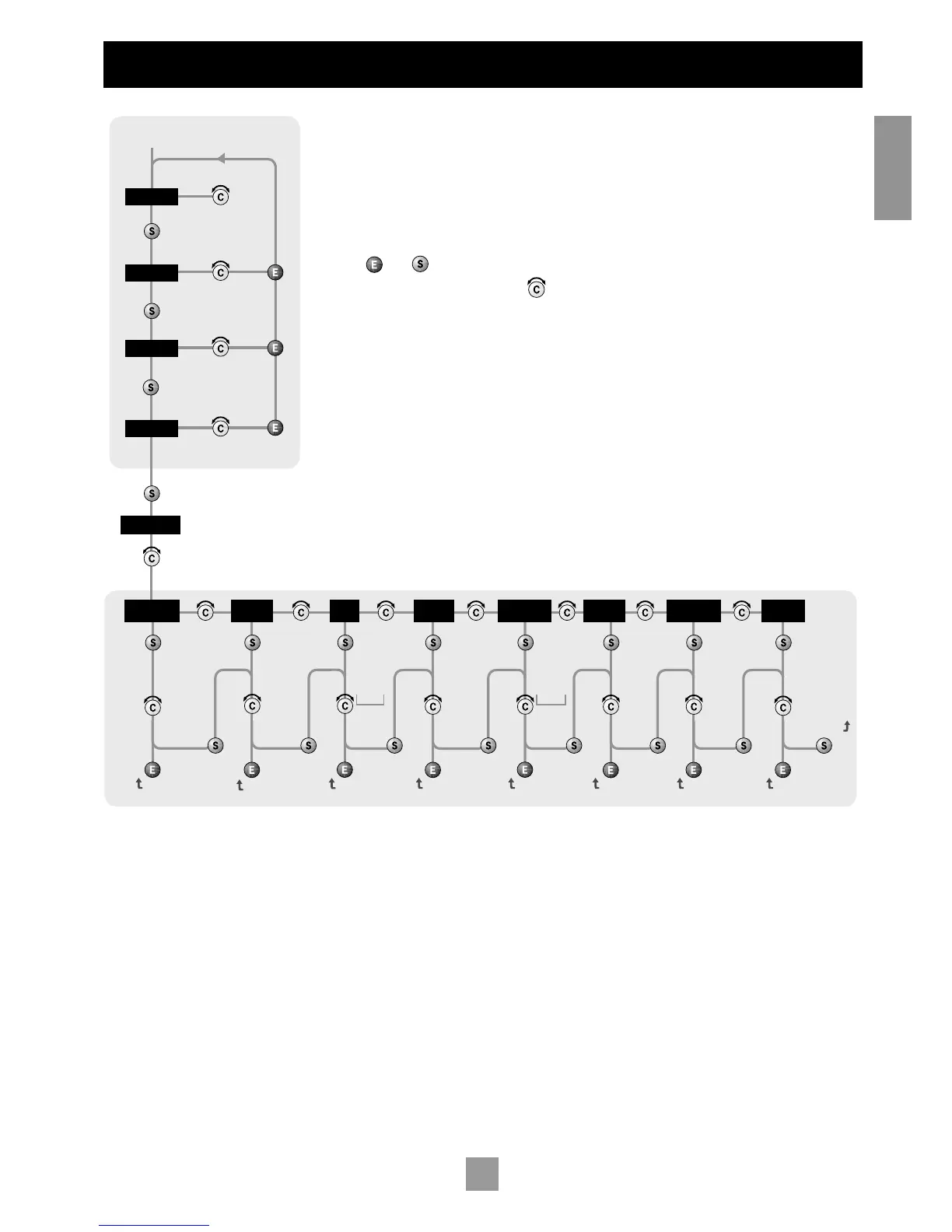
Use this diagram to help you navigate through
the settings available.
The ENTER and SELECT buttons are
represented in the diagram by the symbols
and respectively.
The Control knob is shown as .
Welcome message – You can change the power
on Welcome message from ‘Arcam Amp’ to
display your name, postcode, etc. When customising
the message, use the UP and DOWN buttons to
select the cursor position and the Control knob to
change the letter.
Phono/Aux Text – If you have had the
optional Phono module added, choose
‘Phono’ so this word is displayed when the
input is selected. The default is ‘Aux’.
Restore Settings – this restores all amplifier
settings, including Input trims and the Welcome
message, to their factory defaults.
ADJUSTING LISTENING
SETTINGS
The default display mode is VOLUME, where
the control knob is used to adjust sound level.
Press SELECT to enter edit mode and cycle
through the other sound settings: BALANCE,
BASS and TREBLE. When a setting is selected,
adjust it with the control knob. Press ENTER to
fix the change you have made and return to
default (volume) mode, or press SELECT again
to move to the next setting.
CUSTOMISING AMPLIFIER
SETTINGS
Press SELECT until the display shows
‘CUSTOMIZE->’. Now rotate the Control knob
to choose which setting you wish to alter.
Press SELECT to adjust the chosen setting with
the Control knob.
Press ENTER to confirm the adjustment or
press SELECT to confirm the adjustment and
move on to the next item.
Press ENTER twice to leave the Customize
menu.



 To Next Page