MANUAL V2.0
5 & 7
PLAYING MUSIC > P. 20
“Queue”
allows you to select a track to be played after the current one
is nished.
while a track is playing, switch to the browser window, select
a track to highlight it, then open it. This is your queued track,
which will be played after the current track.
you can only queue one track at a time.
-
-
-
“Intro”
plays the rst few seconds of each track. You can dene the
length to play in “Intro duration”.
-
“Intro duration”
denes for how long each track will be played when “PlayMode” is set to “Intro”.
2.4 PlaylIsTs
A playlist is a list of audio tracks that the music player will automatically play one
after the other.
On your ARCHOS, you can play, create and edit as many playlists as you want.
Note: when you delete a playlist, you are only deleting the list and not the mu-
sic itself.
PLAYING A PLAYLIST
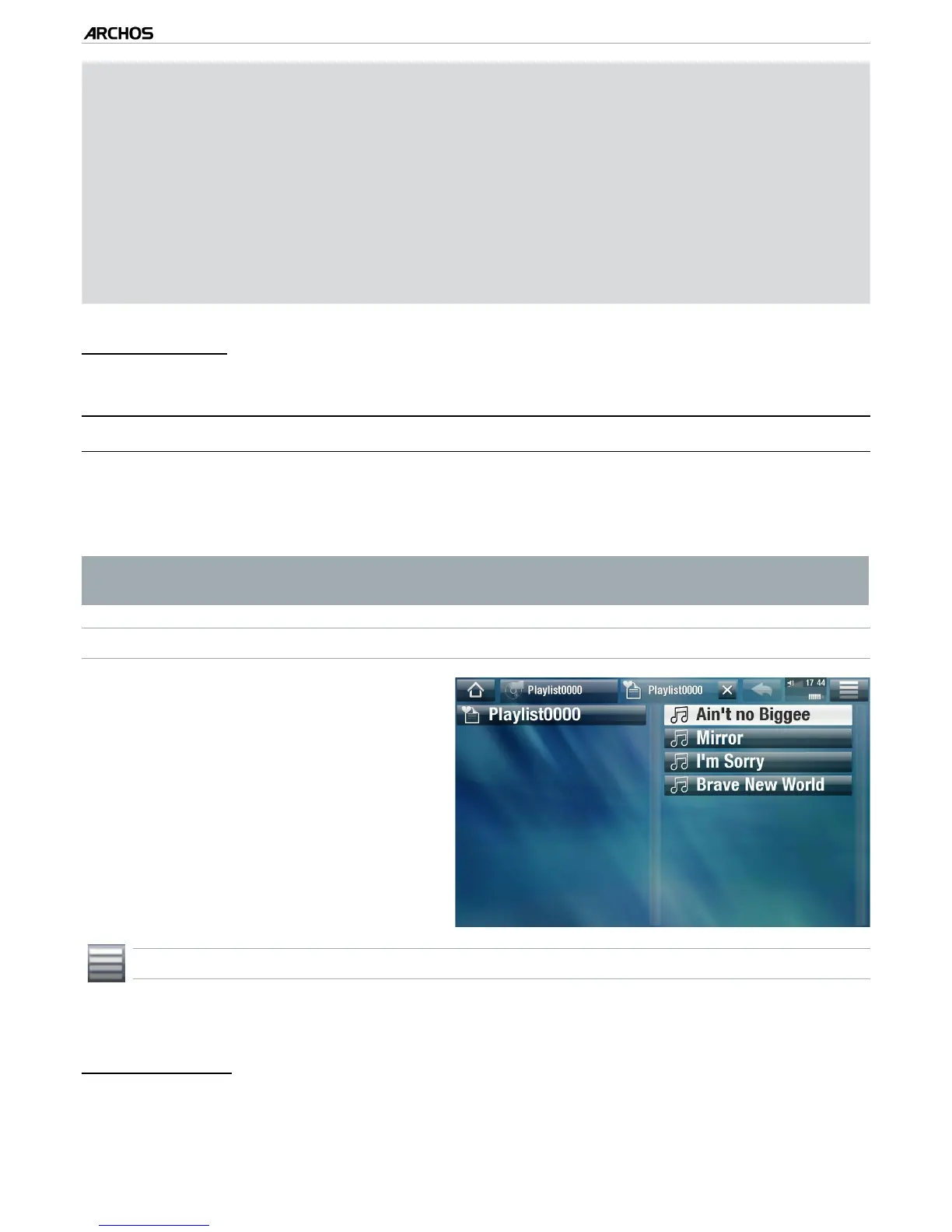
In the Music Library, highlight the
“Playlist” line and open it.
Highlight a playlist and open it. A
panel showing the contents of the
playlist will open on the right.
Open the rst item in the playlist to
start playing from the rst track.
•
•
•
PLAYLIST MENU ITEMS
These menu items appear when a music le is highlighted on the left panel:
“Add to playlist”
“Selected le”: will add the highlighted track at the end of the current playlist.
“All les”: will add all the tracks (from the left panel) at the end of the current playlist.
-
•
•
-
-



 To Next Page