MAINTENANCE
14.164.A_A707en.SM.V1.01.doc ARGUS Medical AG 10.02.04 AS 20 / 38
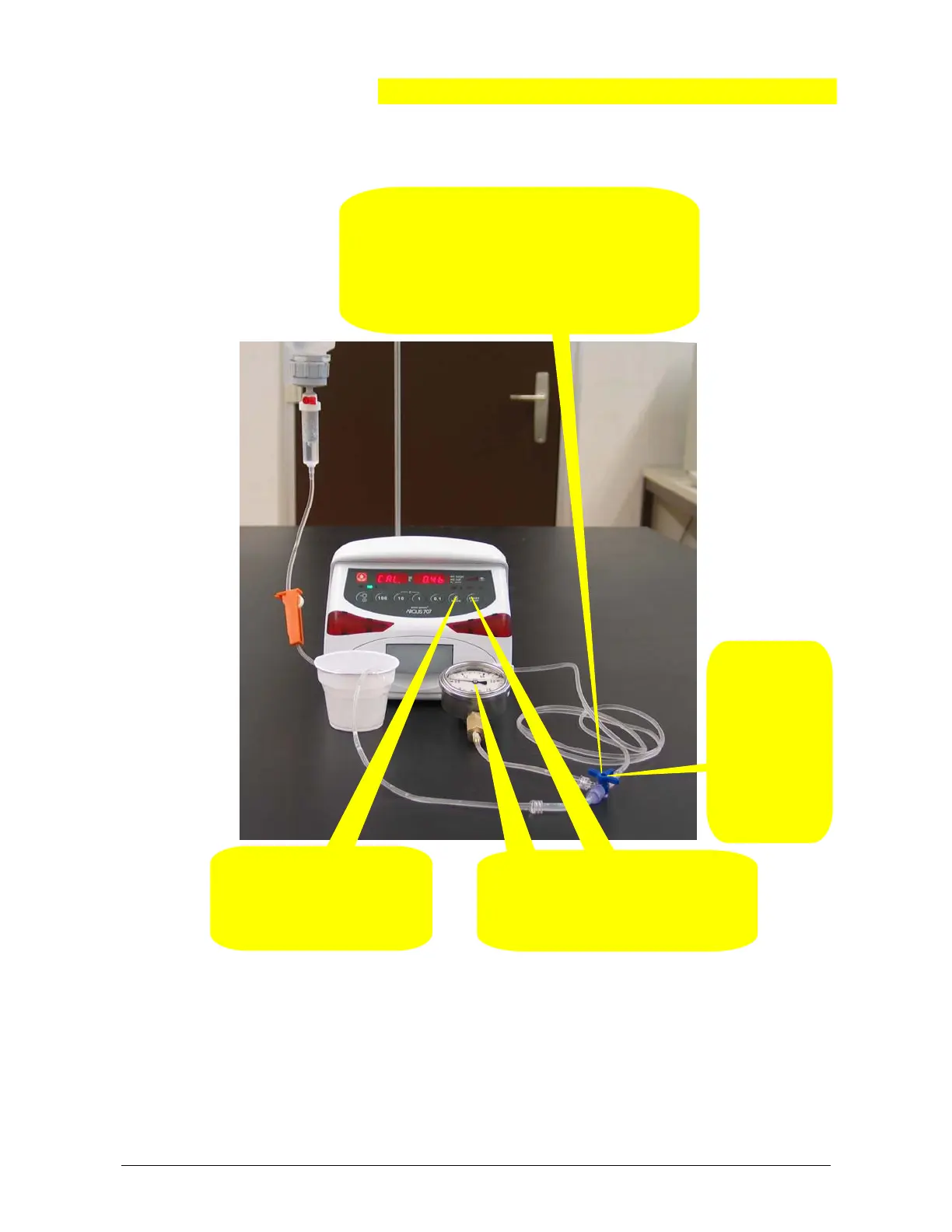
2. Restart a
pressure
build-up.
Check for
the pressure
gauge dis-
play which
must in-
crease.
4. Press the "MODE" key.
The display shows “CAL.
1.4b”. Follow the instruc-
tions on the next side.
1. Simulate a downstream occlusion by the 3-way
stop cock.
The pump must generate a pressure of at least 1.4
bar. Otherwise there might be a mechanical prob-
lem (pressure plate, door hinge, peristaltic, etc.).
Release the pressure again.
3. Press the "START / STOP" key
when a pressure of 0.4 bar has been
reached. The stored value will be
acknowledged by a sound.
5.3.5. Calibrating the downstream sensor (right side).
Remark:
By pressing the key "1" the pump display changes to “Pr S xxxx” where the right
display shows the actual downstream pressure sensor signal in mV.
Return to the original state by pressing the key "1" again.


 To Next Page