14
Seat Deflate
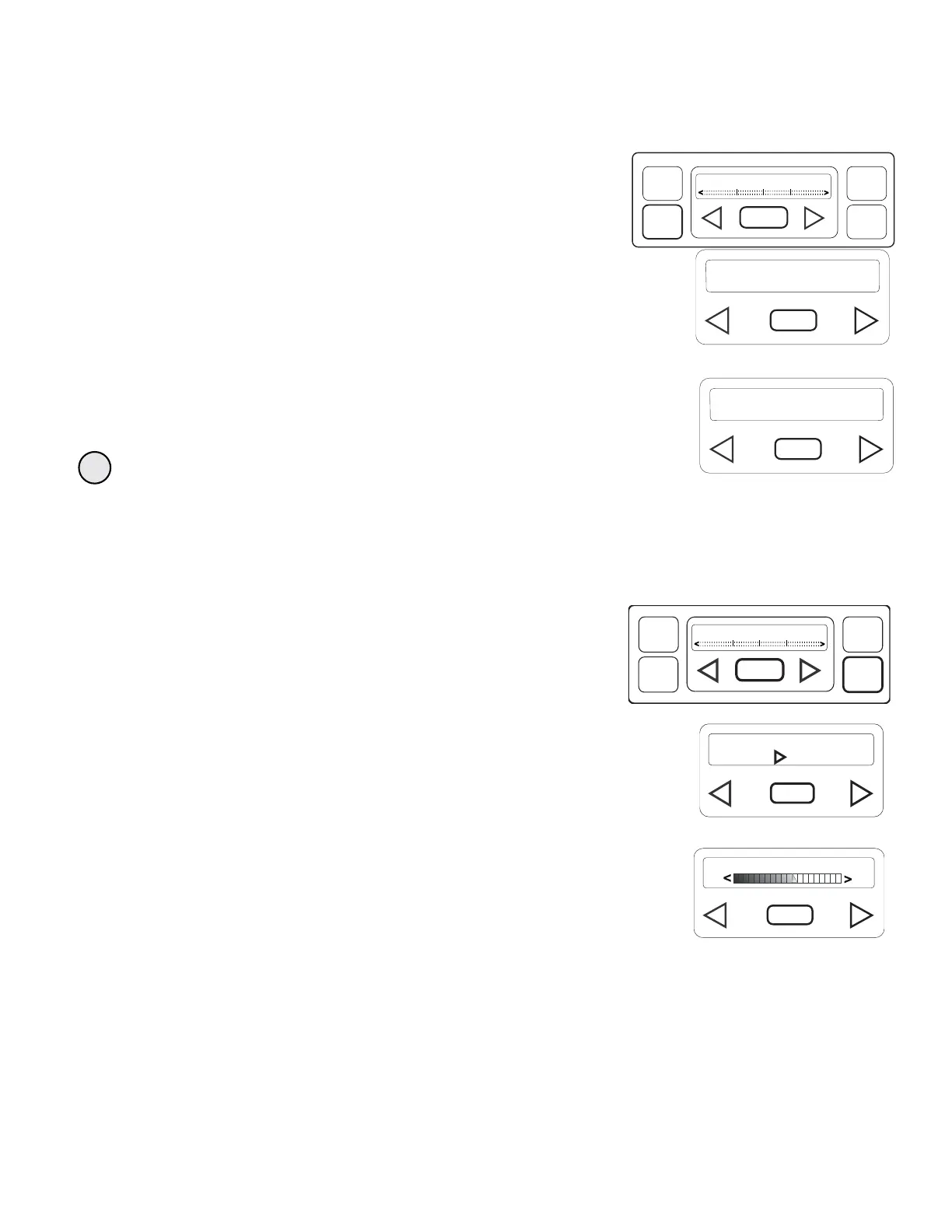
Use seat deflate to assist patient exit and bedpan placement by lowering pressure in body section. Seat deflate should
automatically deactivate after 15 minutes. Screen will flash every second in the last 15 seconds before deactivation.
1. Press the SEAT DEFLATE ON/OFF button shown at right.
Display shown at right will appear and
flash until seat deflate is deactivated.
2. Press the SEAT DEFLATE ON/OFF button to deactivate seat deate. Display shown at right will appear temporarily and then
return to the home display.
Pressure and warmer settings will be restored when seat deflate is deactivated.
Warmer Adjust
Use warmer adjust to set 3 optional levels of comforting heat when desired. Use only by caregiver under direction of patients
physician.
1. Press WARMER ADJUST button shown at right.
The displays shown at right will appear.
2. Press the right arrow button to activate warmer .
3. To deactivate warmer, press and hold the left arrow button until the display reads
WARMER OFF.
4. The panel displays a sliding scale that identifies level of selected warmth.
5. Use the right and left arrow buttons to increase or decrease warmth.
6. As warmth is increased or decreased, LED readout displays LOW, MEDIUM or HIGH
accordingly.
SEAT DEFLATE
INSTAFLATE
ON/OFF
SEAT
DEFLATE
ON/OFF
WARMER
ADJUST
PRESSURE
ADJUST
FIRMSOFT
WARMER: OFF
PRESS TO TURN ON
WARMER: OFF
PRESS TO TURN ON
INSTAFLATE
ON/OFF
SEAT
DEFLATE
ON/OFF
WARMER
ADJUST
PRESSURE
ADJUST
FIRMSOFT
SEAT DEFLATE OFF





 To Next Page