The User Menu enables the following parameters to be modified/interrogated:
Unit Isolation
Time
Date
Battery Log
Print Event Log
Sensor Name
Patient Name (only used on systems with Resident IR key fobs)
Staff Name (only used on systems with Staff IR key fobs)
Promote Patient Call (not applicable)
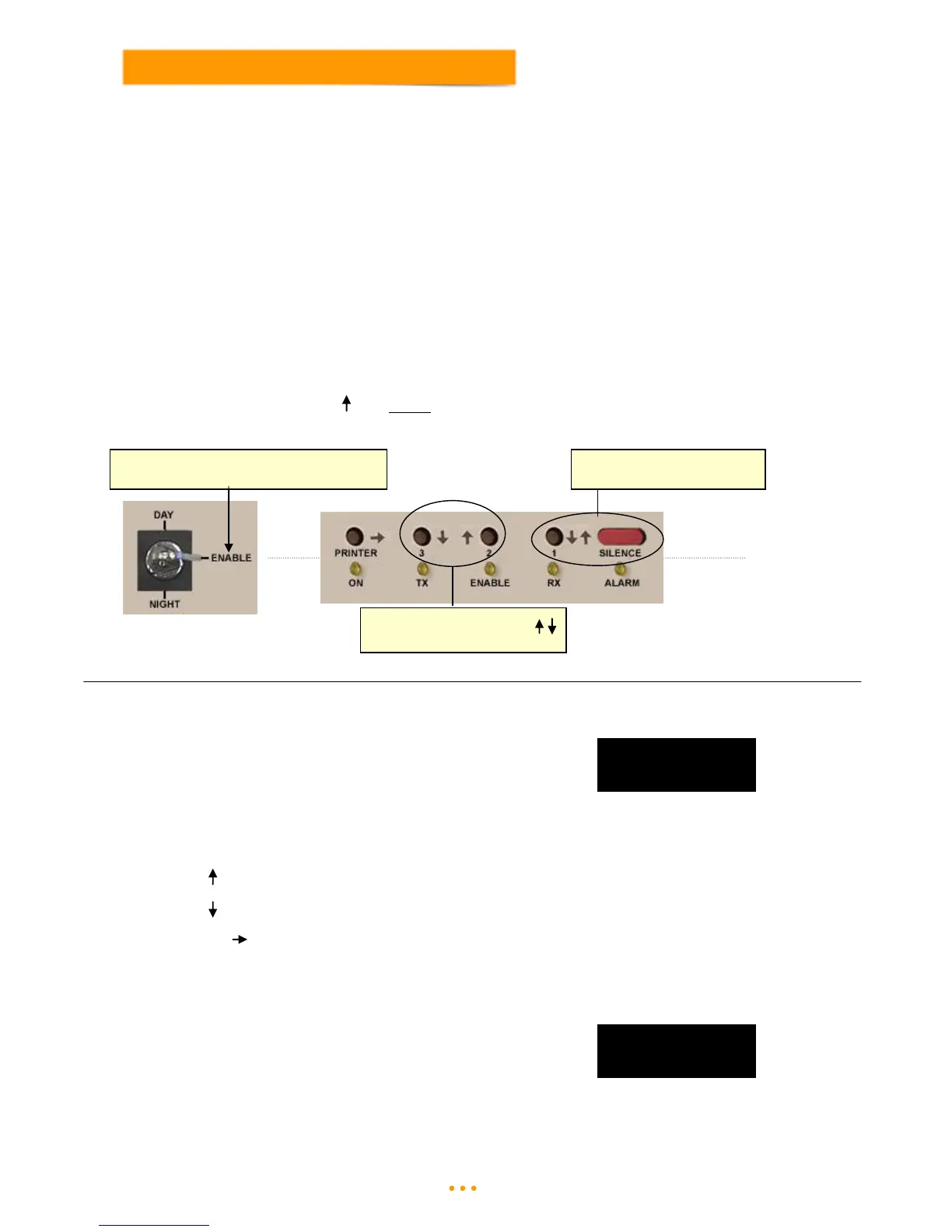
Access to the User Menu is done using the keyswitch and buttons on the front of the Master Display Unit:
Turn the keyswitch on the Display unit to the Enable position (ensure light above enable lights up).
Press the Silence button to select the User Menu.
Then press the (up arrow) key above the Enable light to enter the User Menu.
5.1 Isolate Sensor
Enter the User Menu
Press the Silence button until the display shows:
This menu allows individual sensors to be isolated from System Operation.
Use the Selection Keys to scroll through the sensors on the system.
Up arrow above Enable light to navigate up through Sensor list.
Down arrow above TX light to navigate down through Sensor list.
Use the key (Printer key) to turn a Sensor ON or OFF.
Note: If the sensor was in fault at the time it was isolated it will be necessary to reset the Fault message by
turning the keyswitch to Night and then back to Day.
As a reminder that a unit has been isolated
off the system, the display will show:
This unit can now be sent for repair/replacement, the system will ignore that it is missing from site until it
has been returned and can then be un-isolated.



 To Next Page