The slide switch
next to th& tutiing sliders
lowers
the
frequency of VCO 1 by a
factor of about one
hundred when this switch
is placed
in its L,F.
poation. TTiis is far below the
r^nge
of
hmnan
hearing:
cons&quentiy you will not
h^ar any
continuous
tone but only a more or less rapid
series
of clicks.
The rate of this
low frequency signal is not
controlled by the
keyboard,
but
can be vaned by
adjusting the timing stiders.
Return th& tunirtg
sliders
to
the center of their range,
and set the slide
switch hdck
to the audio range.
Now change the slide switch
under
the blue slider of
the AUDIO MIXER to the bottom
position.
Again,
pjay the keyboard and you will now
he hearing
the
sound of
a raw unprocessed square wave.
Notice how
the
square
wave, especially et tow pitches, has a
hollow, clarinet-like sound.
The squere weve on your ODYSSEY can be
turned
into another
waveform
called a PULSE WAVE by
raising the blue slider labelled
PULSE
WIDTH located
under the VOLTAGE CONTROLLED
OSCILLATOR
1 bo^.
Raise this
shder to the halfway
mark and again
play on
the
keyboard, Nocioe how the pulse
wave
sounds brighter, more
nasal,
than the square
wave.
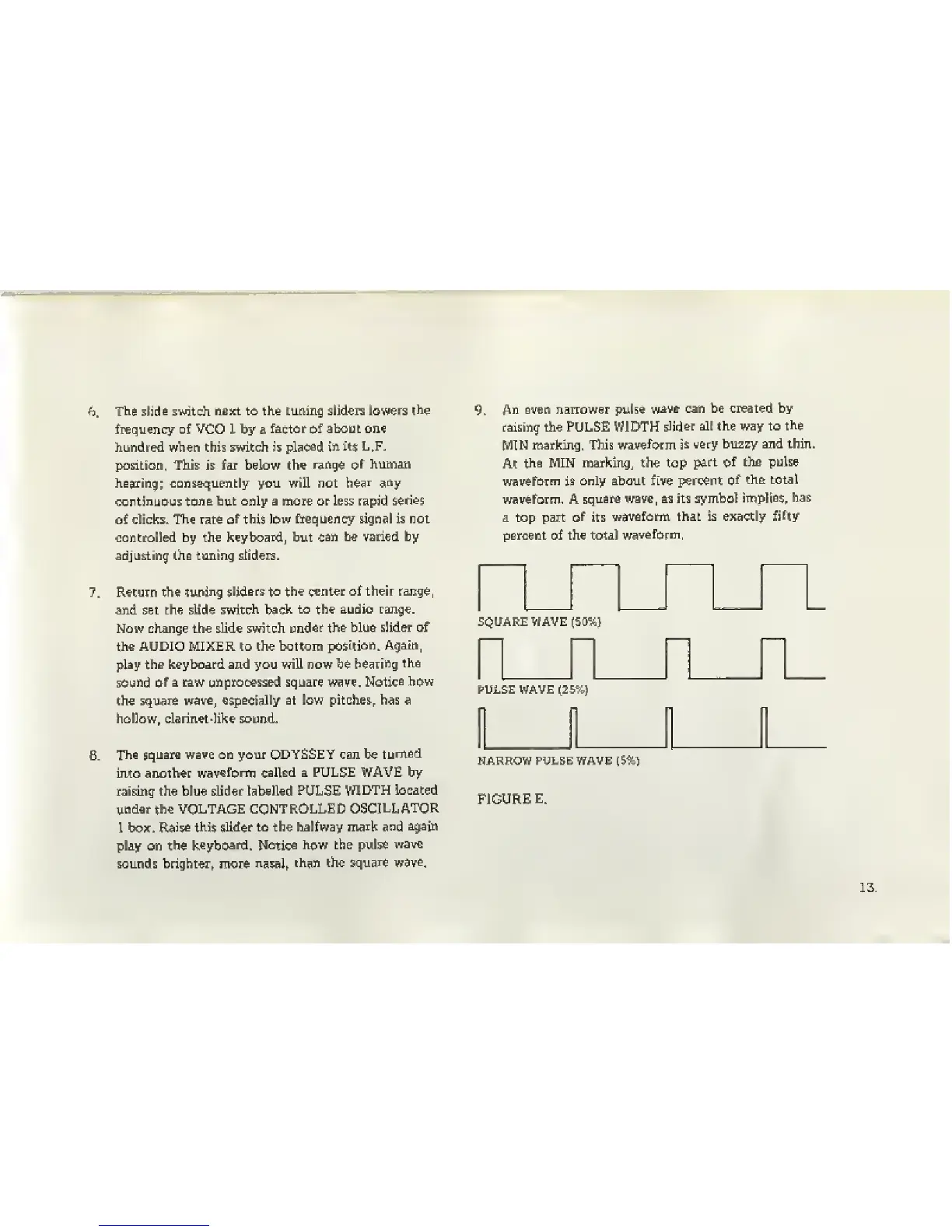
An even narrower pulse
wave can be created by
raising the PULSE WIDTH
slider alt the way to
the
MIN
marking. This
waveform
is very bu2zy and thin.
At
the MIN marking, the top
part of the pulse
waveform
is Only about five percent
of
the total
waveform. A
square wave, as its symbol
implieE, has
a top part
of
its
wavefomn that is exactly
fifty
percent of the total
waveform,
SQUARE WAVE
(50%}
^^_^_^
PULSE WAVE
(2!i%J
NARROW PULSE WAVE
(5%)
FIGURE
E.


 To Next Page