SWITCH. Notice that a slaw vibrato is introduced
that becomes deeper
as yau
raise this contiroK
With
this LFO control up ahout 1/4, adjust
th$
LFO
FREQ control and observe how the vibtato rate can
be changed from very slow to very fast. About 3/4
should provide a pleasing vibrato rate.
Change the HfsE
slide
switch
from LFO
-y\y^
to
LPO
J~LJ~L . Instead of a smooth
vibrato^
the
LFO
J~i_n_ produces a trill. Notice that as you
rais&
this
slider, the bottom note of the triil stays the same
and the top
note mo'ites
depertding iS'rt ths settin^g of
the slider. Try tuning the
trill
for
different intervals,
ILite a fifth, octaves, etc. If you increase the LFO
SPEED
control, the cdl!
can
become a useful musical
timbre,
especially
when
the
triJ] is
tuned
to
simple
intervals, like octaves,
When you have
finished experimenting with trills,
bring the LFO FM slider back down.
How raise
the v\^ite
slider under the
S/H
rnlixer
box.
White
holdirvg down a note
on
the
keyboard,
dowly
raise the yellow 5/H control under
the
VCO. Notice
that this control causes pitch
of the
VCO to jump
around in a completely
random
manner. The higher
you raise the yeUow S/H sHdsr, the wider the pitch
variations. At least one
S/H
Mixer sUder
must be
ra,[sed
in
order for
the yellow S/H control to be
activated.
8.
Bring the yelEov
S/H slider back down, and lower the
white S/H Mixsi slider.
9. Now set the slide switch under the yellow
knob
to
the
ADSR
position,
and
then raise the yellow slider.
Notice how the pitch rises. Leave this control set so
that you have raised the pitch abaut an octave,
10,
How bring up
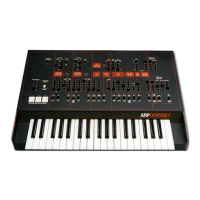
all the way the four red
ADSR
ENVELOPE
GENERATOR CONTROLS (located in
the lower right hand corner of the panel).
11, Again play
on
the keyboard.
You will hear the
pitch
of the sound
rise afid faH
each
time
you hit a key.
Tlie
settings of
the ADSR controls will determine the
speed
of
the
pitch
change. You will learn more about
these
controls
when you get to the section on
"Controllers."


 To Next Page