Fixture Menu
29
Fixture Menu
From firmware-version 2.0
Note: The small, horizontal arrow in the displays indicates sub-menus. Press the ENTER button to access the sub-menus.
Note: In setup and status mode the options keep available until another function is called up. All other modes return to the
appropriate mode after 2 sec.
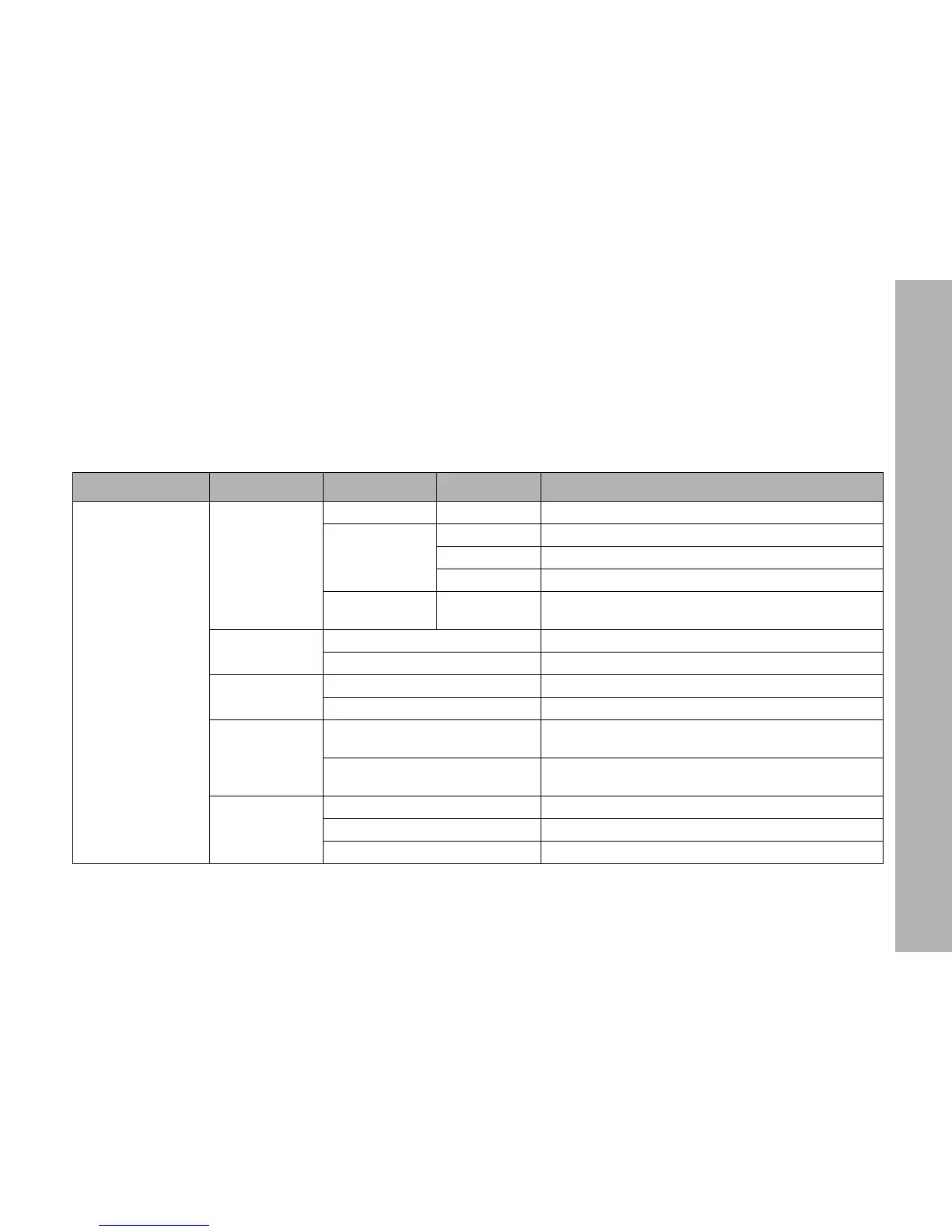
Level 1 Level 2 Level 3 Level 4 Description (Default setting = bold)
SETUP
DMX
PROT P.001...P.015 Set the DMX mode
LSIG
HOLD DMX values are hold when DMX signal is lost
BOUT Product douses when DMX signal is lost
H2MF Product douses 2 min after DMX signal is lost
CHAN 1...512[-Mode]
Set the DMX start address. Max. start address = 512 -
channels used by the DMX mode chosen
FACT
NO Do not load the factory defaults
YES Load the factory defaults
DEMO
ON Activate the demo sequence (see page 24)
OFF De-activate the demo sequence
INDC
ON
The status indicators and the illumination of the dis-
play stay ON
OFF
The status indicators and the illumination of the display
switch OFF
FAN
LOW Fan mode LOW
VARI Fan mode VARI
HI45 Fan mode HI45


 To Next Page